We remain fully operational. Our teams are working around the clock to ensure your deliveries continue safely.

Descargar la aplicación


Servicios al cliente
Sobre nosotros
Copyright © 2025 Desertcart Holdings Limited
Descargar la aplicación


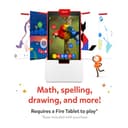


🚀 Unlock Genius Mode: Where Play Meets Next-Level Learning!
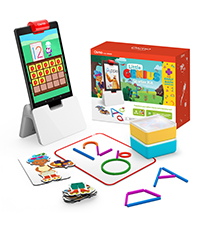
The Osmo Genius Starter Kit for Fire Tablet combines 5 hands-on educational games with physical pieces and Fire Tablet compatibility to deliver a dynamic STEM learning experience for kids aged 6-10. Featuring adaptive difficulty, no WiFi requirement, and organized storage, it’s a classroom-proven, award-winning tool designed to boost math, spelling, creativity, and problem-solving skills.











| ASIN | B07CQ9YSJ2 |
| Age Range Description | Kid |
| Best Sellers Rank | #44,773 in Toys & Games ( See Top 100 in Toys & Games ) #121 in Electronic Learning Systems |
| Brand Name | Osmo |
| Color | Red |
| Customer Reviews | 4.6 out of 5 stars 5,071 Reviews |
| Educational Objective | STEM projects, Stem Toy |
| Included Components | Game Apps - Masterpiece, Newton, Words, Numbers and Tangram, Number Tiles, Osmo Base for Fire Tablets, Stackable storage containers for Game Pieces, Tangram pieces, Words Tiles |
| Indoor Outdoor Usage | Indoor |
| Is Assembly Required | No |
| Item Dimensions | 10 x 2 x 2.7 inches |
| Item Type Name | Genius Starter Kit for Fire Tablet |
| Item Weight | 0.57 Kilograms |
| Manufacturer | Osmo |
| Manufacturer Maximum Age (MONTHS) | 120 |
| Manufacturer Minimum Age (MONTHS) | 60 |
| Manufacturer Part Number | 901-0008/901-00028 |
| Manufacturer Warranty Description | 90 Day Warranty Against Manufacturer Defects |
| Material Type | Plastic |
| Model Number | 901-00092 |
| Number of Players | 1-2 |
| Operation Mode | Manual |
| Power Source | Manual |
| Set Name | Genius Starter Kit with 5 Games |
| Size | Fire |
| Subject Character | Bubbles |
| Supported Battery Types | No batteries required |
| Theme | STEM |
| UPC | 850001161763 850034854403 |
| Unit Count | 1.0 Count |
L**S
Love learning through play, inspiring love of art, no additional charge for apps, yay!
I love that my son enjoys playing with this and he is learning as he plays. I thought it might be too advanced for my 4 year old however, they didn't have little genius set for kindle yet, but he's doing great. We were able to use our own dry erase board for the masterpiece app as well and he loves mo the monster. I thought(explanation follows)it may be a little overpriced as the cards are like a laminated cardboard and could be easily worn but it's new and a great concept. I love that they include the plastic storage containers which will help keep the cards organized and from getting messed up. I didn't like that in order to download the apps I had to but a new kindle as the app wasn't available on older models, however I picked one up on a deal so it wasn't as bad as I feared. Over all I am very happy I made the purchase because my son loves playing with it and is learning at the same time. I also appreciate that the apps are free and not added purchases after paying for the setup, it makes the overall price more understandable. If need be I would purchase again since it is inspiring my son to enjoy drawing as well as learning to add,subtract,make words,etc. I also love that as he get older I can get other "games" to keep the learning going as he grows. Well worth it in my opinion. Great job osmo thank you!
P**S
Awesome technology toy!
Great toy! I accidentally purchased the Kindle Osmo instead of the iPad. I’m definitely going to exchange it and get it again for the iPad.
A**R
Great interactive product for kids!
My sons school had this and he absolutely loved it! I had planned to get it for him for Christmas and it was onsale for prime day so grabbed it up and didn't want to wait to give it to him because its a great learning and interactive tool!
B**G
Kids love it
This product is so good for keeping the kids entertained. They are on the tablet but it's really handy on and educational. It is easy to adjust the level as they get more capable. There are also lots of ads ons to expand the use of this. Cons: Amazon is still shipping out the old osmo reflector tht doesn't work on the newer tablets. Which is a bit ridiculous as the newer tablets are 2 years old now and the adapters for the old reflectors are not available anywhere. On the other hand while it says you need an adapter for the newer tablets you kinda don't. If you go to the camera before you start the osmo apps you can line up the reflector with the camera and honestly it really doesn't move so you can just balance it in place. On the other hand you can buy a couple of thick elastic bands and they will do the same job as the adapter and probably be a lot cheaper. So an easy fix but for the price you really shouldn't have to be jimmy rigging it for the newer tablets. Note: there seems to be a lot of these returned so you can often get them at a good discount. I've not payed full price for any of our bases or add ones. Having said that it takes a bit of figuring out if you are not tech minded. The trick is to go to the adult profile and down load each game that you have separately so see this set as 5 games/apps to download. The first app will have you set up an account and then all the others will be easy after that.
F**N
Tons of Educational fun
My 5 year old was able to play with the Osmo kits at our public library (even though they recommend it for older kids) and LOVED the few games she tried out. I bought her the Genius kit to start off with. The numbers and tangram games are her favorites. I think she will love the words game more once she gets the hang of it. The masterpiece game is just not for us. The Newton game was fun but we are still learning. Over all we love the Osmo and look forward to adding more games to our collection. Some basic info if you buy the Osmo Genius kit, it comes with *almost* everything you need to play the 5 apps that are part of the genius kit. Numbers, Words and Tangrams come with pieces which are included in the kit. Newton really requires a white board - dry erase board and pen. You can use paper but it's easier with a dry erase board. We ended up using a white plastic lid in place of a dry erase board. Masterpiece you use paper I believe, you could probably use a dry erase board but since you are drawing paper and pencil or pen work better. Yes, you do have to download all 5 apps.
A**A
A great way for kids to actually interact with screens
I love this product, I really do. It is so much better and more fun than zoning out on YouTube (*cough* Ryan *cough*). My daughter is 4 and she got this for Christmas 2018. It has quickly become her favorite toy. She loves the monster (which is not actually included in this pack but is a free download that does not need anything special other than a whiteboard and dry erase marker) she had never been very interested in drawing and watching him pull her drawings up into the screen and interact with them is so exciting for her! Santa also brought her a super spiffy convertible easle/table with a whiteboard side that works perfectly with this. Good lighting is important so the camera can clearly see. She enjoys the other games too, but the Monster is by far her favorite. I feel much better about her screentime now that we have this because I feel like she is learning more than she would, even with ABC mouse. I am confident that this is a toy she will be able to grow into and enjoy for many years. My only complaint is that I can not figure out how to add the various games into the Osmo "home" app in Freetime. For now she plays it on my account on her Fire tablet but I think that is something that hopefully will be fixed soon
X**E
Great concept, terrible, terrible implementation
This is really a great augmented reality concept. Unfortunately, it is a terrible, terrible implementation. So terrible, that I feel obligated to write a review and warn others about this product. Read on if you'd like to see what you are in for... First of all, I bought this product for my 8 1/2 year old daughter as a Christmas present. She has a Fire HD 8 (10th edition). That is going to become really important in a moment, because we bought the product that says it is compatible with the Fire HD 8. Only it's not... Read on. I have a degree in Computer Science and am a Sr. Solutions Architect for a Fortune 100 company. I design software for a living. So you could say I'm pretty qualified to review this product. First off, when we opened the packaging, we didn't find the piece of cardboard that told you what to do with the product. We looked all over. We found nothing. No booklet, no card, no pamphlet, no instructions of any kind. Okay... so eventually I wander over to the Osmo website and it says to go to the app store and download Osmo World. So I did that. It had be enter in a parent email and then sent me a 6 digit code via email that I had to enter in to the app. This takes me to the main Osmo World screen. I clicked the mirror thing over the camera as shown on the box... but the Osmo World app REFUSES to go in landscape mode. Yep. The literally designed the software to be incapable of operating in landscape. Who does this? What is wrong with you people? I search online and after spending more than HOUR fighting with the useless Osmo tech support "BOT" that is less trained than my dead dog, I finally learn that if I have a Fire HD 8 (10th edition)... I have to buy a $10 adapter that is not included in the box. WHAT? Key word here is the 10th edition. Because Amazon put the front facing camera on the landscape side of the tablet, and all the other editions of the tablet have the camera on the portrait side, which apparently the Osmo wants. The $10 adapter was not included in the edition that we bought. We can order it off of Amazon. I read more about this adapter and learned that it's basically a rubber band that serves as a spacer to keep the mirror from covering up the camera. That's it. Well dang... you don't really need this stupid thing. I'm a computer engineer, don't forget. So sure enough, if you extend the legs on the base and snap on the mirror over the camera and just make sure there's a little gap so that it's not covering the camera, it'll work. Ok, off to the races, right? Unfortunately, the Osmo World doesn't care or know that you have the adapter or not, it still REFUSES to display in landscape mode. So yes, the main app ONLY renders in portrait mode, period. Oh, did I mention their website clearly states that only SOME of the Osmo apps, but not all, will work in landscape mode? Yeah, they don't mention that on the box, and I double-checked after this fiasco. So we were able to get it work with a couple of apps. But that's it. Remember me mentioning there were no instructions? Well, the NEXT day, I found a piece of cardboard that contained a simple instruction to go to the Osmo website and redeem a special code that was printed on the cardboard. We never saw this yesterday, and would have saved us a little bit of trouble, but not much. So today I did that, and this unlocks the 7 games this thing is supposed to come with. Well guess what? The instructions have you log in on your parent profile, and you have to individually find EACH of the 7 games in the Kindle App Store, and download and install each of them 1 by 1. That took about 20 minutes just do that step. The next step... you have go into the Fire settings, into the profile & family management, select your child's profile, then share content, then click apps & games, then you have to select all 7 of the apps you previously downloaded. Then you log out of your profile and then log into your child's profile. Done, right? NOPE! Now, you have to click on each of the 7 apps which are now shown under the "Shared Content" section, which proceeds to RE-DOWNLOAD each app all over again. So... yes... ANOTHER 20 minutes to download and install all 7 apps a second time. Holy mother of a hamster. And after ALL that jazz... the Osmo World is basically a front "menu" app, and ALL it does is act as a terrible launcher for the apps, which you have to MANUALLY install individually, twice. Oh. my. lord. This is beyond stupid. In this day in age, they couldn't figure how to do this more efficiently so it would all be built into a single app. The people came up with this product had a great idea... unfortunately, they implemented it in the WORST possible way. They deserve a specially reserved place in the opposite side of heaven. I mean... Really. Save your money. Buy your kid something else. This is a TERRIBLE product.
A**A
Kiddo loves this
I got this as a warehouse deal, but I would've gladly paid full price. My son loves this system. He just turned 5 and started kindergarten, and still wants to play with Osmo after dinner. He loves the math and letter games and the tangrams especially. The Newton and Masterpiece portions are still a little difficult for him but with some parental help he manages them OK and it gives him some room to grow his skills. The app was very easy to set up and install, and I appreciate it can be used offline. We set it up on an old Fire tablet we had, and we use a flat white board sheet for the drawing portion. That also gives him a space for tangrams. I'm not sure if a new one would come with the actual whiteboard, or if mine was missing since it was a warehouse deal. But even a sheet of paper would work, laminated or in a clear sleeve if you have it to use a dry erase marker, or just a pen for Newton and Masterpiece if you don't mind getting a new paper each time.
Trustpilot
Hace 1 día
Hace 3 días