🚀 Elevate your workspace with lightning-fast, dual-band WiFi power!
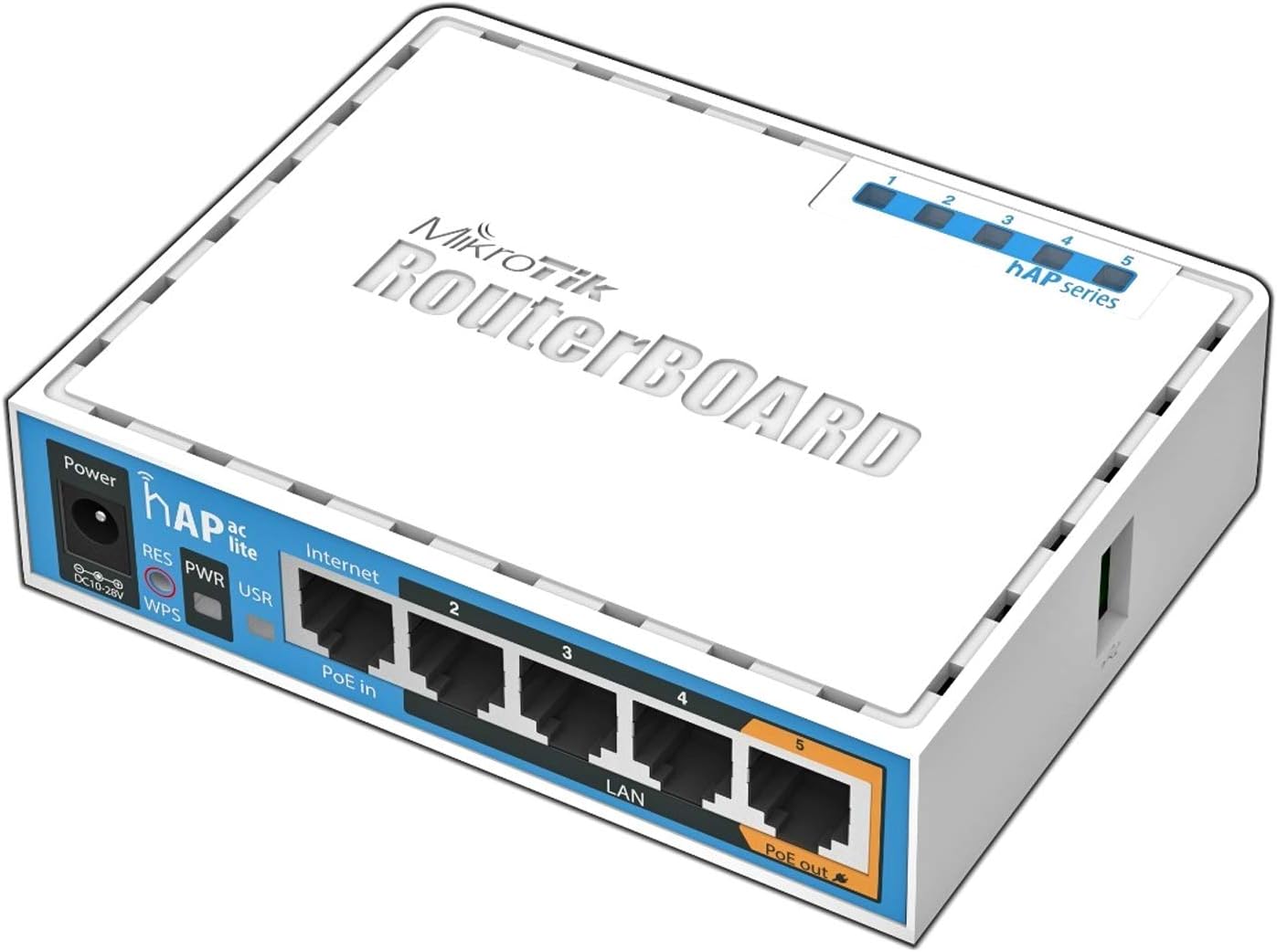
The Mikrotik hAP AC Lite RB952Ui-5ac2nD is a compact, dual-concurrent wireless access point featuring simultaneous 2.4GHz and 5GHz bands, a 650MHz CPU for rapid boot times, 5 Ethernet ports including PoE output on port 5, and a RouterOS L4 license for advanced networking. Designed for professional environments, it supports USB 3G/4G modems and is factory-locked to US frequency bands, ensuring reliable and compliant wireless performance.
| ASIN | B019PCF3QY |
| Are Batteries Included | No |
| Best Sellers Rank | #138,301 in Computers & Accessories ( See Top 100 in Computers & Accessories ) #122 in Wireless Access Points |
| Brand | Mikrotik |
| Connectivity Type | 3G |
| Customer Reviews | 4.6 4.6 out of 5 stars (641) |
| Date First Available | 30 March 2016 |
| Included Components | 24V 1.2A power adapter |
| Item Dimensions LxWxH | 28 x 113 x 89 Millimeters |
| Item Height | 8.9 Centimeters |
| Item Weight | 1 g |
| Item Width | 11.3 Centimeters |
| Item model number | RB952UI-5AC2ND |
| Manufacturer | MikroTik |
| Number of USB 2.0 Ports | 1 |
| Operating System | RouterOS |
| Product Dimensions | 2.8 x 11.3 x 8.9 cm; 1 g |
| RAM Size | 64 MB |
| Series | RB952UI-5AC2ND |
| Voltage | 28 Volts |
| Wattage | 8 Watts |
| Wireless Type | 802.11ac |
T**Y
I’m happy with performance
Performance of this router is excellent, no doubt. Normally, dual band routers take a few minutes to boot up but this one gets ready within 30 seconds.
R**K
Hub
Nice
S**A
Four Stars
Can I setup this router SMS-based OTP or PIN in free wifi Zone
K**M
Bad packaging
With a little doubt at the genuinity of the product. The adapter's quality has degraded. THE PACKAGING WAS REALLY BAD. No extra protection
N**L
This is a great little router / AP for its price point and for what I needed. My main WiFi AP at home is an old EnGenius EAP 1200 which covers our 2-story for most of devices. But lately we've purchased several 'smart' devices like cameras, garage door opener, robo-vac, smart switches, etc. and some of them have pretty pathetic WiFi antennas in them. So I bought this to help them out. Pros: * It has RouterOS and is super-configurable. Multi SSIDs, decent firewall rules, all the standard RouterOS stuff. It has some nice setup wizards for non-tech folks, but for a tech person, you can't get better than this unless you go expensive enterprise. Period. * Despite not having a "real" antenna (just the in-box one), it easily covers about 1000 sq ft of our downstairs plus the garage. Cons: * It's only 100Mbit. But I don't need anything better for our stupid IoT devices. * No WiFi-6. But I don't need that either because I'm not watching 4K video on my robo-vac. * The processor will be weak if you want to do more sophisticated firewall rules like packet inspection. So buy a higher model if you want that.
M**.
El MikroTik hAP ac lite es un punto de acceso pequeño pero matón. No esperes milagros de cobertura como un equipo profesional de alta gama con 6 antenas, pero para un hogar promedio va sobrado. Tiene Wi-Fi dual-band (2,4 y 5 GHz), suficiente para conectar varios dispositivos sin problemas, y el rendimiento es estable, sin cortes raros ni caídas inesperadas, algo sumamente importante. Lo mejor es RouterOS: aunque al principio pueda parecer intimidante, te permite configurar NAT, firewall, VLANs, QoS y un montón de cosas más. La configuración por defecto funciona bien para la mayoría, pero si te gusta trastear, puedes dejar la red exactamente como tu quieras. Además, al disponer de SSH, se pueden automatizar tareas remotas, como encender o apagar el Wi-Fi simplemente enviando comandos, lo que abre muchas posibilidades para la domótica o scripts de gestión. También, el hecho de que se pueda alimentar por PoE pasivo desde otro router MikroTik elimina complicaciones de fuentes de alimentación externas. Tiene un consumo bajo, se calienta poco y cumple perfectamente con lo que promete. Si buscas un router para tu casa o una pequeña oficina que no te dé problemas y te deje cierto margen de control, el hAP ac lite es una opción excelente. Por eso le doy 5 estrellas sin dudarlo.
A**.
Facile à prendre en main, très efficace. Bon pour usage professionnel comme domestique.
F**E
Hallo, dies ist nicht mein erstes Gerät von Mikrotik, ich habe schon ein RB3011, zwei SXT2, drei hAP Lite und den hAP AC Lite. Der hAP AC Lite wird bei mir für ein Loadbalacing aus drei Anschlüssen benutzt. Meine WAN Verbindungen kommen über einen angeschlossen LTE-Stick, Wlan (2,4GHz) und per Lan 1. Das 5GHz WLAN wird als Accesspoint benutzt. Das ganze funktioniert sehr gut! Lan5 ist meine Lan Verbindung. Port 2-4 sind nicht konfiguriert,da ich sie nicht brauche. Habe noch ein zweiten der bei meinen Freund ist, darüber werden zwei WAN Verbindungen benutzen, auch mit Loadbalacing, auch dort funktioniert das ganze sehr gut! Man muss aber fairerweise dazu sagen das die Geräte nichts für Leute sind die gerade mal einen stinktnormalen Provider Router eingerichtet bekommen! Grundkenntnisse über Routing, NAT und Firewall sollten auf jedenfall vorhanden sein, oder zumindest auf jedenfall die Bereitschaft sich mit der Materie zu beschäftigen!!! Von mir eine klare Kaufempfehlung!!
M**F
This is a great little router for your home if you typically find yourself happy at a command-line. It can be controlled via a Windows application (Winbox), a web interface, or command-line via SSH/Telnet. The feature I'm most excited about is the power-over-ethernet output which will let us ditch powerline and run a cable to a single AP in the middle of the house (previously a router at one end, and an AP at the other). Great experiences so far: 1) unit is small and low power (8W). 2) pre-packaged configurations make getting started simple. 3) intelligent and helpful answers on the forums. 4) measurably better signals at 2.4GHz and 5GHz than the larger and more expensive Linksys EA6350. 5) supports LTE modems via USB interface, can be used for mobile internet. 6) POE interface works with Unifi Video G3 cameras and others. 7) Awesome firewall and NAT 8) Super configurable Known limitations: 1) 100Mb/s wired interfaces. 2) No friendly consumer UI. 3) Needs patience to configure. The limitations don't bother me at all as the internet connection here is only 80/20 Mb/s and we don't spend much time transferring files between machines (use robocopy / rsync anyway for transfers to NAS). Possibly useful when setting up - I recommend having 2 network adapters on your PC. One that can connect to the internet and one to connect to the Mikrotik whilst you get used to the tools (WinBox/SSH/WebUI). I'd also recommend downloading a copy of the RouterOS manual PDFs. There is wiki online, but this is a bit more scattershot than the manual at my level of familiarity (48hours). I've asked some newbie questions on the forums and received good advice over the weekend, it seems to have a community around it.
Trustpilot
Hace 1 mes
Hace 3 semanas