We remain fully operational. Our teams are working around the clock to ensure your deliveries continue safely.

Descargar la aplicación


Servicios al cliente
Sobre nosotros
Copyright © 2025 Desertcart Holdings Limited
Descargar la aplicación


Buy anything from 5,000+ international stores. One checkout price. No surprise fees. Join 2M+ shoppers on Desertcart.
Desertcart purchases this item on your behalf and handles shipping, customs, and support to Colombia.
🎯 Master your media kingdom with one sleek sidekick!
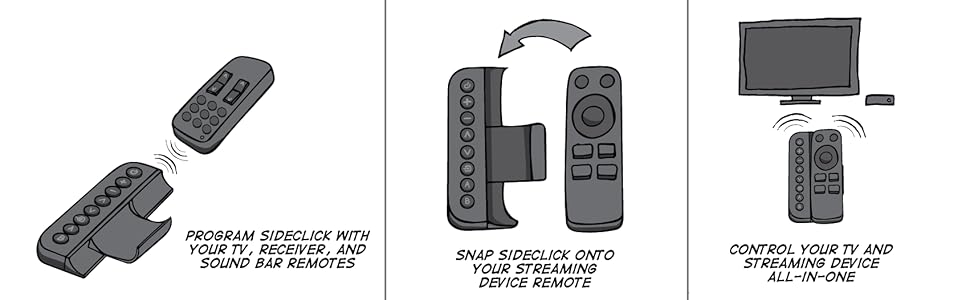
The Sideclick Universal Remote Attachment for Apple TV is a slim, easy-to-program IR remote add-on that expands your Apple TV remote’s capabilities. With 8 customizable buttons and a 10-meter range, it lets you control your TV, soundbar, Blu-ray player, and Apple TV all-in-one. Compatible with most silver and black Apple TV remotes (excluding 4K 2nd and 3rd gen), it’s the perfect minimalist upgrade for streamlined home entertainment control.



| ASIN | B07CLNKYQM |
| Additional Features | Universal |
| Battery Type | Alkaline |
| Best Sellers Rank | #59,966 in Electronics ( See Top 100 in Electronics ) #3,406 in Remote Controls (Electronics) |
| Brand | Sideclick |
| Button Quantity | 8 |
| Color | Black,Silver |
| Compatible Devices | Television |
| Connectivity Technology | Infrared |
| Controller Type | Button Control |
| Customer Reviews | 4.4 4.4 out of 5 stars (338) |
| Item Weight | 4.3 Ounces |
| Manufacturer | Sideclick |
| Maximum Number of Supported Devices | 1 |
| Maximum Range | 10 Meters |
| Mfr Part Number | SC2-APG34K |
| Model Name | Sideclick for Apple TV |
| Model Number | SC2-APG34K |
| Number of Batteries | 2 AAA batteries required. (included) |
| UPC | 859585006132 |
R**S
Simple to program and a game changer for me.
I actually bought a second one - both for my AppleTV's on two separate televisions. With one little remote now I control my respective AppleTV's with their provided Siri remote and the Sideclick Remote (SC2-APG34K Universal Remote Attachment for Apple TV Gen 2-5) controls the rest of the devices. One is a TV alone in the kitchen and I can toggle between the AppleTV and TV with ease fully controlling both as programmed. I also glued some magnets on the back of the remote and it's stored on the side of the SS fridge for easy access. The other Sideclick in the family room can be whatever you need in minutes. My goes like this for the 8 buttons: (1) Power button - On/Off the main flatscreen plasma 1080p TV (2) + Switch back to AppleTV4K on the Onkyo sound receiver. (3) - Switch back to Mac mini PC on the Onkyo sound receiver (for the mouse/keyboard I use an app on my iPad or iPhone.) Note: I don't need the +/- for sound as the Siri Remote is set to control the Onkyo Surround Sound Receiver. (4) ^ Radio Station Seek Up on the Onkyo Sound Receiver (5) ▿ Radio Station Seek Down on the Onkyo Sound Receiver (6) ⌲ Switch back to Onkyo Sound Receiver for Radio (7) A On/Off the power for the Onkyo Sound Receiver (8) B Mute all sound for all devices since they are run through the Onkyo Surround Sound Receiver. To PROGRAM the SIDECLICK you just hold down the top Power and B button together for a second or so and it turns the light solid, push the button on the respective remote you want it to learn, and then I turned the sideclick all the way off and tested it before programming the next button. Maybe those who said it was difficult to program tried to do too many buttons at once? I can't really say, but I did one button at a time and was done in 5 minutes. Note: The AppleTV remotes load from the BOTTOM - not the top of the Sideclick. They side right it with the spring clip depressed and then it clicks back on the bottom to hold the remote securely. Also, it's an IR remote, it would NOT LEARN my ceiling lamp remote. So my ceiling lamp remote still stays near me - bummer. I love being able to have one small handheld remote in the living room for the Sound Receiver, 1080p Plasma Flat Screen TV, Mac mini PC, AppleTV 4K, AM/FM Radio - via Receiver with up/down Seek, and a single Mute button for them all. This was well worth the $30 for me so I bought two. It also comes with the clip for the older silver remote for the AppleTV 3. Those I don't really use anymore. Why this "dual clip" version with both sideclick clips costs half the price of the one with only the 4/4K AppleTV clip is confusing. I think the seller figured out this is a great remote and people only searching for the 4/4K won't see the dual version boxes that probably hit the market first and so they doubled the price for the 4/4K version? I don't know - if their is any difference between the 4/4K solo clip versus the box with the 4/4K and AppleTV 3 too, I didn't find reference to any difference online. So two of the "dual" version sideclick's is like a two for one to me as they sell for half the price. They work very well - good range too - I am glad I found them! Maybe the negative reviews sell competing products. I don't know. I've also never dropped the sideclick on a hard floor. So I don't know how they handle hard falls. There is no rubber on the casing, just plastic, so I think it might be possible they could crack if dropped on a hard surface. Perhaps a silicon manufacturer can join forces with Sideclick and make protective cases for the these remotes? I'd probably buy two of them if they existed. In any case, other than concern over a drop, I might buy a glow in the dark sticker(s) and put it on the remote to make them easier to find in the dark. So that is my wishlist, a glow-in-the-dark protective silicon cover with embedded neodymium magnets so that the sideclick is easier to find at night, better protected from a drop, and sticks to the side of the fridge. Since that cover doesn't exist to my knowledge, I'd stick with my DIY workarounds and keep using this very smart spacesaver remote.
C**N
Perfect companion to AppleTV Remote - adds missing features!
The apple TV remote hasn't had an upgrade in several years and it's simplistic design, what 'pretty' is missing several capabilities: Turn on/off external sound systems (yeah I have an older surround sound system, that's awesome, but doesn't support newer features! As a learning remote, this device works by simply copying the codes from a working remote to this device and you're off to the races! I added power on/off for my stereo, along with a MUTE button. It's awesome! Thanks! Only critique: The device is kind of slippery, just like the AppleTV remote. I had a silicone case on my Apple TV Remote, but had to remove it to insert the remote into this case. I just ordered grip strips to put on the back of this device so it doesn't slide around in my hand. Problem solved!
T**S
5-star design, 4-star execution
This remote is an awesome idea. Simple to use, easy to program, and a huge space saver. 1000% happy I bought it. Only complaints are that the item itself feels a little flimsy (two pieces that are supposed to lock together unlock too easily), and the strength of the RF signal seems a bit weaker than the original remote, although I could be wrong about that. That all being said, I love this thing, but would gladly pay a bit more for a higher-quality item of the same design.
B**1
Simple, easy to use convenient learning remote
Aside from being a simple to program 8 button IR learning remote (you have to have the original remote to learn from), it also has a system of mechanical adapters for various small remotes so it becomes part of the remote. Additional adapters for different remotes are available for purchase. I bought my first one for use with a Firestick remote, and when I switched to the Apple TV 4K streamer and its remote, I was able to buy and clip on an inexpensive adapter for that remote. Nicely thought out product. I own two of them. I wish they made a clip-on adapter for the NVIDIA Shield Pro 'Toblerone' remote, but no such luck. There is a guy selling home made ones, made with a 3D printer, though.
P**U
Cuts down on remote madness
It takes a bit to program this remote add-on, and remembering what each button has been programmed to do takes a bit of repeated use, but it's great once you do. Very innovative solution to "too many remotes". Three years after I bought this Sideclick, it stopped working for whatever reason. I contacted the seller, and though it was beyond the 1 year warranty, they were kind enough to replace the unit for shipping costs alone. Great to do business with a seller that stands behind their product. A+ seller, and time saving technology.
P**R
Works great, except in the dark.
Fairly easy to set up, had no problems with that. But you can't see which button does what, so you have to memorize them and count to find which button you want to press. Good luck trying to give it to someone else to operate. It sits in the bin with the other useless remotes now. Backlighting would make it more usable.
D**I
Love this little add on
With this device you only need to have one remote with your Apple TV to control the entire set up. I have the customized buttons connected to my sound bar and my TV. It was a really helps for the Apple TV remote as both a protection but also as a way to always make sure you’re holding it in the right orientation
M**E
Worth it for the remote alone.
The entire case, including both remotes, is a little klunky in hand. The companion remote is almost perfect on its own. It's SUPPER easy to program with the device's original remote.
R**T
It’s a great way of making sure I don’t lose my Apple remote. Works well with programming most of the buttons on my LG smart remote. My biggest issue is for some reason most of the options (like the home button) won’t program in, ive tried many times. I have the simple channel change and volume control but input and home buttons won’t program.
L**A
Não é um controle remoto, apenas um suporte
A**R
Love it, so much so that this is the 3rd one I've bought. Ran into issues with the 3rd one and the company was fantastic about it. I've even repurposed old ones from different devices as they're so efficient at capturing what you need for such a small form factor! LOVE THIS PRODUCT!
Trustpilot
Hace 1 mes
Hace 5 días