We remain fully operational. Our teams are working around the clock to ensure your deliveries continue safely.

Descargar la aplicación


Servicios al cliente
Sobre nosotros
Copyright © 2025 Desertcart Holdings Limited
Descargar la aplicación


🚀 Elevate your workspace with triple 4K power and lightning-fast connectivity!
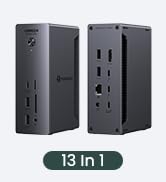
The UGREEN 12-in-1 Triple 4K Docking Station is a powerhouse USB-C hub designed for professionals seeking seamless multi-display setups, ultra-fast 10Gbps data transfer, and robust 100W power delivery. Featuring 12 versatile ports including dual HDMI, DisplayPort, Ethernet, SD/TF card readers, and audio jack, it offers a comprehensive connectivity solution compatible with major laptop brands like Dell, HP, and Lenovo. Ideal for enhancing productivity and creating a sleek, efficient workstation.











| ASIN | B0DRP1F6R7 |
| Best Sellers Rank | #5,173 in Electronics ( See Top 100 in Electronics ) #76 in Laptop Docking Stations |
| Brand | UGREEN |
| Color | grey |
| Compatible Devices | Full Functional USB C Lenovo/HP/Dell laptops,Macbook(For macOS, the displays on the both external monitors are identical) |
| Customer Reviews | 4.2 4.2 out of 5 stars (640) |
| Hardware Interface | 3.5mm Audio, DisplayPort, Ethernet, HDMI, MicroSD, USB, USB Type C |
| Item Weight | 0.22 Kilograms |
| Manufacturer | Ugreen Group Limited |
| Number of Ports | 12 |
| Total Number of HDMI Ports | 2 |
| Total Usb Ports | 4 |
| Warranty Description | 2 year |
| Wattage | 100.0 |
R**T
Previously reviewed.
I have used this brand before, and have been pleased with the quality. This also works well and is a good value.
P**S
Works well and has really good port layout
Works well with my Dell XPS laptop, and has just the right number of ports. A minor thing that I really appreciate: The ports that I rarely need access to (2 HDMI, SD Drive, etc.) are on one side, and the ports I want ready access to (headphone jack, both types of USB) are on the other side. As it lies on my desk, I have the side I need to access facing towards me.
M**.
Good quality.
Good build quality. The cable is "threaded" and seems it can hold on OK. I tested it with 2 externals display and some other peripherals. All working ok. It seems it does not heat up so much for normal use. Used in a T14 with Linux.
S**S
Reasonable price for a well needed item.
USB c hub/docking station works as described. I plug all of my peripherals in and leave it. Simply plug into your laptop and all of your monitors, keyboard, mouse, jump drives work.
M**Y
Worked for awhile then damaged my laptop
Trying to leave an honest review here, and a warning for other potential buyers. The dock worked for about 3 months, but then it fried my laptop. I had it plugged into my Dell laptop (in the proper port) with the laptop turned on and booted into Windows. I unplugged the dock to move my laptop and instantly my laptop hard shut off and wouldn't turn back on. I work in IT so I tried troubleshooting my laptop by removing the battery, holding down the power button to drain residual power, and reseating the memory and HDD, then plugging in my Dell AC adapter, still won't turn on. Motherboard is fried. Docks should be able to be unplugged while the laptop is on. If the manufacturer see's this review, I'd appreciate them reaching out to refund me for the dock. I'll add a note if they do, and add a star, so you can at least gague their integrity.
A**W
Works with Lenovo and Mac
Great price, build quality feels good. I use 1 external monitor and this just works plug n play with both my Lenovo LOQ and my Macbook Pro. Have power, mouse, and displayport connected.
J**E
Works great now that I fixed a problem it had using two identical DVI monitors
I dual-boot Windows 11 and Fedora Workstation 42 on my laptop, and this works just fine with both without having to manually install any drivers or software in either OS. Initially I ran into an issue with two identical older monitors (DVI-only) connected through DVI-to-HDMI cables. When I plugged in the dock, both screens would display my desktop for a few seconds, then go black. They weren’t entering sleep mode, and the OS still detected them, but nothing was shown. This happened in both Windows and Linux, so it wasn’t a driver problem. Switching one monitor to a DVI-to-DisplayPort cable didn’t help. The problem turned out to be that some docks can’t handle multiple DVI monitors sending identical EDID data at the same time. The fix was to use an active DVI-to-DisplayPort adapter for one monitor. Unlike a simple conversion cable, the active adapter regenerates the EDID signal, making it different from the other monitor’s and preventing the conflict. Overall I'm please with the functionality of this dock, especially since it cost less than many others I considered.
L**M
Great Docking Station Solution!
The 12-in-1 is awesome. It's a great docking station solution that delivers all the power you need to get the job done.
H**K
Excellent
D**A
The best but a bit pricey. I was looking for a hub which can support 2 usb c types one for charger input and other for c type earphones or pendrive. Searched everywhere and found this suggested by chatgpt and this is the best product. Metal body, faster speeds, flawless connectivity
L**D
Excellent HUB très complet - en métal, parait très robuste : je ne l'utilise que depuis 2 semaines, on verra dans le temps. il est "grand" et "lourd" mais parfait pour une utilisation en poste fixe. Dans le cas d'une utilisation plus nomade, je pense que j'aurais choisi un modèle plus léger, mais moins complet.
M**I
I love it
B**N
⭐ Works and seems to have good build quality. Same as any other HUBs ,cable is a little bit short. It is also little bit more expensive but has more features. So it is more future-proof but it may be an overkill for some. 👍 Great option for you laptop if you have 4 external monitors and/or you need a display port which is not readily available in most of the budget HUBs and/or you need more ports for connectivities. I say 4 monitors because you can still use the built-in hdmi port so you can get by with less expensive HUBs that offer 2 ports for displays. 🛑 Your laptop may not even support more than 3 displays at once including the laptop screen. My work laptop only supports 3 displays including its screen. So, for two external monitors, a cheaper HUB with a single hdmi port would have been enough. HUB with two ports if I close the laptop screen. My personal laptop supports all 3 external monitors connected via HUB plus it's own display so in total 4 screens. Maybe even 5 if I use the laptop's hdmi port. For the work laptop, I may have returned it and bought a cheaper alternative to save cost. But I kept it for the connectivities and future proofing. Besides, it makes it so easy to use a single usb-c cable to connect/disconnect everything at work (two monitors + 4 usb device). 🛑 Check that your laptop usb-c port has a thunderbolt ⚡ sign, supports charging and connectivities. 🛑 You need a 100 W usb-c charger which adds to the cost by a lot. Hopefully your laptop already came with one 🤞
Trustpilot
Hace 1 mes
Hace 1 mes