
Descargar la aplicación


Servicios al cliente
Sobre nosotros
Copyright © 2025 Desertcart Holdings Limited
Descargar la aplicación

🚀 Elevate your desk game with the ultimate 13-in-1 Thunderbolt 5 powerhouse!
The UGREEN Thunderbolt 5 Dock is a premium 13-in-1 docking station designed for MacBooks and Windows laptops, featuring ultra-fast 120Gbps data transfer, support for dual 6K or single 8K displays, and dynamic 140W charging. It offers advanced cooling, 2.5Gb Ethernet, multiple USB ports, and SD/TF card slots, making it the perfect all-in-one desk hub for professionals demanding speed, power, and sleek design.


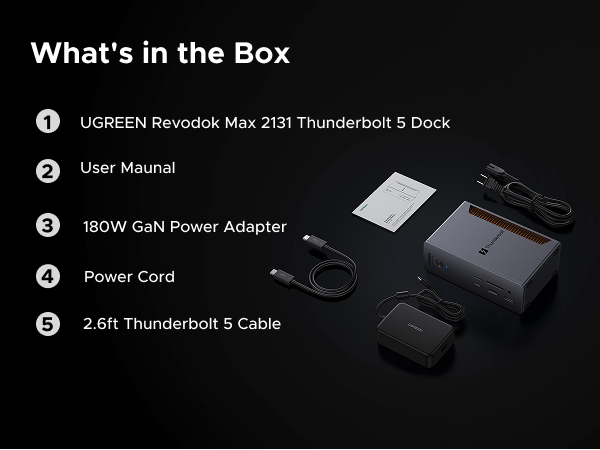


| ASIN | B0DCNZNCFH |
| Best Sellers Rank | #37,160 in Electronics ( See Top 100 in Electronics ) #515 in Laptop Docking Stations |
| Brand | UGREEN |
| Color | Black |
| Compatible Devices | MacBook Pro |
| Customer Reviews | 3.9 out of 5 stars 80 Reviews |
| Hardware Interface | 3.5mm Audio, Ethernet, Secure Digital Card, Thunderbolt 4 , USB 3.0, USB 3.2 Gen 2, USB Type C |
| Item Dimensions L x W x H | 3.77"L x 2.36"W x 5.88"H |
| Manufacturer | Ugreen Group Limited |
| Number of Ports | 13 |
| Product Dimensions | 3.77"L x 2.36"W x 5.88"H |
| Total USB Ports | 5 |
| Total Usb Ports | 5 |
| Warranty Description | 2 year |
| Wattage | 140 watts |
Z**S
Solid alternative to CalDigit, runs cool, but check USB-A device compatibility
I bought this to replace my older UGREEN 7-in-1 USB-C hub. In hindsight, the upgrade might not have been strictly necessary for my setup, but I was running that hub about 8 hours a day off my MacBook Air M2, and it would get noticeably hot, especially while also acting as a PD charging source. I did not want to cook the hub over time or risk it failing in a way that could potentially cause issues for my laptop, so I started looking for a more “stationary” long-term solution. That is what pushed me toward a dock. Docks are basically the all-in-one, leave-it-on-your-desk solution, but most of the premium options are expensive. The obvious high-end choice is CalDigit, but once you get into TS5 / TS5 Plus pricing it was hard to justify for me. At those prices, I would rather let a cheap hub eventually die and replace it. After comparing a bunch of options, I landed on this UGREEN Revodok Max 2131 for $270 (down from $299). It checked the boxes I actually cared about: * A brand I already trusted for hubs and docks * Something designed to run as a desk “lifeline” long-term * At least one higher-power port (30W) so I can charge an iPad and other devices without adding extra bricks/cables * Plenty of high-bandwidth ports for current and future use Once I got it, it was basically perfect for what I wanted. It has been a clean, single-cable dock setup for my MacBook (first the Air M2, now my MacBook Pro M4) and it feels like a much more serious, set-and-forget solution than a small travel hub. Right now I am in a dorm with limited space, so the dock currently sits on top of my cable box just to keep my desk usable. Even in that awkward placement it has been reliable. When I am back home and can actually keep it on my desk where it belongs, it looks very sleek and fits the “one cable” desk setup perfectly. The one downside is a USB-A compatibility quirk with my setup. My UGREEN USB switch/KVM (for sharing a keyboard and mouse between my Windows PC and Mac) did not work on the rear USB-A ports the way it did on my older UGREEN 7-in-1 hub. It did work on the two front USB-A ports, so it is not really a functional problem, but it is slightly annoying for cable management/aesthetics since I wanted everything plugged in behind the dock. If you also run a KVM/USB switch, keep that in mind. Otherwise, this has been a great dock that offers most of what I wanted from the premium brands without the premium price.
D**N
Great Device to Add Ports to MAC Mini
Great way to extend the functionality of a MAC mini 4 Pro, by increasing the number of USB-A, USB-C, and Thunderbolt 5 connections. Setup was easy.
A**E
Expensive Garbage, Buy Anything Else
This hub is expensive worthless crap. The hub disconnects my hard drives without ejecting them first when my Mac is sleeping. When I come back to my Mac I often see several "Disk Not Ejected Properly" error messages. Sometimes it is only one drive, others it is all the drives. I got Amazon support to send me another hub to replace this one. The replacement hub does exactly the same thing. This hub is complete useless garbage. Don't waste your time and money. This hub will corrupt and destroy the data in your hard drives. I contacted the manufacturer. Their support consisted of telling me to plug or unplug different devices to the hub to see if the problem would go away, it didn't. Since they are in China, this process took a day to get a response for each test/question. The entire process was very slow and painful, and ultimately pointless because the hubs are fundamentally flawed. Even the replacement that Amazon sent me had the exact same issues. All that the company could tell me was to send the hub back to amazon because they couldn't replace or refund it. Other cheaper hubs don't cause this problem. It isn't a problem with my cables, my uninterruptible power supply, or my Mac. Connecting the drives to a different, cheaper Thunderbolt 4 hub solves the problem. This hub either has significant quality problems or it is badly designed. Avoid it at all costs. Crushing your testicles between two cinder blocks would be much more useful and far less painful than using this poor excuse for a Thunderbolt 5 hub.
S**K
Great product
Works as expected, runs a bit warm but I think that’s normal. I wish there was a way to receive firmware updates. The company is very responsive to questions.Im happy with the dock .
I**.
Premium dock station
Best dock in town. Everything you need at a competitive price. Premium
S**H
Returned it to get something else
I wound up returning this as I had a couple of issues that couldn't be resolved to work with my setup. - My M1 MacBook Pro couldn't pass USB peripherals through; it would only charge and run displays - My Dell Precision couldn't get the full 140 W charging and continued giving "slow charging" alerts - My Dell also could not use any USB hubs, and then the dock would momentarily crash and reboot at random. I wound up returning and spending more on another option
G**J
Super dock for a MacBook and no doubt any other modern device. Highly recommended.
This dock is great. I have it connected to my M4 Pro MacBook Pro and it's fantastic. Great selection of ports. So nice to have all the ports I need instead of just the USB/Thunderbolt ports on the MacBook. Provides all the power needed to charge my MacBook. Also provides a connection to my monitor and external drive. I put my MacBook on the desk and only have to plug in one Thunderbolt cable to turn it into a desktop machine. Wonderful. It's pricey, but you can't beat the performance and convenience. It's really cleaned up my desk. I can't really speak to the I/O speed. I haven't run any actual tests but so far, moving large files to and from multiple connected SSDs around seems ridiculously fast. I looked at every dock I could before I decided on this one and I'm really pleased I chose it. It's working out perfectly.
S**.
Works great with all peripherals
Works great allows me to use multiple peripherals with this one docking station
Trustpilot
Hace 1 semana
Hace 4 días