




🎨 Master your creative universe with the MX Creative Console — where every shortcut feels like magic.
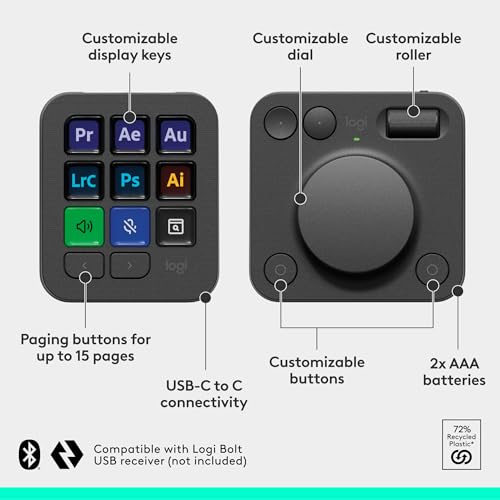
The Logitech MX Creative Console is a premium control device featuring 9 customizable LCD keys, a tactile low-friction dial and roller, and native integration with top creative apps like Adobe Photoshop, Premiere Pro, and Spotify. It offers flexible connectivity via Bluetooth or USB-C, powered by 2 AAA batteries lasting up to 18 months. Included is a 3-month Adobe Creative Cloud membership, enhancing your creative workflow with instant access to industry-leading tools.


| ASIN | B0D5FRQXWZ |
| Additional Features | Backlit, Customizable Display Keys, Hotkeys and Media Keys |
| Antenna Location | Creative, Office |
| Best Sellers Rank | #176 in Computer Keyboards |
| Brand | Logitech |
| Built-In Media | 2x AAA batteries,Stand,USB-C to USB-C cable |
| Button Quantity | 9 |
| Color | Graphite |
| Compatible Devices | Laptop, PC |
| Connectivity Technology | USB-C |
| Customer Reviews | 4.0 out of 5 stars 351 Reviews |
| Enclosure Material | Recycled Plastic,Low-Carbon Aluminum |
| Hand Orientation | Ambidextrous |
| Item Height | 2.72 inches |
| Item Weight | 1.26 Pounds |
| Keyboard Backlighting Color Support | Single Color |
| Keyboard Description | Standalone |
| Keyboard Layout | QWERTY |
| Language | English |
| Manufacturer | Logitech |
| Model Name | MX Creative Console |
| Model Number | 920-012660 |
| Number of Batteries Required | 2 |
| Number of Keys | 9 |
| Number of Sections | 1 |
| Power Source | Battery Powered |
| Recommended Uses For Product | Creative, Office |
| Series Number | 920 |
| Special Feature | Backlit, Customizable Display Keys, Hotkeys and Media Keys |
| Style Name | Modern |
| Switch Type | Push Button |
| Theme | Gaming |
| UPC | 097855197085 |
| Unit Count | 1.0 Count |
| Warranty Description | 1 Year Limited Hardware Warranty |
L**G
Elevate your creative workflow with a state-of-the-art device designed for digital artists, graphic designers, and multimedia enthusiasts. The sleek console boasts 9 customizable LCD keys and a control dial that seamlessly integrates with your favorite software, ensuring an efficient and intuitive user experience. Whether you're editing photos, designing graphics, or mixing audio, this tool is engineered to enhance productivity and unleash your creativity. ☑️ 9 Customizable LCD Keys allow for instant access to your most-used functions, simplifying your workflow. ☑️ The Control Dial offers precise, tactile control over various adjustments such as brush size, zoom level, and more, making it an indispensable tool for creators. ☑️ Seamless integration with popular software like Adobe Photoshop, Premiere Pro, and others, enabling a more efficient creative process. ☑️ Robust build quality paired with an elegant design not only ensures durability but also adds a touch of sophistication to your workspace. ☑️ Easy setup and customization through the accompanying software, allowing you to tailor the device to your specific workflow needs. ⭐⭐⭐⭐⭐ Finding the right tool to aid in the creative process can be challenging, yet this device proves to be a game-changer. Its thoughtful design, combined with empowering technology, optimizes your creative endeavors, making every project more enjoyable and less time-consuming. The ability to personalize every aspect of the console ensures it adapts to your workflow, rather than the other way around. For creative professionals and hobbyists alike, this console is not just a tool but a catalyst for unlocking new levels of creativity and efficiency.
R**T
I used a Contour express Shuttle express for the past four or five years, when it suddenly died on me, so I was in the market for a new paddle to ease my video editing. I came across a review of this item on Premier Gal's YouTube before it was released to market, and I thought yeah, why not? SO glad I did. This item comes with three months of Adobe Creative Cloud which even current subscribers can utilize. that in itself drops the price of this already valued equipment down to almost nil. but if that isn't incentive enough, the build quality is spectacular. the button are easy to press, and the paddle rotates easily. the buttons on the console are programmable, and you can design the logo that appears for whatever application you wish. (That is something you must do on your own however. there is no service available for that purpose on Logitechs website.) The only discouraging thing I can say about this item is the length of the USB cable for use with the panel. it is just a tad short in my humble opinion, but nothing that a USB extension cannot solve. Having already purchased a new Logi-Tech MX-3S mouse, and now the Creative Console, of course I had to purchase the MX keyboard as well. Logi-Tech has come a long way from where they began. This actually made me happy about my shuttle express dying. Well worth the money, whether you use Adobe or not. easy to install and set-up, easy to use. The MX Creative Console makes your workflow so much easier. DO NOT DELAY. BUY THIS NOW!
A**R
It works great, a little time consuming at first to configurate but once configured it's a great tool. I use it in Photoshop but they still have no Bridge or Adobe Camera Raw support, that means that you'll have to create your own personal profiles. The setup software works really well and it's very intuitive, so the learning curve is not steep and wont require much time to learn how to configure. The bluetooth connection also works really well. Logitech is constantly updating the controller, so I expect it to work even better and have more usability in the future
N**P
Easy to set up, and works well with my DAW and video editing apps.
B**D
I've been looking and waiting for this product for 15 years. I've looked at dozens of programmable keypads over the years and found them wanting. My use case for it is mostly Figma and VS Code. The MX Creative Console was primarily designed with Adobe products in mind... but I abandoned Adobe years ago when they decided they preferred to drain my bank account monthly instead of every 3 or 4 years when I needed or wanted to upgrade. But this product works great for my use case. The only downside for my specific uses is that I have to program each button. Adobe products have preprogrammed starters. But I'm sure VS Code and Figma will be added by Logitech in the future. But that said - once programmed, I love that each button has an icon and words displayed that tell me what they are programmed to do. I love also that you can color code them. And I particularly love that as soon as I start to work in any of my applications the buttons automatically switch over to the profile for that particular... or the desktop default. I also like that there are lots of application specific icons to choose from for each button. And that each application can have several pages. There's still a couple of glitches which I expect Logitech to fix... like today, changing the text size on the buttons doesn't work . The ability to do it is built in, but there's a bug in software. For Logitech, if you are reading this - I don't like that the button console has to be hard wired directly into the USB-c port of my computer. The Creative Console did not work using a USB-c port on my docking station ... nor did it work using a USB-a port with a USB-a to USB-c cable. Actually, I would prefer no wires at all. Also they way you size and center icons and text on the buttons when programming them can be improved. That said - this product is a home run for me.
Trustpilot
Hace 1 mes
Hace 2 semanas



