We remain fully operational. Our teams are working around the clock to ensure your deliveries continue safely.

Descargar la aplicación


Servicios al cliente
Sobre nosotros
Copyright © 2025 Desertcart Holdings Limited
Descargar la aplicación




Buy anything from 5,000+ international stores. One checkout price. No surprise fees. Join 2M+ shoppers on Desertcart.
Desertcart purchases this item on your behalf and handles shipping, customs, and support to Colombia.
🎯 Master your art with the ultimate one-hand shortcut powerhouse!
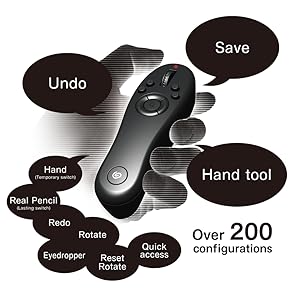
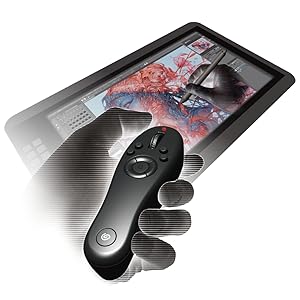
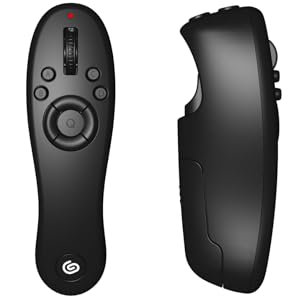
The CLIP STUDIO TABMATE is a wireless, Bluetooth-enabled shortcut controller designed to enhance productivity in CLIP STUDIO PAINT. Featuring a rotating wheel for brush and canvas scaling, over 200 customizable operations, and ergonomic design to reduce physical strain, it supports Windows 8.1+, macOS 10.13+, and Android 9+ (Studio Mode). Lightweight and portable, it empowers digital artists to streamline their workflow and create with greater comfort and speed.





| ASIN | B092QRZ99G |
| Amazon Bestseller | #98,049 in Computers ( See Top 100 in Computers ) #294 in Computer Graphics Tablets |
| Batteries | 1 AA batteries required. (included) |
| Country of Origin | Taiwan |
| Customer Reviews | 4.3 4.3 out of 5 stars (87) |
| Manufacturer | セルシス |
| Product Dimensions | 23 x 14.5 x 5.5 cm; 168 g |
| Release date | May 14, 2021 |
L**O
Great device with lots of potential
German here. Bought this for my english CSP version. Works great on Windows 10 with CSP. You can also use multiple shortcut layouts and switch between them with a click. I'm only using one so far to get used to it (in my case for drawing), but once I get the hang of it I plan to customize more layouts e.g. for animation or for comic functions to fit my workflow. The device itself is well thought out. I have smaller hands (wrist to middle finger tip about 21cm) and most of the buttons are comfortable to click. It lies in the hand a bit like a Wii Nunchuk. What I like especially is that you can also combine button clicks! So you can assign one key as 'Ctrl' and another as 'Alt' and click both together for 'Ctrl+Alt' (which I use for brush size control). So basically you have even more shortcuts available than buttons! Before, as a shortcut jockey, I used to always have one hand poised over the keyboard. I now mostly find myself reaching for my 'real' keyboard to name files and for some rarely-used shortcuts, but mostly I've switched to the Tabmate when drawing. Already, my shoulder is less sore! It's definitely a bit pricey but for me personally, just for that reason this gadget's worth it. And it's just fun to use (hand goes clicky clicky brain is happy) :D Also: Kudos to Amazon.jp delivery, my package arrived within 2 days(!) without customs.
M**S
How clip studio tabmate helps
The clip studio tabmate shortcuts my drawings and makes my work more efficient.
R**E
Reasonable size and price, and good performance!
I draw manga and illustrations for work, and without this product it would be difficult to do so efficiently. There are many similar products, but this one is my favourite because it is light and easy to grip. I also like that I can use it without having to place it on my desk or screen. The round buttons at the bottom allow you to swap between 4 different shortcut keys, so you can assign different functions to different processes, such as "line drawing" or "colouring in". When using it between multiple computers, it is a hassle to have to reconnect the Bluetooth every time, but other than that, I am very satisfied with it.
N**A
Must buy for CSP users!
Its just so good! I have started working digitally on PC coming from Ipad + Procreate. This device gave me so much workdflow its just too good! before using this I got the Huion Keydial which I send back because the drivers was so bad. The Tabmate wokrs flawlessly with Clip Studio which is the program that I use. Cant be happier with it! ITs comofrtable to hold and intuitive to use!. Also the preset keybinds are really nice. Very begineer friendly! I had to buy it from Spain here in Amazon Japan because you cant find it in Europe but it was totally worth it! Also the shipping and delivery was extremely fast! 10/10 would buy again
A**ー
Works great and must have!
Great device to speech up your workflow in Clip Studio Paint. Fully customizable to users' preferences. I'm very recommend this tool.
後**藤
ホイールがめっちゃすぐ壊れる。消耗品ってくらい壊れやすく酷いと半年経たないでホイールが狂う。始めて買ってから3年目だけど今使ってるのが3代目か4代目くらい。毎回買い替え理由はホイールの不調。 それ以外はとても使いやすいだけに少し残念。
K**H
Works perfectly with my clip studio program and was easy to set up on my laptop. It fits well in my hand, a tad big but nothing uncomfortable and I can still reach all the buttons. Makes using shortcuts so easy and much faster than keyboard shortcuts, and you can change the shortcuts depending upon what type of project or step your working on with a click of a button.
T**N
Unfortunately this product doesn't seem to work at all with the iPad Pro, or Windows 10 PC's. I went through five rounds of troubleshooting including resetting my adapters and removing all devices to re-install them in hopes that the Tabmate 2 would pick up on either my iPad, or my Windows 10 desktop. In all instances it not only wasn't found by bluetooth itself, but wasn't even found by Clip Studio Paint, returning a timeout error. I made sure the device had fresh batteries, twice, it lights up upon initializing it, but sadly it seems incapable of connecting to two of the OS/Devices that are listed in it's marketing info. I'll be going with a competitor that is known for easily connecting to iPad and Windows devices. I'd recommend avoiding this at all costs.
O**R
Características físicas: Cuenta con 12 botones y una rueda que puede ser pulsada para tener 13 botones. Pueden decir que son pocos los botones para el control, pero además incluye un botón adicional en la parte inferior para cambiar entre 4 modos. Programación del control: De acuerdo, puede ser algo incomodo cambiar entre cada modo del control, pero el control tiene una función exclusiva con Clip que me deja bastante satisfecho y es su nivel de personalización para cada botón, y no, no me refiero a que el Botón X vale a Pincel y Botón Y vale a Borrador y reemplazar con la configuración que te sea cómoda, No! El mismo botón puede realizar diferentes acciones según la cantidad de veces que lo pulses o la forma en que lo estés pulsando. Quizá, sólo sea algo engorroso configurar la primera vez, pero vaya, solo lo harás una vez, pero ante la duda, haz tu mapa de como lo tienes configurado por si acaso. Ejemplo de personalización: Uso el “Botón X” según la pulsación; si lo pulsas una vez es Pincel, si lo pulsas de nuevo o 2 veces seguidas se convierte en Borrador, pero, mientras lo mantenga pulsado será Gotero y cuando lo deje de pulsar regresará a Pincel. Y no está limitado a solo alternar entre 2 herramientas, puedes meterle más al mismo botón. Otras combinaciones: Vale, las herramientas funcionan, ¿Qué hay de los paneles emergentes como la pestaña de capas o configuración de la herramienta? Se me hizo muy interesante ya que puedes elegir entre 2 modos para ver estos paneles; el temporal, donde mientras mantienes pulsado el botón verás dicho panel en la posición del mouse hasta que dejes de pulsar el botón asignado (útil para el circulo de color), y el permanente, donde con pulsar el botón una vez, el panel permanecerá flotando hasta que vuelvas a oprimir el botón (útil para el panel de capas). En mi caso también tengo asignado el gatillo para guardar el archivo y si lo mantengo pulsado puedo exportarlo. Literalmente puedes llamar con cualquier botón a hacer cualquier acción que exista en el programa hasta secuencias preprogramadas. Ergonomía: Realmente no hay mucho que decir aquí, te acoplas desde el primer contacto, para zurdos y diestros no hay distinción, es pequeño, pero entiendo el porque, no quieren que muevas mucho el dedo para que alcances todos los botones y no hay la necesidad de alargarlo (tengo mano grande y no me molesta). Batería: Usa solo una batería AA, desde el lunes lo estoy usando y aun no se descarga, además se apaga automáticamente después de un rato sin usar, lo que le permite ahorrar mas batería. Restricciones: Este es algo difícil de explicar pero lo intentare, vi en un post de twitter alguien que personalizo con código el control, donde, además de toda la personalización que tiene el control, usaba el gatillo como tecla modificadora condicional; donde por ejemplo, si “Botón X” puede ser Pincel, Borrador y Cuentagotas, si mantengo pulsado el gatillo y pulse el “Botón X”, además ahora será “Ctrl” hasta que deje de pulsar el gatillo. Lo comento porque literalmente solo los botones Ctrl Alt y Shift fueron los únicos que no me dieron en el control. Se lee paradójico que cada botón sea muy personalizable pero no le pueda meter estos comandos, ¿Por qué? me explico: La personalización de cada botón es por categoría, esto significa que al momento de configurar un botón debes de ser consciente que tipo de categoría quieres que tenga, y podrá alternar dentro de esa categoría, ejemplo: Si el “Botón X” lo asigno a que alterne entre la categoría “herramientas” lo hará, tipo, alternar entre Pincel, Borrador y Cuentagotas. Si lo asigno a categoría “Paneles” solo abrirá paneles tipo, Capas, Rueda de color, configuración del pincel. Si lo asignó a acciones solo hará acciones tipo, espejear el lienzo, restablecer la vista del navegador, retroceder pasos, avanzar pasos. Por lo que los comandos especiales están restringidos a su propia categoría y no pueden compartir botón con otra categoría. ¿Qué paso con Ctrl Alt y Shift? Puedes usarlo en el control y hacer combinaciones hasta con el mismo bóton. En mi caso, aunque no los pude meter a mi control por mi configuración (aclaró que puedes configurarlo a tu antojo y puede que los metas sin problemas), los deje en mi tableta de dibujo y es como si no hubiera pasado nada. ¿Lo recomiendo? Pese a las pequeñas restricciones realmente es una excelente compra, el flujo de trabajo se acelera bastante además de que es muy intuitivo de manejar a la hora de trabajar, tu mano y espalda acalambradas para dibujar mientras te estiras para alcanzar el teclado te lo agradecerán. Por cierto, me ha ayudado a limpiar mi espacio de trabajo a algo más minimalista donde solo tengo el lienzo visible para dibujar y todos los paneles solo los llamo cuando los necesito y con la misma los escondo, por lo que no hay contaminación visual. ¿Entonces lo recomiendo? ¡Si! ¡Totalmente es una buena inversión si trabajas Clip! Dejo mi configuración personal por si les interesa probarla ❤ Espero que toda la información aquí brindada les sirva y éxito en sus proyectos!
P**T
Definitely a time saver, turns off after a certain amount of time not being used which can be a small annoyance every so often but as it saves battery it's still a feature I'd keep despite that. Fits comfortably in my hand and the buttons were pretty intuitive to learn, not to mention there's different modes you can switch to to change up the key bindings. Very happy with my purchase.
D**O
As someone who uses Clip Studio full time now I searched where I can buy the remote since it's not available in my country and I'm very happy with what I got. Very simple yet customizable. I'm very satisfied!!!
Trustpilot
Hace 1 mes
Hace 1 semana