We remain fully operational. Our teams are working around the clock to ensure your deliveries continue safely.

Descargar la aplicación


Servicios al cliente
Sobre nosotros
Copyright © 2025 Desertcart Holdings Limited
Descargar la aplicación





🚀 Elevate your network game with MikroTik hEX RB750Gr3 — where power meets precision.
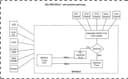
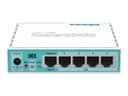
The MikroTik hEX RB750Gr3 is a compact, affordable 5-port Gigabit Ethernet router featuring a powerful dual-core 880MHz CPU, 256MB RAM, and advanced RouterOS capabilities. It supports IPsec hardware encryption at speeds up to 470Mbps, includes a microSD slot for enhanced file storage performance, and offers passive PoE and USB connectivity. Designed for professionals and networking enthusiasts, it delivers enterprise-grade security and customization in a sleek, easy-to-deploy package.
| ASIN | B01MSUMVUB |
| Amazon Bestseller | #28,655 in Computers ( See Top 100 in Computers ) #190 in Computer Routers |
| Antenna Location | Home |
| Brand | MikroTik |
| Color | white |
| Compatible Devices | Personal Computer |
| Connectivity Technology | USB |
| Control Method | App |
| Customer Reviews | 4.6 4.6 out of 5 stars (1,275) |
| Data Transfer Rate | 470 Megabits Per Second |
| Frequency | 880 MHz |
| Frequency Band Class | Dual-Band |
| Global Trade Identification Number | 00709257380070, 04752224002761, 05395481556784 |
| Item Weight | 300 Grams |
| Manufacturer | Mikrotik |
| Mfr Part Number | RB750Gr3 |
| Model Name | RB750Gr3 |
| Model Number | RB750Gr3 |
| Number of Ports | 5 |
| Operating System | RouterOS |
| Other Special Features of the Product | Access Point Mode |
| Security Protocol | WPA2-Enterprise |
| UPC | 709257380070 619201252721 |
| Voltage | 45158 Volts |
| Wireless Compability | 802.11n |
R**G
Quality
Good item
L**S
I bought this because it was cheap among the many other options. I needed something that could do port forwarding better than the Virgin Media 'superhub' as the options on there are: Open to the world, or closed. I stumbled across Mikrotik in a YouTube comments section about a UniFi USG. I own two UniFi AP lites and it was the obvious choice. But I saw the price of this and did some reading about the functionality it gives for it and thought I'd give it a shot. Hardware wise, this has more to offer than the USG, so I took that as better value. Little did I know that this unassuming plastic box can do pretty much any kind of packet pass-through you can dream of, even if the configuration is totally wrong. This is networking without the stabilisers; consider it a challenge, and a very rewarding one at that. If you want something simple with a plain web UI and simple options, this is not the router for you. The kind of person who buys a Mikrotik product for the home is one who is sad enough to list networking as a hobby. I hope by now you've decided whether this sounds like the sort of thing you'd like to get into. My theory on Mikrotik after using it for a few months is: if you learn the Mikrotik way, everything in networking is easier after that point. It is recommended that you download the Winbox software and interact with the settings that way, it is quick to use and reliable. My first goal was to get this hooked up to my modem mode 'superhub' and get internet access. This can be done using the quick set options within the interface, and within 20 mins of unboxing it for the first time I at least had internet access. The default Firewall rules are sensible, but I looked online at various guides of how I can secure it down a bit, of which there are a few decent YouTube videos that actually describe why you are clicking certain check boxes and what the impact of it is - much of the RouterOS terminology is largely unique to Mikrotik and best practice networking manuals. Even in the age of the internet, there are few easy to follow guides that properly explain RouterOS, so having a strong networking background would be advantageous as you watch the odd how-to guide. I struggled a bit trying to set up a NAT port forward from a specific IP into my home, but after some research and creating an account on the Mikrotik forum I got the advice I needed and the rule is now working. Rather handily you also get a little indication how how much data tx/tx the rule has had going through it. So with the internet up and running everything was good. I had my access points hooked up to it, DNS/DHCP policies were configured and it all just worked. The Routerboard didn't cut out, LAN latency was minimal, and packet loss when playing games was gone! I've had this running for 4 months and not had a single problem with my home internet. If you want a cheap, reliable router for home or a small business packed full of enterprise grade features. This is the most cost effective choice... That is if you don't value the time you spend learning how to configure it! I'll be making a few more Mikrotik purchases soon I think.
R**E
ottimo router per gestire un piccolo ufficio che necessita di segmentare la rete o applicare delle regole specifiche. Non è molto adatto per una persona inesperta, si deve essere un po' esperti nelle reti. Se si ha un po' di manualità si possono seguire le istruzioni online (ma si deve capire l'inglese).
K**S
Works perfect
M**L
with change to apple ios 14, many l2tp-ipsec vpn’s from many firewall routers failed. this microtik with routeros >6.0 works! not for the noob, but its more easy to config then cisco catalyst. in fact this router is perfect to learn the networking technologies. the router comes with full routeros license with all functions and lifetime upgrades included. not only CLI, but using the wintool almost all configs are possible. a lot of documentation and a good user forum is available This small box handles my routing firewall requirements very well. vpn’s, vlans, ip routing. established home,game,office,guest segments. throughput is good, especially with the fast track technology (i use tp link switches in addition) lot of functionality for good price.
J**C
Sólido, 2 años después sigue como el primer día, no falla.
Trustpilot
Hace 1 mes
Hace 3 días