


🚀 Scan smarter, not harder — precision meets speed in your hands!
The Creality 3D Scanner Bridge (Otter Version) is a lightweight, ergonomic handheld scanner delivering up to 25mm accuracy and capturing 2 million data points per second. Compatible with leading 3D software, it’s engineered for professionals seeking rapid, precise digital modeling on the move.



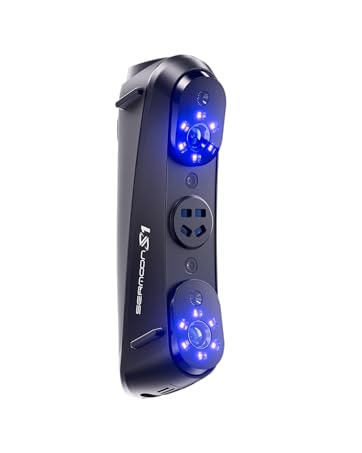



| Manufacturer | Creality |
| Part number | Scan Bridge (otter version) |
| Item Weight | 1.27 Kilograms |
| Package Dimensions | 24.89 x 23.49 x 14.6 cm; 1.27 kg |
| Batteries | 2 Lithium Ion batteries required. (included) |
| Item model number | Bridge for Otter |
| Included components | Scan Bridge (otter Version) |
| Batteries Included? | Yes |
| Batteries Required? | Yes |
L**E
Missing 5V AC power adapter to charge unit
I am taking one whole star for the lack of a power adapter to charge the unit. It doesn't help much to have a USB C charging cable, but no US AC power adapter. For over $400 with taxes I should have gotten a lousy $5 power adapter included. Instead I had to scramble around to find a USB A to USB C adapter and a USB A power adapter with a 5V 3A rating. Fortunately I had both, but this appears to be an increasing issue with China made products no matter the cost of the item. It's happening so often that it has to be a deliberate choice. Not nice!
B**S
Does not work with iPhone - it will scan, but the transfer-to-PC function is broken
This product is not compatible with iPhone. The Creality Scan app works for scanning, but the "transfer to my PC" function is broken. So you can scan objects just fine, but you can't get them to your computer for further editing. I have contacted Creality support, but they have not responded....it's been over 2 weeks. The application requires you to scan a QR code from the app on your PC, which requires the application have access to your iPhone camera. However, the app does not properly register with the iPhone and the iPhone has no idea the app wants or needs access to the camera, so when you go to the camera permissions, the app is not listed and so you cannot grant it access.
J**A
Necesito solucionar este inconveniente
Actualmente tengo problemas con el producto, como apenas llego hoy no fue compatible con mi raptor pro, no se si sea por el tipo de cables. No se que hacer por que tampoco se donde comprar los conectores para el productor por fa necesito que me ayuden con este incidente 🙏
K**S
Overpriced and not as near useful as I thought it would be
Overpriced for what it does. Instead of *joining* a wireless network, it is a wireless network. So you have to have your PC or laptop close enough to be in range of the bridge. You know, the opposite of how you would think they would design this thing. So instead of joining my home network and connecting to my powerful pc to say scan from my garage, I will still need a laptop with Windows to scan things because their iPhone app is garbage. And I would use my MacBook air's to scan, but they require you to enter your macOS password when you start the software, only problem is they ask for it via a fake macOS authentication window, instead of using the macOS api's like they should. Super SKETCHY to say the least and makes me question the company as a whole. I've spent a lot of money to essentially still need to tether my otter to my pc, so I guess I'll spend even more money and buy a dedicated laptop :/
Trustpilot
Hace 1 día
Hace 2 meses



