We remain fully operational. Our teams are working around the clock to ensure your deliveries continue safely.

Descargar la aplicación


Servicios al cliente
Sobre nosotros
Copyright © 2025 Desertcart Holdings Limited
Descargar la aplicación


⚡ Power your smart home smarter — control, monitor, and amplify with THIRDREALITY!
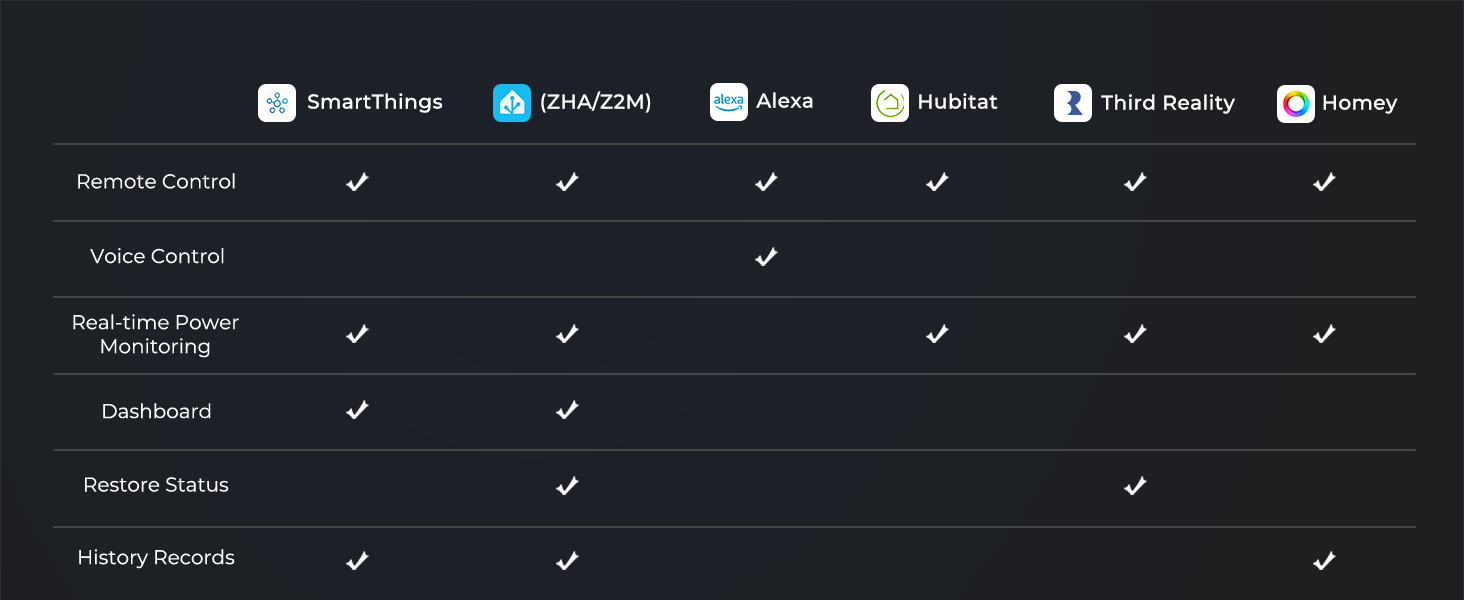
The THIRDREALITY ZigBee Smart Plug 4 Pack delivers robust 15A power handling with ZigBee 3.0 compatibility, enabling seamless integration with leading smart hubs like Echo, SmartThings, and Home Assistant. Beyond simple on/off control, it features real-time energy monitoring to help you cut waste and save money. Acting as a ZigBee repeater, it strengthens your mesh network for enhanced device responsiveness. ETL certified and designed for easy setup, this pack empowers professionals to automate and optimize their smart homes with confidence and style.




| ASIN | B0BPY5D1KC |
| Actuator Type | Push Button |
| Best Sellers Rank | #222,613 in Tools & Home Improvement ( See Top 100 in Tools & Home Improvement ) #2,194 in Outlets & Accessories |
| Brand Name | THIRDREALITY |
| Circuit Type | 1-way |
| Color | White |
| Connectivity Protocol | ZigBee |
| Connector Type | Plug In |
| Contact Material | Alloy Steel |
| Contact Type | Normally Closed |
| Control Method | App |
| Controller Type | Amazon Alexa |
| Current Rating | 15 Amps |
| Customer Reviews | 4.5 4.5 out of 5 stars (1,172) |
| Included Components | Smart Plugs |
| International Protection Rating | IP20 |
| Item Dimensions | 6.9 x 3.3 x 2.9 centimeters |
| Manufacturer | Third Reality, Inc |
| Material Type | Plastic |
| Model | 3RSP02028BZ |
| Mounting Type | Wall Mount |
| Number of Items | 4 |
| Number of Positions | 1 |
| Operating Voltage | 120 Volts |
| Operation Mode | ON-OFF |
| Specification Met | ETL |
| Switch Type | Button |
| Terminal | Through Hole |
| Unit Count | 1 Count |
| Upper Temperature Rating | 40 Degrees Celsius |
| Wattage | 1800 watts |
J**.
If you have a Zigbee gateway (I do via Home Assistant Yellow) these are the best smart plugs on the market. No cloud connectivity required. Setup is as simple as plug it in and let your zigbee gateway detect it. Furthermore these smart plugs are super responsive. There is almost no delay between hitting the toggle in home assistant and the lights going on or off. Being that these are plug-in zigbee devices they will act as repeaters for any battery operated zigbee sensors you may also have nearby.
E**E
J'ai acheté ces prises intelligentes Zigbee et j'en utilise maintenant trois dans la maison (ventilateur sur pied, cafetière et lave-linge). Je suis vraiment impressionné par leur performance. Le pairage avec mon système Home Assistant (ZHA) s'est fait sans le moindre problème. La fonctionnalité de mesure de puissance électrique en temps réel est un vrai game-changer pour les automatisations avancées. J'ai pu transformer ma cafetière ordinaire en cafetière intelligente en détectant quand elle est en marche et arrêtée. Même chose pour mon lave-linge - je reçois maintenant une notification quand le cycle est terminé, juste en surveillant la consommation électrique. Bonus : ces prises agissent aussi comme des routeurs Zigbee, ce qui a considérablement renforcé et stabilisé mon réseau maillé. Depuis leur installation, mes autres appareils Zigbee sont beaucoup plus fiables. Seul petit bémol (et je chipote vraiment) : elles sont un peu larges, mais c'est le cas de pratiquement toutes les prises intelligentes sur le marché. Ça ne bloque pas les prises adjacentes dans mon cas. Pour ce prix, c'est un achat sans hésitation. Je les recommande sans réserve!
C**1
Manual states that they are good for up to 15 amps, 1500 watts. Looks like it is good for it. I am running 1200+ watts through one right now. I thought I had killed one. I was wrong. We seemed to be having another power problem that cause one unit to flake out. A power outage the other day that turned out to be a bad connection at my house electric company meter proved that the socket itself had not gone bad. It was just 'scrambled' / 'confused'. The manual for these tells how to perform a factor reset. I did. It still would not show up in my zigbee devices. It took a lot of fussing to work out it was stuck in bluetooth pairing mode. Eventually I worked out how to get it out of that mode and become visible again as a zigbee device. Major pain in the butt. But it is back online and works correctly. So, verdict? It does work. It is responsive to zigbee commands. It works fine with household portable heaters. I took my newly recovered socket and put it onto a heater that has a nasty bug: If the power goes off at the heater, when it comes back on it is running at full power, with no high temperature limit. So I put it on the socket, and set the socket to not turn on after a power loss. That takes care of the risk if we are out of the house when a power outage occurs (however brief). I also put it there so I can monitor power use. That is a great feature on these. I can remotely see how much power the heater is drawing, and turn it off if I need to. Even when I am off in the wild world of fast food restaurants, or some such. Worth buying? Yes, if you are me. For the two reasons I noted above. If I go pickup another thermometer unit, I can setup a script that watches room temperature and can turn it on or off as needed automatically. Exactly what these are built for. I still stand behind the comment below about not using them for things like motors (that do not specifically have a 'soft start' feature). Those can kill any electronic switch not built for the power draw spike. ------ Old review.. take two grains of salt - I retract it.------ It looks like I managed to kill one by plugging in a room heater into it. This plug works great with Home Assistance , using Zigbee2MQTT. I could see from the power usage sensor that the heater was drawing up to 1300 watts. It seems to work fine. They have been connected together for a day or two. I even wrote an automation to turn it on in my home office before I start work. Just a few hours ago, I turned it off. But it did not turn off. The manual power button works on it. So I followed the instructions on how to wipe it back to factor default and re-pair to my Zigbee network. Removed the device from Home Assistant (HA) and stepped through pairing again. There she is! Add it back into HA and it shows up as a Zigbee Smart Plug from ThirdReality. But.. during the paring process there is an 'interview' stage where HA works out if the device is reporting sensor data and its attributes. This never completes. I bought the four pack and have only used two. So I delete this plug from HA and paired up another one. It paired up quickly and completed the 'interview' instantly. So... yeah.. Maybe just a bad one. Maybe I fried it. I have put the newly paired plug back on the heater. We shall see if it holds up over the next week. Outside of that consideration, I haven't had these very long. Not long enough to give a real review. Just share something you should know. Last little nugget of knowledge: Electronic switches (smart or just a timer) do not do well with major load spikes like running electric motors. That is why they are frequently suggested as not the right solution for things like pond or well pumps. You just burn them out. They do make electronic switches built to survive that workload. I will guess this is not that kind of switch. Be that as it may, so far these are working fine on low power draw workloads (like my desktop PC)
L**O
O plu funciona perfeitamente com Philips Hue (sem medição). Muito importante! Precisa de atualizar ele antes. A atualização é direta pelo APP e bluetooth, não precisa de nenhum hub ZigBee. Feita a atualização basta resetar o plug novamente e adicionar. Nas primeiras tentativas ele não apareceu no App Philips Hue, mas depois que tirei da tomada e resetei, consegui adicionar. No aplicativo HOME o plug entra como luz, basta alterar pra plug. Ele onsegue puxar a informação do Hue. Isso é ótimo, diferente dos plugs paralelos ZigBees (Hue + Home) que eu tenho.
L**.
Mi antena ZHA lo detectó casi de inmediato y el emparejamiento fue rápido, solo el firmware se tuvo que actualizar, y dos días después de instalarlo ha funcionado genial Da información también de electricidad en uso, recomendable
Trustpilot
Hace 2 semanas
Hace 2 semanas