
Descargar la aplicación


Servicios al cliente
Sobre nosotros
Copyright © 2025 Desertcart Holdings Limited
Descargar la aplicación

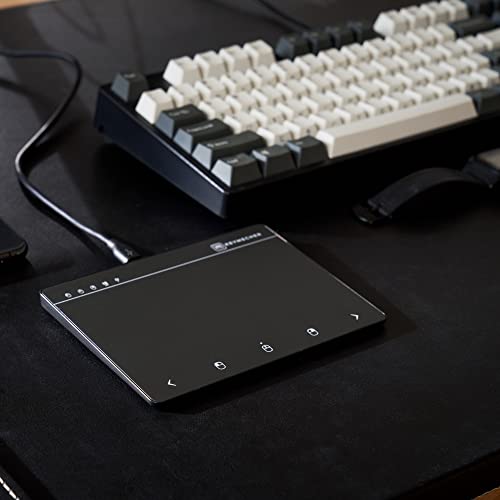

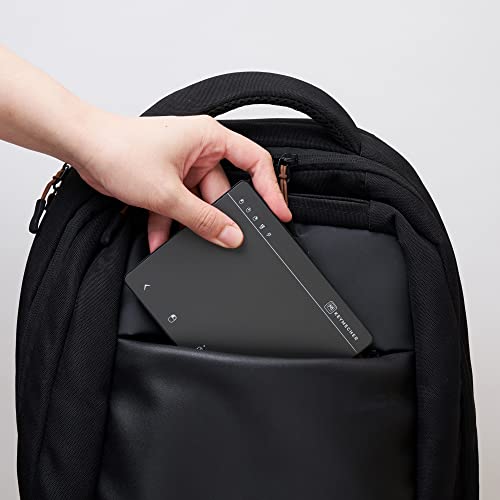


🖐️ Elevate your touch game—because your workflow deserves the smoothest glide.
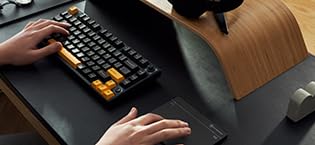
The KEYMECHER MANO Multi-Gesture Wired Trackpad is a precision-engineered USB touchpad designed exclusively for Windows 7, 10, and 11. Featuring a spacious 5.15 x 3.18 inch ultra-smooth surface with advanced electromagnetic sensors, it supports full multi-finger gestures including scrolling, zooming, and task switching. Its ergonomic aluminum design includes dedicated mouse buttons with LED indicators, ensuring intuitive control without batteries or drivers. Compatible across a wide range of Windows devices, this plug-and-play trackpad redefines desktop navigation for professionals seeking seamless, tactile efficiency.










| ASIN | B0B93RSRLM |
| Batteries Included | No |
| Batteries Required | No |
| Battery Average Life | 12 Months |
| Brand | KEYMECHER |
| Compatible Devices | Laptop, Personal Computer, Tablet |
| Connector Type | USB |
| Customer Reviews | 3.8 3.8 out of 5 stars (214) |
| Date First Available | 30 October 2022 |
| Generic Name | mouse |
| Hand Orientation | Right |
| Hardware Platform | Mac, PC, Tablet |
| Item Dimensions LxWxH | 16.9 x 10.9 x 3.5 Centimeters |
| Item Weight | 186 g |
| Item model number | MANO |
| Manufacturer | china |
| Material | aluminium |
| Model | MANO |
| Model Name | MANO-603UV2-BK |
| Mounting Hardware | USB Cable |
| Movement Detection Technology | Electromagnetic, Precision Capacity Touch-Sensor Technology |
| Net Quantity | 1.0 Count |
| Operating System | Windows 10, Windows 7 |
| Power Source | Corded Electric |
| Product Dimensions | 16.89 x 10.9 x 3.51 cm; 185.97 g |
| Special Features | Ergonomic Design, Portable, Rechargeable |
| Standing screen display size | 13.18 Centimetres |
P**S
I have several computers in use around the house including a newish windows 11 laptop and an older W10 laptop. The touchpad on the older one is not working as well as it used to. It has single finger scrolling but the surface of the touchpad is wearing out. The newer W11 laptop does not have single finger scrolling and I think the touchpad has other limitations. With some older software it doesn't scroll at all and I have to use the down arrows. I've tried to install more features but it isn't having it. I looked for a usb touchpad and all the ones around at the moment except this one seemed pretty basic. This Keymecher one was an extravagance as it is quite expensive, coming as it does via the US (there were no delays for import duty as that was all dealt with in the purchase). I'm using it now and I'm delighted with it. I'm only just exploring it and it works fantastically. It's a little larger than a laptop touch pad, sits nicely by the side of the computer. When I use the laptop to cast catchup TV to an old smart tv it will be very useful. By the way, it's made in Taiwan.
J**E
laggy and slow
J**P
Overall review is an excellent product. I've loved trackpads, they are easy to use and less hurtful to the hand. For windows there has never been a good trackpad other than the laptop installed ones. Till I tried this. This works exactly like my apple magic pad just not Bluetooth yes that's a con but not terrible because you never have to charge it. They allow you in the setting under Bluetooth to control the gestures used. You can make it exactly like the apple trackpad or not. you just have follow their manual. So for myself I change the scrolling directions to match the apple magic pad since that is the one I use for personal use. Design wise its great, I wish they didn't have the bottom portion but if you struggle using the gestures it really helps. The track pad has no lag between touches and scrolling. It is mostly plastic sadly, I would love to see a high end metal, but the plastic is probably what makes this super cheap and affordable in comparison to the apple. In the future if they were to offer a high end I would definitely buy it, I would also buy this one again. This is a great option and has worked flawlessly with my windows 10 work computer.
L**.
Ich habe mich inzwischen so an das Touchpad im Laptop gewöhnt, dass ich es auch am Büro-Arbeitsplatz antelle der Maus nutzen wollte. Nach langer Suche habe ich endlich dieses Touchpad gefunden. Ich habe keinen Unterschied zum internen Touchpad bemerkt und ist es ist kompatibel zu den aktuellen Windows-Versionen - Treiberinstallation läuft unbemerkt im Hintergrund. Für mich ist es der ideale Ersatz für eine Maus. Aber nicht dass es Missverständnisse gibt: Das Verhalten wird unter Windows mit den Touchpad-Einstellungen gesteuert. Die Maustasten-Felder im unteren Bereich sind eigentlich überflüssig - die Touchpad-Gesten funktionieren prompt, manchmal etwas zu prompt - Gewöhnungssache.
E**E
Pad is a bit small. Have yet to use more.
Trustpilot
Hace 1 mes
Hace 3 semanas