We remain fully operational. Our teams are working around the clock to ensure your deliveries continue safely.

Descargar la aplicación


Servicios al cliente
Sobre nosotros
Copyright © 2025 Desertcart Holdings Limited
Descargar la aplicación
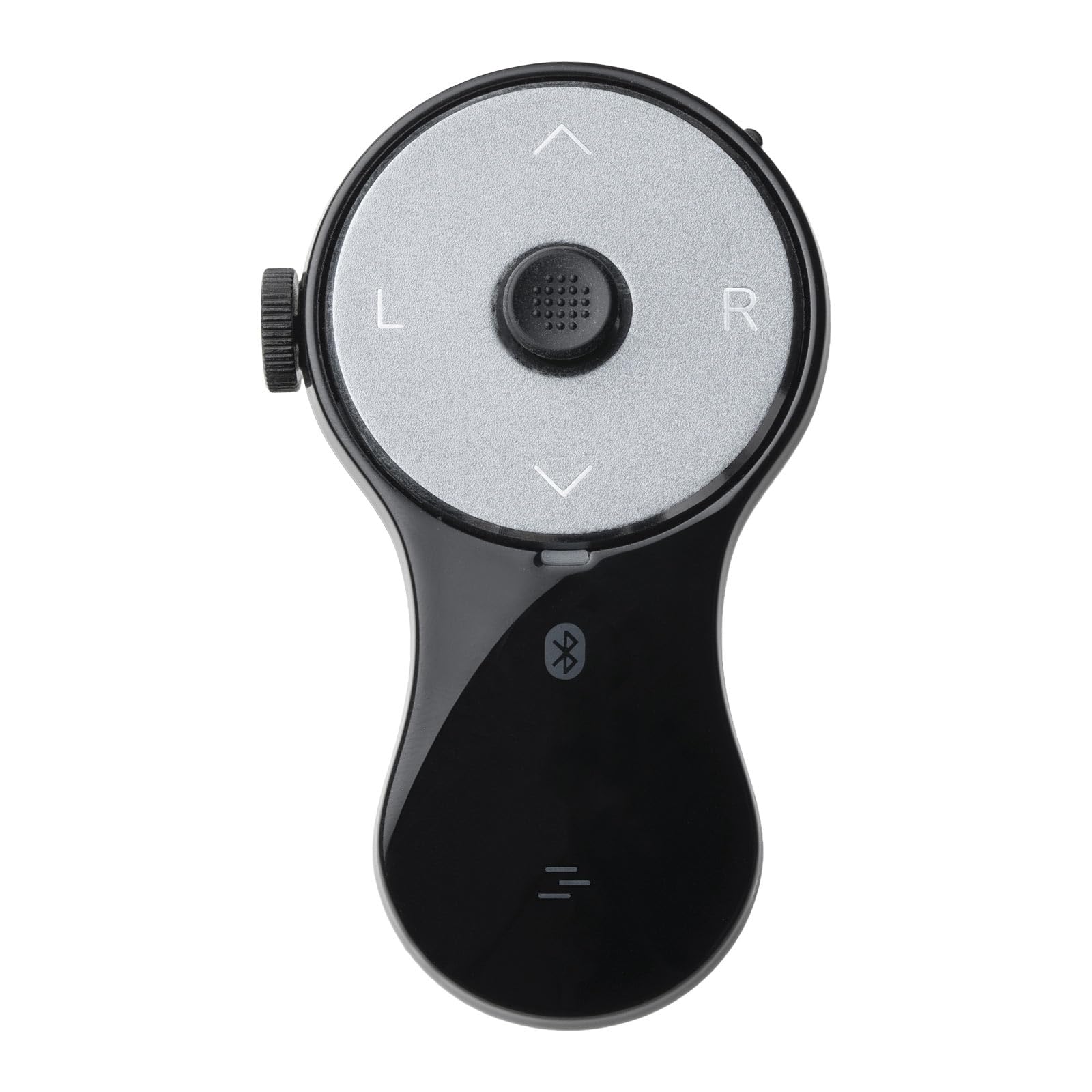
🖱️ Elevate your workflow—wear the future of control on your finger!
The SANWA 3-in-1 Bluetooth Finger Ring Mouse is a compact, rechargeable wearable device combining a mini mouse, wireless presentation clicker, and video scroller. Featuring Bluetooth 5.0 for reliable 32-foot connectivity and a 34-hour battery life, it offers ergonomic comfort with a soft silicone ring to reduce wrist strain. Ideal for professionals managing presentations, video content, and eBooks across PC, Mac, tablets, and smartphones.


| ASIN | B0DLGK55CD |
| Additional Features | Ergonomic Design, Portable, Rechargeable, Wireless |
| Battery Type | Lithium-Ion |
| Best Sellers Rank | #451 in Computer Mice |
| Brand | SANWA |
| Button Quantity | 5 |
| Color | Black |
| Compatible Devices | Personal Computer, Smartphone, Tablet |
| Connectivity Technology | Bluetooth |
| Controller Type | Button Control |
| Customer Reviews | 4.1 out of 5 stars 136 Reviews |
| Item Weight | 0.02 Kilograms |
| Manufacturer | SANWA SUPPLY |
| Maximum Range | 32 Feet |
| Model Name | GMABT156BK3 |
| Model Number | GMABT156BK3 |
| Number of Batteries | 1 Lithium Ion batteries required. (included) |
| Number of Buttons | 5 |
| Special Feature | Ergonomic Design, Portable, Rechargeable, Wireless |
| Warranty Description | 1-year warranty. This mouse operates via Bluetooth only; no 2.4 GHz USB receiver is included. Please verify that your device supports Bluetooth and complete the pairing process before use. Note: Compatibility with all operating systems is not guaranteed. |
R**.
Ergonomic Air Mouse that works.
Good quality. Controls are placed ergonomically. Angled scroll wheel is easy to operate. Cursor mini-joystick button takes some time to master. Bluetooth and RF connectivity are a plus. Rechargeable built-in batteries are convenient (charge lasts very long). Other so-called air mouse devices might be cheaper, BUT they lack a scroll-wheel and are awkward to hold. You could pay a little more for a Gyration Air Mouse, but I don't know if the new ones are still reliable. At this price point, this is an above-average package.
B**T
No Glam - Just the Facts
Simply Perfect. This device functions flawlessly, and is an absolute 'Quality of life' needed item. The controls and functionality are intuitive and very easy to use. Buttons are large enough to hit easily, and are very responsive Easily connects to my devices Battery life is excellent and recharge is simple and fast. The mouse has been subjected to drops and being stepped on, still works perfectly It is light and very durable, but does not feel cheap. Wish it came in different colors (*wink*wink) Only negative I have is I did not read the instructions and thought it was broke because I had it on the scroll function mode and not the mouse function mode. And it is rather small, which is nice, but it can get lost easily. I bought this mouse in Feb 2025, and am writing this as of Nov 2025. I shall return with an update if I remember
E**N
Handheld is good, just some improvements
Honestly it works how I wanted, but only because I downloaded software to alter my windows hotkeys. I think these things should be improved for next model: - Software to customize functions - Button for the trigger finger (currently it's annoying to do everything with the thumb, there's no good click and drag) - Bad bluetooth could be improved, or offer a dongle
A**S
Not bad, not great.
Works well, do like the placement of the buttons and the wheel. The little mouse stick thing is exactly like what you see on some laptop keyboards and is pretty accurate in it's movements. Has all the buttons a "presentation clicker" should have, save for the middle mouse button. It does have an impressive battery life, and good range. I do however have to say I hate that there is no middle mouse button. It didn't actually need to be under the mouse wheel, though I really can't see why not, but including that button would have really improved this mouses usefulness in my opinion. I really would like to give this a 3.5 out of 5, but sense we can't do that on amazon, Imma have to just give this a 3 of 5 instead.
A**R
Almost Perfect
I bought this specifically to use as a mouse alternative for the PC to prevent RSI. It sits nicely in my hands, but I could see it being a bit too large for women/people with slender fingers. The construction is solid and the Bluetooth connectivity works flawlessly. The cursor sensor is responsive to very light touches and is easy to get used to, but it's closer to using a joystick than it is to a mouse - it's not as quick or precise as a mouse, but its speed does respond to the level of pressure you put on it, which is a nice improvement over using a joystick. The scroll wheel is also neither too tight nor too loose, and spins easily to light touches. However, it's awkward to reach with my thumb when using the ring mouse left-handed, which is a bit disappointing because I like to swap hands around to avoid repetitive movement. My biggest gripe with using this thing as a mouse is that the default Page Up/Page Down buttons are a waste of potentially useful button spots since that functionality is easily covered with the scroll wheel. I had to install AutoHotkey for Windows 10 to remap those buttons to something useful, namely mouse buttons 4 & 5 to navigate back and forward on webpages. I think you might be able to remap them natively with the built-in mouse and keyboard control center in Windows 11, but I haven't used Windows 11 yet to know for sure. Either way, it seems like a missed opportunity to make this thing a full mouse alternative right out of the box. Overall this is a handy little device for my purposes. If I could design a new one for myself, I'd add a second scroll wheel on the opposite side of the existing one to make the device more ambidextrous-friendly. I'd also add a single button perpendicular to the disk face at the top of the device, which would make click & drag much easier and faster to do if you wear the device on your middle finger. I'd also map the default function of the Page Up and Page Down buttons to mouse buttons 4 & 5 for mouse mode. I think that'd make it absolutely perfect. It's very nice as it is though.
R**K
You Get What You Pay For👌
This item works very well, and has the features to fully control your Facebook page and other social media content because it has enough buttons built in it to control like a full size mouse would, like with a Left & Right button as well as a scrolling wheel. This device does have a tendency to disconnect from Bluetooth out of no where and then needs to be reconstructed again through your devices Bluetooth menu to make it work again. But other then that, it's a good device and I use it daily. The battery life is also pretty good, and lasts 4 or five days of 3 hours of use each day before needing charged again. This device seems to be on the High end of these types of "Ring mice" and that's why it's a bit more costly, but like most things, YOU GET WHAT YOU PAY FOR.😉
G**E
Nice set up don't work right.
Purchased it for one Hand/Finger use, and I have to use 2 hands to excecute certain functions, going back.
D**D
My favorite ring
This Ring Mouse is the perfect accessory to my Viture XR Glasses allowing easy manipulation of the screen when not using a desk. I've used this to navigate Dex mode desktop from bed, to select and start movies while on the plane, and for more serious work both while traveling and when using my XR glasses during field testing. Battery life is excellent, and it charges quickly to get back to work (ie: if you forgot to charge it before a flight). If you are used to the old-style mouse-sticks on laptops, this ring mouse will quickly become second nature. It is a little awkward if you need to click + drag, but otherwise is comfortable and easy to use. While you can long press to drag, I found it easier to use my other hand to press the click button while moving the cursor in most cases. The only other issue I've had is more an Android bug paired with the ring mouses battery-saving timer. If there is no activity for a period of time, the mouse goes to sleep. However, this sometimes causes certain apps on Android to detect a device connect/disconnect and causes media playback to jump forward or back. This is clearly a software bug, though one that could've been bypassed if there was a way to configure the sleep mode of the device. Form wise, I do wonder of the long-term durability of the plastic ring piece, especially when I'm sticking it in my backpack or pocket between uses, though it's held up well so far.
Trustpilot
Hace 3 semanas
Hace 2 meses