We remain fully operational. Our teams are working around the clock to ensure your deliveries continue safely.

Descargar la aplicación


Servicios al cliente
Sobre nosotros
Copyright © 2025 Desertcart Holdings Limited
Descargar la aplicación


🚴♂️ Ride Longer, Navigate Smarter, Charge Naturally!
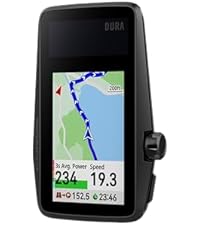
The COROS DURA Solar GPS Bike Computer delivers an industry-leading 120-hour GPS battery life enhanced by solar charging, featuring a crisp 2.7" MIP color touchscreen optimized for all lighting conditions. Designed for serious cyclists, it offers seamless turn-by-turn navigation with advanced rerouting powered by Google Maps and popular cycling apps like Strava and Komoot. Its intuitive interface combines touchscreen and tactile dial controls for easy use even with gloves, while fast WiFi and Bluetooth syncing ensure your ride data uploads instantly. Rugged, lightweight, and IP67 rated, the DURA is built to keep you confidently exploring longer and smarter.








| ASIN | B0D6TQWRCN |
| Battery Average Life | 120 Hours |
| Battery Type | Lithium Ion |
| Best Sellers Rank | #12,921 in Electronics ( See Top 100 in Electronics ) #4 in Cycling GPS Units |
| Brand | COROS |
| Brand Name | COROS |
| Color | Black |
| Connectivity Technology | Bluetooth |
| Customer Reviews | 4.6 out of 5 stars 329 Reviews |
| Display | Always-On Memory LCD |
| Display Size | 2.7 Inches |
| Display Type | Always-On Memory LCD |
| Global Trade Identification Number | 00810005783200 |
| Human Interface Input | Touchscreen |
| Included Components | COROS DURA GPS Cycling Units |
| International Protection Rating | IP67 |
| Item Dimensions L x W x H | 0.2"L x 0.05"W x 0.33"H |
| Item Weight | 102 Grams |
| Manufacturer | COROS |
| Model Number | COROS DURA Solar GPS Bike Computer |
| Mounting Type | Handlebar Mount |
| Native Resolution | 480x240 |
| Product Dimensions | 0.2"L x 0.05"W x 0.33"H |
| Screen Size | 2.7 Inches |
| Sensor Type | GPS Sensor |
| UPC | 810005783200 |
| Warranty Description | 2 year |
D**K
Coros Dura
So far this Dura bike GPS has been great. I also own the Garmin Explore 2 (Garmin E2) to compare it to. I just bought the Coros Dura in August 2025. And it installed the latest update upon turning it on. It has Firmware v 3.1011.0 dated Jul 28, 2025. I understand the earlier versions had issues that were resolved in later releases. I have no experience with the old Dura software, only this July 28, 2025 version. So my comments may differ from others that bought the device in 2024. The battery on the Dura so far appears great, no complaints. So far i have 37.5 hours of use on the first charge. I have not charged it after the first charge yet. Given it has 70.8% battery left, I will not charge until it gets below 50%. I think if I put it in the sun when not riding it would never need to be charged with AC. Solar charging while riding is dependent on sun and angle of the sun. I find when I ride I'm rarely riding into the sun for any length of time. When the sun is behind me the solar panel is shaded. The most sun it gets is when I stop for a break. Then I angle it into the sun and get good solar charging. The maps lack street names on the Dura device but i find I don't really need or use them. It does show the street name to turn on about 500 ft early. That's all I find I need. Also, while the Garmin has street names, it only displays some street names and sometimes no street names. I never really noticed it on the Garmin while on the trail until I watched for it. Typically bike paths and most streets are not labeled on the Garmin while in route. The routes on the Dura are much better than the routes on the Garmin. I know everyone says they use the same maps and routes but that has not been my experience. The Garmin will route me on streets with a 45mph speed limit and no shoulder. That's crazy when there are local streets that will take you to the same location. I feel the Garmin routing is based closely on their car routes. The Dura has routed me on local 25mph streets and bike paths. And surprisingly it has routed me on some short cut bike cutaways between streets, thru parking lots, etc. I'm amazed at the routes it finds. I have been on some crazy great short cuts. Not sure how it knows about them, I didn't know them. On the other hand garmin will route around underground tunnels built for bikes. Not sure why it misses those great shortcuts that are much safer to cross a road. And fun to go thru. I had gone off route a few times already with the Dura. The Dura rerouted me quickly and on a decent route, not a fast busy road. I think it uses the phone to reroute but no issue and fast. I'm not sure what all the reroute complaints are really about. I always have my cell phone with me and of course the app is running. It does not drain the battery anymore than any of my other 100 apps. I say the reroute is no issue in this version of the firmware. Obviously if you bike in a no cell phone signal area you would lose the reroute ability for those moments but you might lose GPS signal too. Once you get back into range you can reroute. I'm never really in any zone with no cell coverage and certainly not for any great length of time. The Garmin E2 had been a major headache to use. It is a very difficult to use device, particularly when all you want or need is a GPS for navigation. I already have an odometer, speedometer, and time on my bike. I have miles, calories, heart rate, temp on my watch. Only need Navigation. The Garmin has this incredibly complicated user interface. Full of features I would never use. I don't care about calories or what it thinks I burned or energy I used. I'm all about riding no matter how many calories. The first few times using the garmin i had to abort using the gps. My later adventures with the Garmin were better but still frustrating. For example, at one point i took a long break at a restaurant. I could not get the Garmin to turn off to save battery. For some reason it thought i was still riding. But I did stop the navigation so it was confusing. And the timer on the Garmin requires too much hand holding. Great for cheating on route time but why cannot the GPS figure out the timer why do I need to be involved. The Dura does all the timer stop/start activity on its own, like a computer should. The Garmin has major issues in routing friendly paths and roads. I don't like the routes from the Garmin. And the rerouting keeps wanting to take you back to the original route. It does not like to find a new route forward unless you stop the current route and plan another from your current location. And usually it directs you on a busy high speed street. Very flustrating. While the screen size on the Dura is 2.75" the map space is larger than the garmin explorer 2 with its 3" screen. The Garmin E2 has a block on the top of the map and a block at the bottom. Dura uses all the screen for the map and only uses the top of map to show the road to turn on when you are 500 ft away. Both GPS units have the same screen resolution of 240 x 400 pixels. Both look clear and have good graphics images. Garmin Explore 2 Steps to get to the Map: Open app, there is a home page with 5 links on the bottom. Home Challenges Calendar News Feed More Oddly to get to the Map you need to choose More. Why more on a GPS ?? Seems like Calendar or News Feed would be a More… After choosing More, then there are around 15 items to choose from. Need to choose Training & Planning down into the menu. Then another menu is displayed with 6 items to choose from. Choose Courses and that takes you to a listing of courses you have created. Need to click on Create Course, then choose a Course type among 7. I chose Gravel/Unpaved Cycling. That takes you to another menu of 2 choices. Choosing Custom will finally bring up a Map. My question, why so menus to get to a map on a navigation GPS? That is crazy. At that point you need to choose a starting point. Dura just assumes the current location and you can change it if you want. Not on the Garmin, you need to pick it. Then there is no address entry so you need to zoom out and move around to find your final location. On the Coros app, it has 4 menus on the bottom of the main page. Progress, Activities, Explore, and Profile. Explore is the map, I would have just called it Map but ok Explore works. Click on the Explore option and yes, it takes you right into the map. Looks like Google Maps It is that easy to get there. Put in an address or choose Create Route and then move around the map and drop an end point. What a relief to see it just make the mapping easy enough. Taking a 12 mile route on both Dura and Garmin yield different results. The Dura has lots of side streets, many turns on various roads. Looks ok to me at a glance. The Garmin takes the least number of roads but looking at it, it chose a great route for a car. On streets that are 50 MPH and other main streets. No idea why it chose that route but no way, not on a bike. I would not take that route. You can create a route street by street. But it takes time and if you venture off course Garmin will be happy to route you back on a main high speed street. And with all this Garmin nonsense, it was 4 miles longer. Just confusing for a navigation GPS made for a bike. If you live in a rural area and the number of roads are limited then the Garmin would likely choose the only possible path and all is great. But with lots of side streets around it does not make use of them. Garmin just seems to use the routing it has on their car GPS’s. One other area of different between Garmin E2 and Dura is the data transfer. The Garmin Explore 2 only has bluetooth and it is very slow to download and install a firmware update. The last update I installed this year took me 3 days. In the first day it ran for an hour and I had to run so I stopped the download. I started it back up later and let it run for 2 hours and had to stop it for a call. It was on the final and third day I let it sit until it was done but it took a very long time. I feel the process is too slow, but it does work. The Coros Dura has both bluetooth and wifi. The wifi is much faster. The firmware update I did only took a few minutes. That is how this should work. Bluetooth is just too slow for transferring data. If I had to pick one thing to like about the Dura it would be the routing. The routes are crazy good for bikes. No high speed roads, lots of bike only routes. It chooses a better path than I could. The battery use and charging are great too. But it is the routing that amazes me the most. The screen on the Dura is very good during the day. I have not been on a night ride with it yet. The Garmin screen is as good. No issues with either unit. Have no idea why Garmin cannot use the same routes. I have sat and picked the same routes on Dura and Garmin side by side and Garmin always chooses some high speed road for 10 miles or so. I hate that. The Dura just picks a great biking route. Bike paths whenever it can and low speed roads when needed. I am very happy with the routing on the Dura. I have compared to other apps like Komoot and Strava. Although those both nag you about a monthly feed. Getting thru that, they still choose bad routes down busy high speed streets. I like whatever Coros Dura is doing with their routing. After using the Dura for a few weeks I have some further comments. Surprisingly I have not charged the Dura since the initial charge. Thats is really good. There is no need to worry about the charge on this guy, just go biking. The zoom level by default is one level out too far. When you come up to a turn and there are several streets that could be turned on, the map is hard to tell which one at the default zoom level. If you zoom in one level then no problem. It would be nice if that was defaulted. Trying to change the zoom level while riding is a challenge. The road is bumpy and riding one handed sometimes feels like riding a bull. And in general, I find changing screens a challenge while riding too. And the zoom level cannot be changed after the upcoming street is displayed. Also, the zoom level is reset after a turn. If on a smooth street then all is good but those smooth streets are rare in my area. Creating routes, one day I tried to create a new route on the road and in the rain. But the device kept saying I had too many routes and need to delete a route to make room. I was not sure where this action was needed, on the app or device. And removing one route on each it still did not work. After removing a few routes I was able to get a new route on Dura. Flustrating in the rain. Would have been nice to just replace the oldest route and not show any error message. Interestingly, last week a new software update came thru and it said it fixed the limited routing. I'm not sure if that is the same routing issue or not but good to hear.
A**R
Excellent battery life, everything I need
The initial setup process on the Dura was a bit glitchy due to Bluetooth weirdness. Bluetooth syncing just didn't seem very reliable for me. And installing firmware updates using WiFi was terrible since it couldn't find many networks. (Might be a 2.4GHz vs 5GHz issue.) But afterwards when I actually use it, the Dura was amazing. I charged to 100% ahead of a long bike ride, and after 112 miles of biking it had 88% battery left! This is simply amazing. I really liked the customizable data fields for display and I selected the speed chart, heart rate chart, and cadence chart as my main display. After the ride, I was able to view a plethora of statistics previously not known to me. I liked the training load and training effect statistics; they seem helpful. The navigation is also good; following the breadcrumb navigation is easy thanks to the great screen with good brightness. The turn-by-turn navigation certainly isn't as good as Google Maps but I was used to way worse experience on a bicycle so this is still an improvement. I am now way more confident to try out new roads on my bike with the Dura than before.
P**R
Great Value!
I already have a COROS watch and heart rate monitor and I like the simplicity, value, battery life, and flexibility of the COROS system. I decided to stay with COROS in spite of the negative early reviews when the product was first released, knowing that COROS continuously improves and updates software (like they did on my Pace watch). As I hoped, all of the areas of concern I saw in reviews were not issues for me, and presumably have been fixed. Pairing with my existing Ant+ cadence, COROS HR, and COROS watch were easy. Loading maps and routes was easy. While riding, the screen was very readable and the device quickly re-routed me when part of my route was closed. I also appreciated that they had fixed the climbing display, to show the entire climb on one screen, unlike early reviews. Because I'm used to the watch crown, I found using it on the Dura to be simple (and I preferred it to buttons). My only complaint was that the default data screens were more than I need, so I'll be customizing these for my next ride. Also of note: the battery didn't charge much on an early morning ride (used 2.5% and generated .4% for 90 minutes due to shadows), so consider time of day when thinking about the effectiveness of solar charging.
T**K
First pro computer, and I love it
I certainly love it. This is my first pro bike computer. It has a lot of functions but is easy to use and set up. The biggest "problem" was me being picky about choosing what information goes on what screen. I love that its customizable for giving different bits of information. It connects to my phone from another room, and seems to always be ready to recieve information when I want to sync a new route to it. I enjoy the GPS in it, not only being able to make and plan my own routes, but also not getting lost by simply pressing "take me home" on the computer. The only complaint i have is that it gets a little confused when automatically creating a "there and back" route that involves one-way roads. Itll tell me to turn but shows a different path to take. Nothing I cant overcome though. Also, a few spots on some trails seem to not be rideable, but manually setting way points helps. The alerts are very useful. I set a timer that alerts me in consistent time intervals when to eat, an alarm thatll beep if my heart rate or cadence gets too high, and of course it'll inform you of upcoming turns. Riding in the sun, in the morning, or at night, the visual display is very easy to read and never has a glare. This is definitely worth it. The app it connects to is very easy to use as well. It gives a lot of information and even tells you how long you should rest for. Great for serious cycling or simply enjoying regular riding.
D**D
Good, but some gaps that are not well publicized
I was frustrated with my garmin 830 so thought i would try the Coros. Lots to like. Definitely keeps charged up. Even on a cloudy day and a 40 mile ride it sips battery. On a sunny day I hold charge. Display is crisp and legible. If you get a text message, it fills up the entire screen which is amazing. A few things to note of you are considering this: 1- you download maps on the unit. They are more detailed than a Garmin, but oddly road names are not provided. If you upload a route, you do get the name of the roads in the directions. 2- it does not have incident detection. If you press the button or wheel on the right it sends your location to your contacts of you have entered them. I prefer this as with the garmin, if I stop too fast, it thinks I have wrecked and I can never cancel in time for some reason. So family is freaking out and I have to text them to say ignore. 3- a bigger miss is the absence of live track like Garmin and Wahoo. It has a group track function, but it only works with others who also have a Coros device. Your friends and family are not able to track you from a web link. I understand Coros is aware the user community is wanting this. However it is unclear if they have it in the development pipeline. Overall a good unit. Will probably keep, but the livetrack gap is not a small thing for me.
T**S
Great computer!
After 6 hours of riding here are my impressions. Easy to connect to phone, apps(strava), and pair with accessories such as heart rate straps and power meters. Battery life is amazing! Still at over 90%. I did charge to 100% as recommended by Coros when I first received the computer. Fits on my current Garmin mounts so I didn’t have to replace those. The app itself on my phone is very easy to navigate and shows all of the information I need. Great product!
A**C
Great bike computer with excellent battery life
Extremely happy with this bike computer. Screen is very easy to read without my reading glasses and following a route is easy to see. Data screens are highly configurable using the Coros app. Loading a GPX route from apps like Ride with GPS, Trailforks and the Coros app works great. The battery life is the star of the show. A 5 hour ride in full sun used only 0.3% battery! I don't use the "out front" mount that it came with because I mountain bike, but it's nice quality. Instead I bought an "on the bars" mount from Amazon that works perfectly.
A**W
sturdy build, amazing battery life
Build quality is solid, it feels really nice in your hand, mounting is sturdy and the display is nice and bright in the sunlight. Battery life is fantastic, ridden 110 miles and the device is still at 93%. Great user interface, don’t have to navigate through a million menus like my Garmin. It's an amazing device for half of the price of some other brands...
Trustpilot
Hace 1 mes
Hace 2 semanas