We remain fully operational. Our teams are working around the clock to ensure your deliveries continue safely.

Descargar la aplicación


Servicios al cliente
Sobre nosotros
Copyright © 2025 Desertcart Holdings Limited
Descargar la aplicación


🎙️ Elevate your sound game — record, stream, and create like a pro, anywhere.
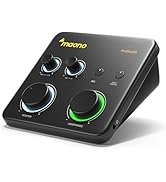
The MAONO PS22 Lite USB Audio Interface delivers professional-grade 24-bit/192kHz recording with versatile XLR and instrument inputs, powered by intuitive ProStudio routing software featuring LOOPBACK and ASIO drivers. Compact and compatible across PC, Mac, and mobile devices, it’s designed for podcasters, musicians, and streamers seeking high-quality, low-latency audio capture in a sleek, plug-and-play package.




| ASIN | B0D9P3Y22C |
| Audio Input | Microphone, Guitar, Bass, Computer, Smartphone |
| Best Sellers Rank | #989 in Musical Instruments ( See Top 100 in Musical Instruments ) #8 in Computer Recording Audio Interfaces |
| Brand Name | MAONO |
| Compatible Devices | Guitar, Headphone, Laptop, Smartphone, Microphone, Speaker |
| Connectivity Technology | USB |
| Customer Reviews | 4.3 4.3 out of 5 stars (417) |
| Frequency Response | 20 KHz |
| Impedance | 32 Ohms |
| Item Dimensions D x W x H | 6.29"D x 5.19"W x 2"H |
| Item Weight | 0.43 Kilograms |
| Manufacturer | MAONO |
| Maximum Sample Rate | 192 KHz |
| Number of Channels | 2 |
| Operating System | Android, ChromeOS, Windows, iOS, macOS |
| Supported Software | Avid Pro Tools, Ableton Live, Steinberg Cubase, studio one, logic pro , nuendo, reaper, Audacity, Adobe Audition |
| Warranty Description | 1 year. |
K**.
Great For the Price and Great Support... When you reach them
My previous review on this product was not a happy one. I connected it to multiple devices, had the biggest problem with crackles and pops and as much as it did what it was supposed to, it just wouldn't do it smoothly. I initially tried to contact support through Maono's website to figure out what was going on. No answer. Initially my review on this product was 2 stars, 3 for a product that kind of works with a lot crackle and pops and bringing it down to a 2 for not getting an answer from support. Despite the support not being available through their website, I recommend reaching out to the email listed on the website as well. Between the efforts of both Amazon and the support on the email I sent to separately, I can now re-review this product and am very grateful I got a new one sent out to do so. The new product is great! It is everything you would expect from an interface at this low of a price and more! It is the only interface worth getting at this price point. Is this the highest quality interface you can get? No. If you're willing to spend about twice as much, you can get the Audient devices which I personally consider to have fantastic sound quality, especially at their price. But this is PERFECT for it's price. That said, there are a few things to note. Imagine my disappointment when I plugged in the new interface, and it also crackled and popped. But this time, doing tests on multiple devices, I found it wasn't the interface itself, not strictly. Before I get into more about the crackles and pops, the device itself has an instrument in port and an XLR port, allowing for two inputs. Each has its own gain knob. There are also two outputs, one for a monitor and one for headphones. Each of these also has its own knob. It is pretty straightforward. It has a switch to direct monitor or just receive the full mix on output. It has a 48v phantom power for any condenser mics that might need it. As with any interface, I recommend downloading and installing the driver when you get it. That said, please read on to see one of the issues I had with the driver and the easy process on how to fix it. Another part that I really like and didn't think about being unique before, but got pointed out in a review by Obscure Mics, which I recommend going to check out his review of it on YouTube, is the lighting. The lights on this are really cool, modern and unique. If you start to clip, it even turns red to show you. Really nice job here. Now, for the snap, crackles and pops. Okay, not the snap, but I couldn't resist. There are four causes for crackles and pops on this device, and I had the fortune of being able to find all four causes to now be able to assess how to deal with them: 1) The first device I received was having internal issues. This seems to be an infrequent thing to happen with their products where I just got unlucky, so I can't hold that against them. The new device doesn't have this issue. No problem. 2) When I received the new device, it still had an issue on my main computer. I had an idea though. What if, by chance, it was the driver causing the issue? Easy enough to test. I tested the same exact inputs and outputs, but this time I used ASIO4ALL. And wouldn't you believe it worked JUST fine. No issues. No crackles and pops. Occasionally some weird ASIO4ALL issues, but that's not relevant to this interface. So I tried reinstalling the driver. And this fixed it! No more crackles and pops. So if you're having an issue, and it's only when using the Maono driver, I recommend trying to reinstall. But I also recommend that Maono look at why this happens and work on fixing it for future users. 3) Use USB-C. On some devices I still had an issue running the interface through USB. USB is outdated, and this device uses USB-C for a reason. If you're having issues, use USB-C. 4) Use a hub with a phone. If you want to connect this to a phone, which you can, get a hub that has both pd charging and a USB-C out data port then plug it into your phone and make sure it's charging while the interface is plugged in to the data port. This will provide a stable power source for the interface when connected to a phone and will work fine at this point! Positives: Great device for the price! It works and works pretty well once the bugs are figured out and dealt with! The input, output, dial and switch options are really nice on a device of this price range. The driver works well and provides low latency. The option for 96 khz is really great! It helps it keep up with the times, as well as using USB-C. Speaking of USB-C, the provided USB-C to USB cord is nice. I just don't really recommend using it unless you absolutely have to, and you've tested and know it will work for your setup. Recommendations for Improvement: A bit of additional quality control probably wouldn't hurt. Please fix whatever issue I had with the driver if it's something that can happen again to someone else. Provide an option for additional power straight to the device for more consistent power. Improve the pre-amps. This is half the price of the Audient devices I mentioned before, but the pre-amps do sound like it. I would love to see this device redone at the same price with improved pre-amps. Create more budget interface devices at reasonable prices. Include the improved pre-amps. Behringer has an 8-input interface at $180. I challenge Maono to do the same but cheaper with the higher quality pre-amps. Maybe even include ADAT ports or have devices with them? Maybe we can get it down to $100? Think about how much of a market that could take over! Extra buld quality like being made of metal would be nice, but at this price, is it really a major concern? Not for me. Overall, I really like this product for the price. And if you need a budget interface to start out with or to carry around, this is a great one for you. I currently have this rated at four stars, but if this device is still working great after a month, I'll make sure to give it five at that time. Edit: 5 Stars after a month of usage! Still works fine without crackle issues!
T**H
The Truth
One of the standout features of the MAONO USB Audio Interface is its user-friendly design. The setup process is remarkably straightforward. Upon unboxing, I found that connecting the interface to my PC was as simple as plugging in the USB cable. It is truly a plug-and-play device; my computer recognized it immediately without the need for any complicated drivers or extensive configuration. The interface features an XLR input, which is essential for connecting professional-grade microphones like the PS22 Lite. This allows users to easily switch between different microphones or instruments, providing versatility for various recording situations. The controls are intuitively laid out, with clearly labeled knobs for gain, volume, and other essential functions. This design ensures that even those new to audio recording can navigate the interface with confidence. The routing software included with the MAONO interface adds another layer of convenience. The LOOPBACK feature is particularly beneficial for streamers and podcasters, as it allows for easy mixing of audio from multiple sources. This feature can be set up quickly, enabling users to capture both their voice and system audio without hassle. The ASIO driver support further enhances the user experience by minimizing latency, which is crucial for real-time monitoring during recordings. In terms of construction, the MAONO USB Audio Interface is built to last. The body of the device is made from durable materials that feel solid and reliable. It has a compact design that takes up minimal desk space. The robust build quality is evident in the weight and feel of the interface, which instills confidence that it can withstand regular use without issue. The interface features high-quality components, including a well-designed preamp that enhances the sound quality of connected microphones. This attention to detail in construction ensures that users receive clean, professional-grade audio in their recordings. Additionally, the knobs and buttons are responsive and provide a satisfying tactile feedback, making adjustments easy and precise. The Audio Interface excels in both ease of use and construction quality. It’s designed with the user in mind, allowing for quick setup and seamless operation, while its sturdy build ensures longevity. This combination makes it an ideal choice for anyone looking to elevate their audio recording experience, whether for music production, podcasting, or streaming.
R**S
Simple and Effective
Good interface that makes my mic sound louder and clearer. I like that I can plug my instruments straight into it too. Easy setup and solid performance for the price
D**H
Small, but mighty!
Impressive! This device was so easy to use! The audio is clean! The unit itself is so small, it’s easy to make room on a desk. I can enhance the audio with software I already have. But this is a great way to get audio onto your computer from your microphone. This little guy kicks WAY above its pay grade! I highly recommend this interface.
R**L
Great audio interface
Let's get something straight and clear the air..... You don't have to spend hundreds or thousands of dollars on good audio equipment. Maono makes the best audio equipment and you don't have to sell your soul or sell a kidney to afford it. This has a combo xlr and a line in connection and so many people confuse a combo xlr and only put a mic... Combo xlr has a line in as well (there are xlr connections that are mic only, it's only going to have 3 pin holes). You can put 1 mic and an instrument or 2 instruments or 2 mics (xlr and line in version). Let's talk about mic noise.. Does it have? If your mic needs alot of gain yes but if you don't use cheap mics then you are fine
B**Y
YOU GET WHAT YOU PAY FOR!
YOU GET WHAT YOU PAY FOR. I bought this unit a year ago, and it worked fine. However, almost one year to the day I bought it, it abruptly quit working. So into the trash it went. Lesson learned: don't go cheap on this piece of junk. Save your pennies and get yourself a decent, reliable unit, such as Focusrite (which is what I did).
F**S
TLDR: This is a great audio mixer for the price. It does its main job well, i.e. interface your audio inputs and giving you an output. Audio quality is great and has an ASIO driver that works. My experience with the Maono audio interface so far is mixed with amazement, relieve and points for future additions. My review is from a gaming view 1st, voice chat 2nd and low cost 3rd. I have not used an hardware audio interface before and already had a FDUCE SL40 Dynamic USB/XLR mic that I originally got as a budget friendly XLR mic to help me when I was ready to move from USB to XLR (this was not the reason for getting the audio mixer as the USB worked really well). The main reason for getting the audio mixer was because I bought a budget friendly Linsoul KZ ZS10 PRO 2 IEM set and the audio cable was short and didn't reach from where my pc was located. This planted the seed to look into audio mixer vs getting an extension cable. Since I wanted to get one eventually I started researching but always had this question how will it work in game, will I hear the footsteps with spatial location awareness i.e. from where are the footsteps or shots coming. This info seemed to be very difficult to find as no one would comment or mention the surround sound passing through to the headset but now I can help someone out. The surround sound and quality of the audio passes along great, you can hear where the plane or car is coming from, where someone is running or walking and trying to sneak up on you. The headset output has its own volume control which again I find amazing as you can adjust the audio very easily when you are in a loud battle or up it when you are in a very quite place. The mic was detected effortlessly after ensuring the Windows settings were defaulted to the new audio interface. There is an individual control for the mic gain (with clipping) which I find really amazing as you don't need to open any software to adjust especially in a game. The mic audio sound and feels more crisp and is most probably due to being amplified on the device as opposed to software gain. It has 48V phantom power than I don't need so did not test or use it. One big disadvantage on the mic part is no Mute button on the device. I would hope they add this as I find it very odd that you have gain control on a mic but no way to mute it except turning down the gain but then you loose your current gain setting. The device is a 2x input and you can have an instrument also connected which I did not or can't test. It also has an individual gain control and acts the same as as the mic. There is a monitor feature with a push button to activate or deactivate together with a dedicated volume control. I did not use or test this function as I use voicemeeter for channel management and monitor but again great for not having to open software to use it. The audio mixer is very lightweight and a decent size. Knobs and buttons feels like good quality and included USB cable it good length. It comes with its own software that also installs the ASIO driver and does virtual channel management. It works well as basic channel management but I have the need to split my audio channels i.e. I use separate mic, windows, game, music and voice chat channels that I need individual volume control on and the included software only gives me ability to do 3. I am also using the ASIO driver in voicemeeter and confirm that works well and it shows active in the Maono software. 3 channels will be more than enough for most use cases. The UI of the app is easy to navigate and setup. A con for me is no additions (that I could find) where you can manipulate the audio such as compressors, noise, eq, etc. even basic ones like voicemeeter has. Adding in the ability to use third party plugins would have made this software amazing but with most things you can get around it with other software. I am currently trying out voicemeeters filters but generally you can use something like APO to add the filters on the mic before it gets used by the Maono Pro Studio software. One last item, I had some audio artifacts that sounded like a soft helicopter in my headsets. Eventually I figured out when I held it the sound went away so I moved it to the other side of the desk away from the WiFi router and a light source and this removed that sound so it seems the lightweight design or something else makes it susceptible to interference. Either try to shield it or move it around to see if it helps remove the artifacts if you are experiencing it.
M**A
Amazing sound and minimal latency, perfect for beginner guitar players
M**W
Love this sound card from Maono easy to setup great buy speedy delivery thank you very much cheers.
J**G
I purchased this for my son who recently got Edifier studio speakers with balanced inputs. Purchased along with Amazon cables. This device for price is amazing. 32bit 192khz ASIO was easy to set up can also support odd frequencies like 17400khz eg DSD in foobar. He also has his XLR Mike plugged in. The quality of the sound, ease of use is all excellent. So good I'm thinking of purchasing a few products for myself.
S**E
You won't regret this purchase. For the last 15 years, I've believed that "CD-quality" was as good as it gets, and I've always plugged my headphones into the audio-out jack on the front of my PC, I mean, it's CD-quality, right? Well, sort of. Although it is, in fact, CD quality, your PC is capable of better-than-CD-quality audio by accessing sound through the USB port. That's where this Maono device comes in. Rather than using your PC's lower quality sound conversion chips (via the audio out jack), attaching this device to a USB port allows you access to higher quality sound via Maono's much higher quality sound-convertor chips. Their headphone jack is conveniently located on the lower right side and the large volume knob makes volume adjustments more easy and precise than the volume+ and - function keys on my keyboard. My old KOSS headphones (on their 4th set of replacement pads) suddenly sound crisp and alive, as though someone has lifted a woolen blanket off of the sound. I suppose I'm delighted that at my age, I can hear a difference because it means my hearing is still pretty good. I'm eager to use this device to record my ukulele as I have a Maono XLR mic that I can plug into the back. About the only gripe I have (hence, 4 stars) is that there is only Windows software for it, which excludes Mac and Linux users (me) out of being able to access more features. For what it is however, this device is a bargain I enthusiastically recommend.
Trustpilot
Hace 2 meses
Hace 1 mes