We remain fully operational. Our teams are working around the clock to ensure your deliveries continue safely.

Descargar la aplicación


Servicios al cliente
Sobre nosotros
Copyright © 2025 Desertcart Holdings Limited
Descargar la aplicación
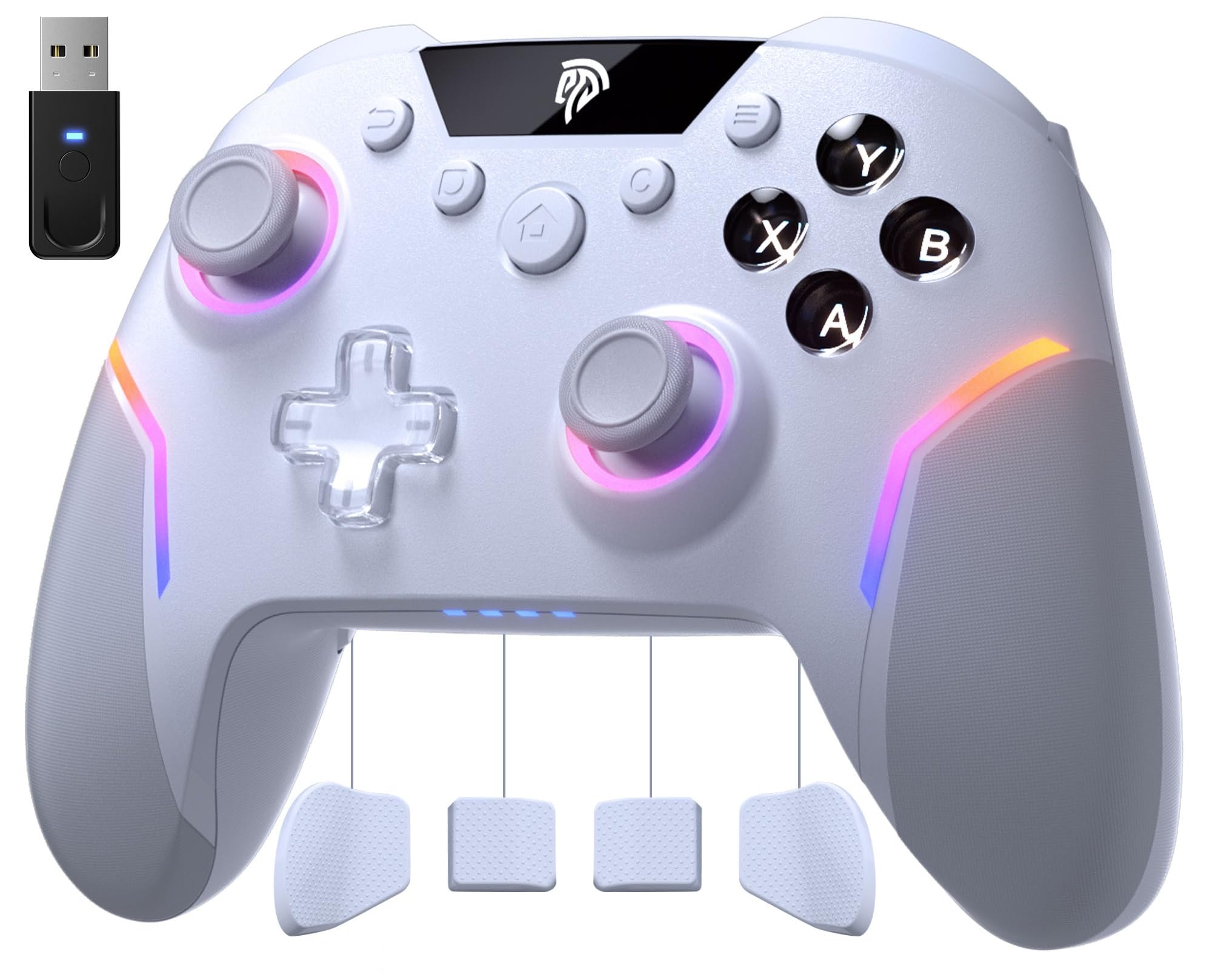
🎮 Level up your game with pro precision and style — don’t get left behind!
The EasySMX X20 Wireless Gaming Controller is a multi-platform powerhouse compatible with PC, Switch, Steam, and Android. Featuring a pro-grade 1000Hz polling rate, dual-stage Hall-effect joysticks for zero drift, mechanical action buttons, adjustable trigger locks, and a 6-axis gyro for motion control, it delivers esports-level precision and durability. Its dynamic RGB backlighting syncs with gameplay, making it a stylish and responsive choice for serious gamers seeking premium performance without the premium price.


| ASIN | B0DDHBT724 |
| Batteries | 1 Lithium Polymer batteries required. (included) |
| Best Sellers Rank | #646 in Video Games ( See Top 100 in Video Games ) #27 in GEM Box Microconsole #35 in Nintendo Switch Controllers #44 in PC Game Controllers |
| Customer Reviews | 4.2 4.2 out of 5 stars (6,727) |
| Date First Available | August 17, 2024 |
| Item Weight | 11.2 ounces |
| Item model number | X20 |
| Manufacturer | EasySMX |
| Product Dimensions | 6.5 x 4.7 x 2.7 inches; 11.2 ounces |
| Type of item | Video Game |
J**E
Pleasantly surprised!
I ordered this controller to replace my current OEM Xbox controller. Pros: What made me choose this were the extra M1-4 buttons on the back of the controller, as well as the extra QOL functionality and compatibility with multiple device types. Initial impressions are that this controller does NOT feel cheap. It feels more premium than my ORM Xbox controller. All of the buttons and triggers have a satisfying, but not annoyingly loud, click. The RT and LT buttons have a neat trick which allows you to turn either (yes - individually or both) trigger into a smooth, longer travel press (like the OEM Xbox controllers) or into a short travel press similar to the RB and LB buttons. This switch can be made in real time with a physical switch on the controller, located near each trigger but comfortably out of the way. You will not easily find yourself accidentally switching them to different travel. The color and vibration controls are intuitive and can be changed on the fly at any time as well with shortcuts built into the controller itself. You can also turn off the RGB if you want to conserve battery life or just isn’t your thing. The Hall joysticks are held on with a magnet, and easily are removed for cleaning by just pulling up. But I can confidently say there is no danger of the joystick head coming off when you don’t want it to during more intense gameplay. I attempted to push hard in all directions to see if this would happen and had no feeling that i could make it happen. Cons: If I had to make any suggestions for improvement, I would say…. The dedicated C (color) button and Screenshot button placements should be swapped with their partner buttons - Screenshot with Select and C with Start. This would make transitioning from using a traditional Xbox controller much simpler for more people. I’ve been using it for a few hours and have found that I need to retrain myself to place my thumbs a bit higher on each side of the controller to hit these buttons, because i keep hitting the C and Screenshot buttons which are located where I am already naturally activating the Select and Start buttons to be. The USB C port for charging and wired use is a great choice, but the port itself is recessed inside of a hollowed out area that makes some USB C cables unable to fit inside and connect to the port. It seems you either must use their included cable, which to be fair is of reasonable quality, or own another USB C cable that happens to be able to fit inside of the recessed hole that the port lives in. Just raise this port up to be level with the rest of the controller body so all USB C cables can be used. Small nitpick, but because of how the A, B, X and Y buttons display their letters, if I or anyone else (perhaps a person not as familiar with game controller layouts) needed to peek down and look at the button letters, it is not possible to read the letters on the buttons without tilting your controller to be directly facing your eyes. As in, they cannot be read properly from a diagonal angle, which most people tend to be relaxed back in their chair or couch with their hands down near their lap. So this means you MUST tilt the controller toward your eyes when looking down, opposed to just looking down. Making these more pronounced and readable from an angle would just be a niche but easy QOL change to improve the design, Overall, great first impressions and seems very much like a great value when compared with the competition - particularly from big brands like Xbox, Razer, etc.
R**L
The Best In It's Class and Price Point
I have been using this controller for awhile now and it's probably the best one I have used at it's price point. I have used it on the Switch OLED, Switch 2, and on PC via the included Dongle as well as via Bluetooth. Connection to the dongle from my couch to the HTPC in the TV stand are great. I always struggle with Bluetooth being stable so the 2.4Ghz is nice. Being able to set the back buttons to something has allowed me to actually play insect glaive on MH Wilds. The ability to lock the triggers is perfect for some Mario Party mini games. Let's talk about the elephant: the clicky buttons design. They are actually key switch instead of a membrane button. First off, they will last significantly longer than the modern 1st party controllers from the likes of Xbox, Nintendo, etc. They will make a noise but, for me, I have PC gamed on louder mechanical keyboards in the past. I would rather have the click for long term reliability of key switches over membrane alternatives any day. I can see why they are not for everyone but if you're focused on the game, the noise generally fades into oblivion. Your SO listening to it is another story, luckily mine games to. The Hall Effect Joysticks are also built to be more immune to stick drift unlike Nintendo's $85, switch 1 recycled, switch 2 slop controllers. The only negative I would wish for is the ability to wake the Switch 2 like it did the Switch OLED but that's a Nintendo problem and not an EasySMX problem. The controller sits comfortably in my hand just like any of the last 2 generations of Xbox controllers I've used. Good news is this one didn't have the buttons wear out within a year or two of moderate use; at least not yet anyway. I think it is worth even the full price but I see this controller on sale for $10 bucks off a lot. They even sell one with a protective case for a few bucks more that is worth picking up if you game on the go a lot like I do. This controller also won the employee favorite controller tournament over at Linus Tech Tips after a lot of consideration earlier this year (Jan 2025) and I can see why.
T**R
Pretty Good, but with some Caveats
It's a very versatile controller. There's so many ways to connect. You can connect via bluetooth, via the included 2.4ghz dongle, or whatever the Switch uses. You can use XInput or DInput. It has turbo, programmable buttons (including 4 extra buttons on the back), and gyro. In terms of tactile feel and build quality it is pretty close to the Xbox Series controller. It has rumble which works fine. However, the things I bought the controller for 1) the gyro and 2) the programmable buttons have a big problem and a small problem respectively. Both features operate only within the controller, Steam is not aware of either and they can't be configured through Steam Input. The gyro works, but it's a little wonky. Compared to the DualSense (PS5 controller) and the Steam Deck's gyro, you really have to jerk the controller around to get it to register. Also there's no way to enable it dynamically (i.e. left trigger full). Because you can't configure it through Steam you're stuck with what the controller came with. You can have it do left stick or right stick and you can't tweak anything like sensitivity. The programmable buttons in the back also work fine, but are really easy to trigger by accident. There's no fine tuning, it does exactly what you press at the speed you press it. Again, you can't configure them through steam, so you can't have the buttons do something like a keyboard button press. Overall it's not a bad controller. If you want something like this for Nintendo Switch it would probably be a great buy. I intend to use it primarily for PC/Steam Deck and my main desire was to have gyro. With that in mind, for me it would have probably made more sense to get another DualSense/PS5 controller for the better gyro and ability to configure through Steam.
D**A
Quality is good and comfortable in handling.Makes gaming easier
T**F
Super manette ! Ma fille l'utilise sur sa Switch et elle en est super contente ! La manette est parfaitement compatible, aucun souci de connexion, sur switch . Elle fonctionne nickel pour tous ses jeux, de Zelda à Mario Kart. 🎮 Ce qui m'a vraiment séduit, c'est le design. Les couleurs sont discrètes et élégantes, pas trop flashy comme certaines manettes gaming. Le toucher est agréable, avec une prise en main confortable même pour les petites mains. L'éclairage RGB sur les joysticks et les poignées est vraiment joli sans être too much, avec 7 couleurs au choix. Ça donne un petit côté moderne sympa sans faire sapin de Noël ! La technologie Hall sur les joysticks, c'est un vrai plus : ça évite les problèmes de dérive qu'on a souvent avec les manettes classiques. Et la batterie tient largement 8/10 heures, parfait pour les longues sessions de jeu sans avoir à recharger toutes les cinq minutes. Le fait qu'elle soit compatible avec PC, Switch, Android et iOS, c'est pratique si vous avez plusieurs supports à la maison moi c'est switch uniquement . Seul petit bémol : le D-pad est un chouïa mou, pas idéal pour les jeux de combat très techniques. Mais pour le reste, c'est du solide et vraiment joli ! 🌟
J**Z
Cumple con lo que promete, buenos materiales!!
J**K
Love this thing
S**H
Great value controller with Hall effect sticks and triggers. The controller has mech switches so the tactile feedback is good. One plus point no software required just plug and play. To change any settings just use the button shortcuts to adjust brightness turbo mode etc.
Trustpilot
Hace 2 semanas
Hace 4 días