We remain fully operational. Our teams are working around the clock to ensure your deliveries continue safely.

Descargar la aplicación


Servicios al cliente
Sobre nosotros
Copyright © 2025 Desertcart Holdings Limited
Descargar la aplicación


🖤 Small Case, Big Impact: Build Bold, Stay Cool, Connect Fast!
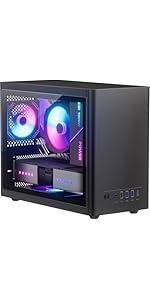
The JOYJOM Micro ATX Case is a sleek, budget-friendly desktop chassis designed for Micro ATX, ITX, and DTX motherboards. It supports multiple storage drives and efficient cooling with up to three fans, while offering convenient front USB 3.0 and audio ports. Crafted from durable 0.8mm SPCC steel with ample ventilation, this compact case balances performance, style, and affordability for the modern professional seeking a clean, versatile PC build.




| ASIN | B0CQXFSWQD |
| Best Sellers Rank | #166 in Computer Cases |
| Brand | JOYJOM |
| Color | Black |
| Customer Reviews | 4.1 4.1 out of 5 stars (267) |
| Date First Available | December 25, 2023 |
| Item Dimensions LxWxH | 10.43 x 6.3 x 13.9 inches |
| Item Weight | 4.84 pounds |
| Item model number | Micro ATX Case |
| Manufacturer | JOYJOM |
| Number of USB 2.0 Ports | 2 |
| Number of USB 3.0 Ports | 1 |
| Product Dimensions | 10.43 x 6.3 x 13.9 inches |
| Series | MATX Case |
J**K
Super Cheap - But still looks nice.
looks great, added 120MM fans and still has room for 2xSata SSDs and and small video card. Zero built in cable management, going to require old school zip tieing and only one side paneled comes off What saved it, and why I gave it five stars is depending on sales, seller, and branding this case can be had between $30-$39 in multiple colors. The only valid competition at that price is open air benches, and noting at this price point in white. Nothing as clean looking in this price range. I have a full build video up.
O**O
Completely adequate
It is a tight squeeze, but for a small home NAS it is a pretty decent case. I had to use double-sided tape to mount some drives, and I ordered magnetic filters for the front of the case. Other than that, it's a pretty cheap solution that will last just as long and will work just as well as any other case.
G**G
Good case for the money
This is a decent case for the price. You need to be aware that you are not getting a high end case with solid structure and options for wire management and storage. This is a perfect case if you are looking for a smaller case. This is my 10th computer build. I used a micro ATX board and like others shared, it barely fits. While I made it work, this would be better with a mini ATX. You can only get one 120mm fan on the front since the motherboard power plug interferes with the second spot (mATX board). The case is thin, but it works. There are no case fans, but those are cheap and easy to install. It was better to put everything in and then fit the fans around it. I installed one 120mm fan on front and one 80mm on the back. The three design issues with this are 1) The power supply mounts on the top and there is no vent for the PSU fan. For that reason, I had to mount with the fan pointing into the case (not ideal). 2) The opposite side cover is not removable which makes it more challenging to mount the CPU cooling unit 3) The mounting points for the motherboard do not extend to the mATX. Therefore the edge closest to the front does not have mounting points. This is not a huge issue but made it harder to securely plug in the motherboard power connector. Overall, very happy with the size and design. For the price, this is a good value.
A**Y
Perfect for my needs
Very affordable case…which was exactly what my wife needed for office work and telehealth. All components fit perfectly and it’s small enough to hide behind her monitor. It would accommodate a GPU if necessary, but not one of the monster gaming devices.
S**N
Low Price Because its Cheaply Made
Not the greatest value. It's reasonably compact and small. You can fit a lot in there if you're clever. Modular PSU is a must. There are no rubber feet, so it slides around extremely easily. It actually slid off my desk that had a very slight slope (like a 1 degree slope...) and because it's so flimsy, it bent the corner of the front of the case, breaking a rivet. It fell maybe 24 inches, was fully built. Right before delivery of the build. Not happy. Since I got it for ~$30, no fans included - and because it's so flimsy, I don't recommend. If it was like 25% more sturdy, I would recommend. Find a different case for $40.
E**M
Very Smart and Simple Build
I can't wait to build this one. It's so simple and wastes no metal anywhere. I've built PCs dating back to the early 90s when they would use enough steel that you could melt it down and probably build a truck! This case is so simple and to the point. I like building gaming PCs once in a while but I also like to build a fast but still efficient machine too. This is going to be just that. I've been seeing reviews giving it less stars because it's not as tough as a safe. It's not supposed to be. I've gone through countless PCs in my life and I've never once relied on the strength of the steel case to hold my car up while I changed a tire or anything like that. I came close once but that's a story for another time. If you need a simple case that will hold your PC together, this is going to be it. I can do cable management but to be honest, not one person has ever come to my house and commented on what the inside of my computer looks like. I've waited but gave up. The only review I read that helped mentioned that if your motherboard's SATA ports point outward instead of straight up, you'll need to get some 90-degree connected SATA cables. Very smart. Thanks to whoever wrote that.
B**N
Don't buy unless you have an ITX board.
I didn't mind the case for the price, but I highly reccomend reading all the 1 star reviews. I didn't do that until I had the case at home. I had a Micro ATX motherboard and it barely fits. It is a pain to assemble and fairly misleading in the pictures because if you put fans in the front of the case, they block the 14 pin power cable for the motherboard. Some reviews said they were able to fit one fan, but with the motherboard I have (B550M Pro-VDH) It won't work with either. Also the front usb cord won't plug in unless you bend the ever living crap out of the cable or motherboard. I decided not to do that, and I think I will just buy a new case. I think this case would work great for an ITX board, but I wouldn't suggest buying it unless you really know what you are doing. This is the 4th build I am doing, and first mircro atx. The case itself seems okay, it doesn't have screw holes for all the MATX board, which I thought was a little misleading. But, I paid 30$ for the thing, what more can you expect.
R**.
Good value for the money when moving components from large old case
I bought this case to transfer internals from an old computer. There was plenty of room for the components and the cpu cooler. The fans are very quiet while running. There are not issues with overheating. It looks nice and sleek sitting on my shelf. It fit easily into the space and wasn't too heavy to move around to get just right. The cost was the main factor when I was looking for a case and this one was very affordable. Great value for the cost.
J**P
Usandola con una placa mATX, todo cabe bastante apretado. Olvídate de usar ventiladores de 25mm de grosor, incluso los de 15mm están apretados. Igual el pcb de los botones y los puertos estorba mucho para meter la placa. Con mucho cuidado y paciencia es posible.
R**2
This is a nice compact case ideally suited for the MATX motherboard. Given the motherboard has a CPU and PSU fan, as well as vents on the case, a case fan is unnecessary for everyday normal use. It comes with mounting screws attached to the cable with elastic bands.
A**7
I like the case. It takes a full size at power supply which is good for ryzen 7 5800x. But it's a hot processor and I first ordered 120mmx25 front fans and they didn't fit so I went with 2 noctuna NF-A12x15 for the front and they fit perfectly but don't squeeze the case on the front picking up the computer puts enough force that the front panel will touch the spinning fans. They could use washers behind them. just be careful to shut it down before you pick it up to move it and you'll be fine. The cpu cooler was 7/10 hard to install I first went with a smaller noctuna model number in the photos but replaced it with NH-C14S which is the absolute largest intel/am4/am5 cooler I could install. While tucking the wires to the side I can still add ram and replace the ssd with the cooler installed. I used a micro screwdriver to plug in the cpu fan because it was such a tight spot to get into. I used an extention first from the 120mm fans to help because the large cpu fan barely reached my motherboard plugin. I used a splitter for the two front 120mmx15mm noctuna fans and I put an 80mmx25mm noctuna fan on the back. The temps were at 70 and 80 degrees just running unraid and a single vm with smaller cpu cooler the large cooler keeps idle at 49 degrees c and 60-65 under heavy load running benchmarks which is just fine. This was a quick build but I had to experiment with which fans all fit the fans cost more than the box itself I spent $200 on cooling fans. If I did it again I'd pick a larger box that comes with fans already. But now that it's already together and running my surveillance system I'm glad it has a small footprint. Enjoy the photos they show which components fit to maximize cooling. I figured 550 was plenty for power supply 105watts for the 5800x and 100w gtx1030 was all I needed for a gpu to run code project ai and agent dvr with ai object detection. I picked up a 2 tb nvme xpg gammix I had laying around and the cpu came from my other server I recently on Amazon purchased ryzen 9 5950x. I wish I could afford to buy another it runs at 35 degrees when the 5800x runs hotter 50 degrees. overall the case is good it can hold all the cooling power u need with special fans and it's small takes up little room and has the basic no frills look I wanted. It holds 4 ssd 2.5inch and no 3.5 if you put the front fans in which you need for temps. So undecided if I want to order the corsair case and tear this down again and it has 2 3.5 bays plus 2.5 ssd storage and cable management. This case has poor cable management. Better off if I had gotten a modular power supply. But it was a bit over budget. You decide.
T**T
This case lives up to its reputation for being cramped, so be prepared for a challenging build process. Ensure all your RAM is properly seated before installing anything else, as accessing components becomes significantly harder once everything is in place. My build includes three HDDs—two mounted at the front and one at the bottom. While I managed some basic cable management by routing harnesses between the bottom front drive and the case, it’s far from ideal. The case lacks sufficient mounting points for a micro-ATX motherboard, which caused noticeable flexing when connecting SATA cables. Installing RAM after mounting the motherboard also felt precarious, adding to the sense of compromise in the design. Mounting the bottom HDD was particularly difficult. The drive sits flush against the case floor, leaving no clearance for my PSU’s 90° SATA power connectors. After much trial and error, I found a workaround using three standoffs as spacers to raise the drive. Without this adjustment, connecting power would have been almost impossible. Additionally, the openings for PCIe expansion cards, such as GPUs, are poorly aligned with the motherboard slots. This misalignment makes installation trickier than necessary and adds to the overall frustrations of working with this case. The case also amplifies noise from my enterprise-grade HDD, especially when placed on an MDF desk, due to the rigid mounting. Despite these issues, the case has its positives. It’s solidly built and surprisingly sturdy, with a square and precise frame—qualities not always found in cases at this price point. However, the lack of space for cable management, poor airflow, and alignment issues make it less suited for those prioritizing ease of assembly and cooling efficiency.
R**N
Bought this to downsize from a CM Q300. Wanted my good PC in the living room. This thing is small, literally as wide as an mATX mobo, which can make it a bit tricky. Plan your build and think it through. There are only enough standoffs for an ITX board so you'll need a bit of extra support at the front if using mATX. Run your front panel wires under the mobo, tape them down. Otherwise straightforward build, but you'll have to compromise on fans and GPU. It says up to 250mm will fit but that is optimistic. My RX7600 is 235mm, and it fits with a standard width 120mm fan. They almost touch. Had to shave one corner of 120mm fan off to fit beside 24pin on mobo. For the money very happy with it.
Trustpilot
Hace 2 días
Hace 1 mes