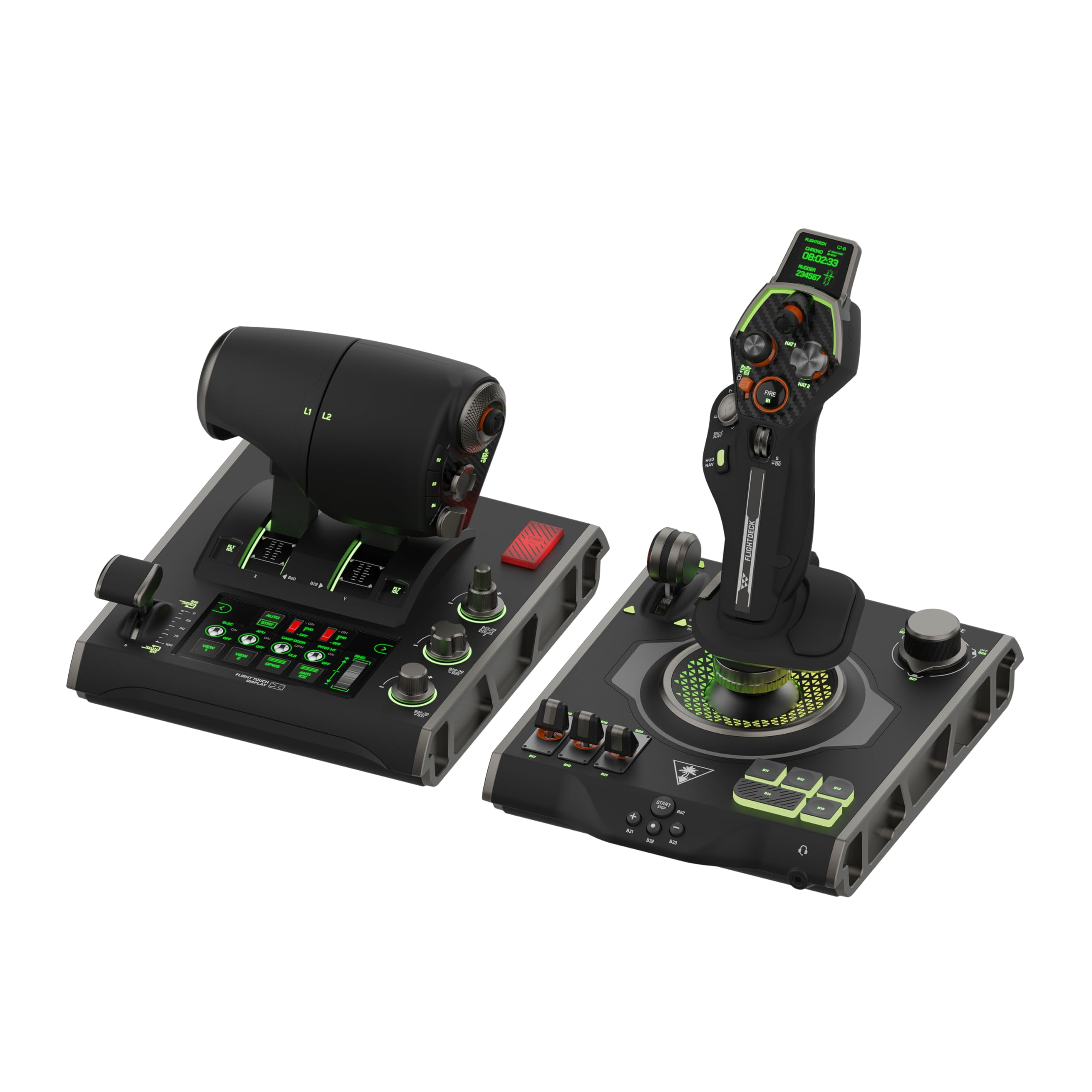
✈️ Elevate your flight sim game with the ultimate HOTAS cockpit command center!
The Turtle Beach VelocityOne Flightdeck is a premium HOTAS system designed for Windows 10 & 11, featuring 139 programmable controls, a groundbreaking Flight Touch Display, and precision hall-effect sensors. Its modular stick and throttle offer ergonomic adjustability and extensive customization via the Flight Hangar app, delivering immersive audio-visual enhancements and unmatched control fidelity for serious flight and space combat simulation enthusiasts.


| ASIN | B0CPQ7RF6Z |
| Best Sellers Rank | #649 in Video Games ( See Top 100 in Video Games ) #2 in PC Game Flight Controls |
| Customer Reviews | 4.0 4.0 out of 5 stars (2,161) |
| Date First Available | December 14, 2023 |
| Item Weight | 9.41 pounds |
| Item model number | TBS-0724-05 |
| Language | English |
| Manufacturer | Turtle Beach |
| Product Dimensions | 6.93 x 20.63 x 10.04 inches; 9.41 Pounds |
| Release date | February 13, 2024 |
| Type of item | Video Game |
A**X
Amazing HOTAS for the price
(Bought on sale) I have owned this HOTAS for a few weeks at this point with regular use in combat flight simulators (DCS World, War Thunder), and I can confidently say that this is an amazing HOTAS system for the money, Turtlebeach really outdone themselves with this product. The build quality is amazing and all the buttons and switches function perfectly. However, and this was stated quite a lot before me- The three switch covers on the Joystick base feel loose and wobble on the metal switch arm itself- However for me it is not an issue at all. _Stick_ Pros: - Stick grip is very ergonomic and fits most hand sizes with the sliding feature. - A lot of programmable buttons, switches, HAT switches, joysticks and rotary switches. - Build quality is amazing for the price. - Very satisfying buttons and switches. - Very responsive gimbal. Cons: - Pretty useless screen ontop of the stick - "Mouse" feature on the pickle button is very rough and unresponsive, as well as also being useless as it is right now with how choppy it is. _Throttle_ Pros: - Very accurate throttle readings. - Extremely smooth throttle sliding. - "Fire" button extremely satisfying to press (personal opinion) - Many useful buttons, HAT switches, 3 position switches and joysticks all over the throttle grip. - Split throttle feature, can prove useful in certain twin-engine aircraft. - Useful programmable screen (Can make your own switch panel using keyboard bindings in the software) that makes use of digital switches, dials and buttons. - Satisfying knobs and dials near the throttle grip Cons: - Never found a use for the "flap" lever as no game I tried recognizes the lever moving (as an axis), instead recognizing the switch clicks on the bottom and top of the travel - Touch screen is pretty low framerate and can wash out at certain angles. Overall, I really recommend buying this HOTAS system as it is a great product overall and you get an amazing system without breaking the bank like some of the more higher end HOTAS out there by Thrustmaster, Winwing, Etc. And you get a lot for what you pay which is always a big plus!. and I really recommend buying the Turtlebeach Rudder pedals along with this HOTAS system for an immersive flying experience!.
A**R
EXCELLENT. BUY IT.
Amazing. Switched my thrustmaster 16000 and rudimentary throttle quadrant for this to play Warthunder sim in VR and DCS and so far all I’ve played is Warthunder, but it works like a charm. Haven’t had this much fun flying in a long time, you have to map out each button for Warthunder and DCS but anyone who plays will know this already. The only complaint I have is that one of the 6-8 hat buttons doesn’t have a binding for if you click down and only works directionally. Would be an issue if there weren’t FIVE OTHER hat switches that do let you bind clicking it. Buy it you won’t be disappointed.
K**O
You need to read this. LCD Pixelated Day 2 MASSIVE POWER PROBLEM
I ignored the negative reviews on this stick. Day one I thought it was amazing. The throttle felt great, the stick was awesome, it had so many customizable issues!!!!!! The materials felt amazing. I was really excited. I am not a picky person with electronics nor am I rough on them. I was locing every bit of the velocity one flight deck. I returned an X56 for throttle issues within a week. I am not a picky person but when the trittle sticks at the detents every single time it's moved after 20 hours of use it's going to keep doing it. The stick also started creaking. It felt like it was going to break. I was ignoring bad reviews there too. So 2 days in and maybe 8 hours total playtime the LCD touch display pixelated. I unplugged it and plugged it back in, tried changing ports, reinstalled the profile, nothing fixed it. I noticed during this that the power slowly cut out to my Stealth 700 dongle in the same USB 3.0 hub (powered) on the front of my Alienware R16. This throttle nearly burned out my hub. I let things cool and my dongle worked again but the port the throttle was plugged into doesn't even wanna enable my simple thrustmaster hotas one, though the system detects it and "dings". I'm now worried that port is fried and will need repaired as it doesn't seem to be working properly. Edit: Tested port again in the a.m. and everything is working fine. It di not fry my port nor did the port do this to the throttle. I have put many devices in that same port and this is the only one that developed an issue. I bought the assurion protection plan but I am in no way accepting a replacement. I am not endangering my PC again. This will be a full refund return and I will be emailing Turtle beach about this as well. DO NOT IGNORE THE BAD REVIEWS. I did it twice and I am regretting it. I also don't know where I'm going from here. There's nothing really left in the $200 to $500 price range for a full hotas with more than 12 buttons. Virpil, Thrustmaster (high end highly reviewed stuff not the T16000M), VKB and Honeycomb are all going to be at least $700 to over $1,000 to get something similar.
E**R
This product is not for Xbox players
FOR ANYONE LOOKING TO GET THIS FOR XBOX: Fairly nice feeling build quality but still 90% plastic. The flight stick is EXTREMELY stiff and did not come calibrated correctly as I had drift. The buttons are satisfying and the screen was nice and clear. This would be a nice simple starter stick ON PC. On Xbox this is pretty much useless unless all you play is Microsoft Flight Sim. The “compatibility mode” meant for use with games like War Thunder have extremely limited functionality and are very unsatisfying. Please do not get this for Xbox you will waste time and money.
G**Y
A Very Comfortable Joystick
So, I started playing War Thunder and I was using the Logitech 3D Extreme and after some time playing in the simulator mode, I realized I wanted to upgrade to a more quality joystick that had more features (buttons) that would suit my game play. I saw that Turtle Beach offered the Velocity One joystick listed on Amazon and after reading a few reviews and watching a couple YouTube videos I decided to go ahead and invest in one since I already owned the Turtle Beach gaming headset and ordered the joystick through Amazon. Now that I have been using it for the past three weeks, I can give an honest review. I love it. There are so many ways you can configure this stick and it comes with more than just extra buttons... it's got two throttles and a middle mouse wheel along with a touch pad to control the mouse pointer. It is unique in that you can adjust, calibrate, modify and do everything right on the stick that has a small navigation screen you use to adjust your settings. I could even adjust the audio and mic settings on the Turtle Beach gaming headphones right on the stick which is so cool. You can even change the button lights right on the stick for heaven's sake! Since I am a PC player, I cannot speak to how it performs on Xbox, but it does have a compatibility feature that enables a player to use it on an Xbox console. You just have to go to their website and download and install the new firmware version. You should do that whether you are a PC or console player right off the bat. It was painless for me. There is one thing that I must admit that I don't use on the stick and that is the mouse pointer pad. It is so sensitive that even the slightest touch will activate the mouse pointer when you don't want or have the need for it, so I turn that feature off. But it is really unique that it has that feature. One other thing I experienced when I first started using it is that it may seem a little stiff at first, but once you use it for a few hours it seems to get "broken in" and now it is very comfortable for me, I think that's due to the heavy spring that is inside. It can be configured for right or left-handed players and the palm rest is height adjustable in case you have large or small hands. I play a lot of War Thunder and this joystick has performed perfectly for me. I honestly feel that I really got my money's worth, and it is absolutely an upgrade from my Logitech's 3D Extreme stick. A solid 5 stars from me.
L**Z
Not Bad, Not Great
1. it was missing the screws to secure it. 2. If you're not going to secure it, it kind of sucks because when you move the joystick, the base is not heavy enough to keep it down due to the tension of the stick. 3. Touchpad is pretty much a worthless gimmick. I'd rather they didn't have it then having it the way it works (which doesn't really work). Regardless of the sensitivity settings, it never worked right for me. Very difficult to use, not accurate, pointless. Aside from those two negative things, the Joystick itself works. I used it with Microsoft's flight simulator 2020. Looks nice, quality feels good (although all plastic) but very sturdy. Lights look nice, functionality overall is good as well. I liked the multiple buttons which allow for a good amount of mapping to your Joystick so that you don't have to be moving your hands a lot back and forth between Joystick, keyboard and mouse. Due to its limited use (having to secure it which I don't want) and practicality, based on it's price I don't think it's worth it and I'm returning it.
H**.
Flight controllers
I purchased the item used and it was advertised as in mint condition. The package for the controllers was wet and dried so the box was swollen and contorted. The controllers were placed back into the box but not as it was originally packaged which caused a button on the flight stick to get broken off. The broken button was missing. I did notify Amazon and the were going to refund me the purchase however I wanted to keep the flight controllers so they placed me in contact with Turtle Beach. Turtle Beach responded very quickly and sent me a new flight stick right away. Turtle Beach customer support and service was top notch. I highly recommend any product from Turtle Beach because the quality is in every component including the support and service.
G**U
Excellent flight stick!
I’m a real pilot and this is an excellent flight stick. Of course nothing is like the real thing. I had a custom home built simulator for years and sold it after I started flying approximately 18 hours a week for my job. I decided years later to jump back in with an Xbox Series X since it’s somewhat portable and powerful for the price point, allowing me to use it in my motorhome. I also didn’t want to haul around a full yoke and rudder pedals. I initially bought the Thrustmaster stick and it was horrible. This has a much better build quality! The dual hat switches at your thumb are excellent, the two levers are perfect for throttle and gear. The second can easily be remapped for mixture, etc. It also features many more programmable buttons, but the out of the box preprogrammed set-up for Xbox is quite good. For something easily portable, extremely functional and easy to learn, I highly recommend the Turtle Beach - Velocity One Flight Stick. If you’re seriously using these tools to learn to fly for a living, I’d recommend the Turtle Beach Yoke, Throttle Quadrant and Rudder Pedals for a more realistic transition. I’m definitely impressed by this product. I’m also blown away by how awesome MSFS is on an Xbox Series X. I last used Flight Sim X on a PC, and this was a huge improvement. Happy Flying.
Trustpilot
Hace 1 mes
Hace 3 días