We remain fully operational. Our teams are working around the clock to ensure your deliveries continue safely.

Descargar la aplicación


Servicios al cliente
Sobre nosotros
Copyright © 2025 Desertcart Holdings Limited
Descargar la aplicación


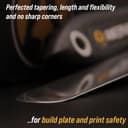


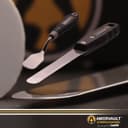

🚀 Elevate Your 3D Printing Game with Tools That Mean Business
The Premium 3D Print Removal Tool Kit by REPTOR features hardened stainless steel blades with a beveled edge and solid riveted wood and rubber handles, designed to safely and efficiently remove 3D prints without damaging the build plate. This enhanced set includes a flexible spatula and a sturdy knife, combining durability, ergonomic comfort, and precision to streamline your 3D printing workflow and protect your equipment.
| ASIN | B075SLTY8B |
| Best Sellers Rank | #10,952 in Industrial & Scientific ( See Top 100 in Industrial & Scientific ) #163 in 3D Printer Accessories |
| Blade Material | Stainless Steel |
| Brand Name | AMERVAULT |
| Customer Reviews | 4.7 4.7 out of 5 stars (2,404) |
| Handle Material | Wood |
| Item Dimensions L x W | 10.63"L x 3.15"W |
| Manufacturer | REPTOR |
| Manufacturer Part Number | 1 |
| Material Type | Stainless Steel |
| Recommended Uses For Product | 3D print removal and handling |
A**.
Excellent Set
Recently got a resin 3D printer and used the tool that came with it to remove prints. It worked OK some of the time, but it ended up being a pain to use and I ended up scratching the bed on some of the more difficult prints. Looked around and got these to try. Excellent move on my part! These work incredibly well. They slide easily under the base layer and I can either pop the print off, or just slide the tool around a bit and the print falls off. This is definitely a tool to have. The tool that came with the printer is much thicker and wider, a putty knife in essence. These are thinner and easier to use. Since I have started using these, I have added no new scratches to my bed. If you have a resin printer, you should take a good look at these. I do not think you will be disappointed.
T**A
Designed for Makers, 100x better than the cheap knock-offs (Prints Slide off like butter, see video)
Conclusion up front: This 3d print removal kit is nothing like the ones that come with printers, or that you buy at the local tool store. I purchased this based on a post somewhere in desperation and it will changed our entire resin printing workflow (seriously, a properly designed tool can make all the difference.) I rarely video review things, in this case I am in hopes other people get the chance to experience what I did. Your supports slide off like someone coated the build plate in butter. Well worth the price to try it for yourself (see the video for technique/examples). The liquid creates a vacuum seal (which is why it's so hard to remove them), this disrupts that in an ingenious way, making it so much easier to get stubborn things off. You can tell this was designed by someone who has the same frustrations the rest of us did (You end up beating your build plate into a state of gouges and scratches trying to remove supports). The clever rounded bevel design combined with a strong metal alloy choice give you an experience one of those knock off's from China simply can't provide. Instructions: When removing supports that touch the build plate do as follows: 1. Take the longer rounded scraper and ensure the bevel (it looks like a slant) is facing up. 2. Gently slide it under the support, allowing it to break the liquid suction that is holding it down. 3. Once you get under it you can just slide the entire thing off in one steady motion. My build plate has some serious battle scars, it got to the point I despised resin printing (it took so long to remove the supports, they would break and require so much work to clean out). This tool set has changed the entire workflow at our small company. We are losing less items to accidental damage, turning around prints faster for production, etc. I did have an occasion to ask a few after sales support questions, the vendor was amazing, you can tell he is passionate about this business and that he himself is a maker. The person who invented this has sat in our shoes, struggled our struggles. That's why I believe rather than buying cheap imitations (that simply don't work, you can't copy this design without both the precision manufacturing and the proper materials.) Knock-offs break way too quickly (then leave scrapes all over your prints/bed.)
D**D
Must-Have Tools for Anyone with a Resin Printer
These scrapers are some of the most useful tools I've ever purchased for 3D Printing. I use them for removing prints from a Resin printer (Elegoo Saturn 4 Pro), and they do the job flawlessly. They are a huge upgrade over the scraper that came with the printer, which was difficult to use because of its sharp corners, thickness, and flimsy blade. These Amervault tools are great for several reasons: - They are designed with rounded tips, so they are far less likely to scratch your build plate. - They are narrow, so you are able to get them underneath individual smaller prints with more precision. - The tips are tapered, sort of like a knife edge (but they're not sharp!), which makes it easier to slide them between your prints and the build plate. - The metal blades are flexible enough to use at different angles, but sturdy enough that they don't bend when you're removing prints. - They are easy to clean (a quick spritz of IPA and a wipe-down with a towel, and you're done in seconds!) Overall, this 2-piece kit is well-built, does exactly what it's supposed to do, and is excellent value. After using them regularly for nearly a year, I have virtually no complaints. The only issue I've experienced is that some resin residue did get around the larger tool's handle, which eventually caused the handle to crack and split open after the resin cured-- but that's mainly my fault for not keeping things as clean as I should, and the problem was easily solved by wrapping the handle in some duct tape.
J**S
Highly recommended
Very nice tools, perform as described making removing prints and do it well.
A**R
The best tool for removing 3D prints from plate.
I’ve tried sll of them from sharp razors, putty knives, plastic scrapers. This set is by far the best tool. The long flexible blade has a sharp tip to get under prints and allows you to continue through to release the printout. The shorter angles one is great to get leverage to gently lift up the print. These are now the only two tools I use. Highly recommend spending the extra. Also the build quality is great with a nice solid handle.
V**E
Excellent quality!
These tools are very sturdy and well made. Comparing them to the standard 2" spatula that is provided with most 3d printers, these are way better! First off, they are way thinner. I used my micrometer and these tools are half the thickness of the standard 2" spatula. The edges of these are even half the thickness of the standard 2" spatula. With the spatula that was included with my 3d printer, I needed to use way more force to get it under the prints than with these. The tapered edge on the both of them are thin enough that they easily go under the prints with very little force. The long knife works great to push completely under the print and rotate around the edges to help with releasing. I use glue on my bed and these tools make the removal of larger prints 10x easier. I haven't printed out their stl file for the holder yet, but that's next on my list.
M**K
J'ai passé commande de ces spatules après avoir malheureusement cassé la mienne qui était fournie avec mon imprimante CR6-SE. Du coup, j'en suis extrêmement satisfait, d'une part car elles sont bien meilleures et plus fines que celle que j'avais, et d'autre part, elles ont un rapport qualité prix quasi imbattable ! Dans le colis, il est fourni : - une longue spatule qu'on peut utiliser comme grattoir. La lame est fine et c'est plutôt facile de passer sous un raft par exemple. - une spatule un peu plus courte, qui permet de passer sous l'impression 3d et de donner un mouvement de levier un plus aisément qu'avec la longue spatule. La lame est également assez fine sur cette spatule. Remarque : les 2 spatules sont solides, fines et agréables en main grâce à leurs manches style "grip". Au final, je recommande bien évidemment ces 2 spatules qui sont des outils incontournables pour extraire aisément vos impressions 3d.
T**A
After using many tools over the years this is my favorite. It is just sharp enough to jam in between the print and the print bed, but not sharp enough to really scratch the print surface. More tools i have bought proclaimed this, but they were all too dull for the job. Still have to see what the long term quality is, but so far it all seems to be of good quality.
F**F
La recomiendo 100% para los aficionados a la impresion en 3d, ambas herramientas estan diseñadas de forma esquisita, se introducen facilmente entre la pieza y el plato de impresion ya que la punta es muy delgada, pero luego se va haciendo más gruesa para que sin movimientos forzados la pieza se despegue, ademas, ambas herramientas estan pensadas para no tener que introducirlas con ángulos forzados... una poque es muy larga y el mango que es mas grueso queda fuera del plato, y la otra por tener forma de L, asi que las usas paralelamente al plato sin dañarlo.
K**G
High-quality tools that make print removal with both SLA and FDM almost-trivial.
C**D
Great set of tools - I use a resin printer so you do need to pry prints off the plate and the larger removal tool, worked great! Some harder resin prints came off the plate nice and easy, due to being nice and thin with very little force needed! It left no scratches or marks on the plate! Would recommend!!
Trustpilot
Hace 1 día
Hace 1 mes