We remain fully operational. Our teams are working around the clock to ensure your deliveries continue safely.

Descargar la aplicación


Servicios al cliente
Sobre nosotros
Copyright © 2025 Desertcart Holdings Limited
Descargar la aplicación


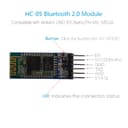


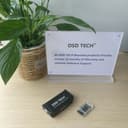
🚀 Elevate Your Projects with Seamless Bluetooth Connectivity!
The DSD TECH HC-05 Bluetooth Serial Pass-through Module is a versatile wireless communication tool designed for Arduino enthusiasts. It features dual master/slave functionality, operates within a voltage range of 3.6V to 6V, and utilizes the reliable CSR BC417 chip for stable connections. With user-friendly AT command setup, this module is perfect for both beginners and seasoned developers looking to enhance their projects.
| ASIN | B01G9KSAF6 |
| Brand Name | DSD TECH |
| Color | Black, Green, Silver |
| Customer Reviews | 4.2 4.2 out of 5 stars (836) |
| Data Link Protocol | Bluetooth |
| Data Transfer Rate | 1382400 Bits Per Second |
| Hardware Interface | Bluetooth |
| Item Weight | 0.02 Pounds |
| Manufacturer | DSD TECH |
| Manufacturer Part Number | sh-hc-05-us |
| Model Number | HC-05 |
M**N
Good delivery, working product great tech support
Hi, I bought two of these to allow me to communicate between 2 arduinos. I had googled a little and it seemed simple enough from the examples I had seen, but once I got the chips I discovered none of the examples I found on-line worked. That's where the support desk from DSD came in, these guys were great, I explained what I wanted to do and they helped me every step of the way, I'm not sure I would have gotten them working without the support desk's help. So if anyone wants to send data between two arduinos using these blue tooth chips here are the steps I followed Step 1 To wire up the blue tooth to the arduinos follow the instructions on the following site, I also found arduino libraries help which controlled the serial communication ( I could not get the normal Tx Rx pins to work) http://www.martyncurrey.com/arduino-to-arduino-by-bluetooth/ However the bluetooth commands listed on this site did not work for me, that is where DSD came to my rescue. Step 2 To enter the AT command mode (where you define setting on the chip) press the button on the right hand side of the chip just above the pin as you are powering the chip on, if the chip enters command mode the led will flash slowly. Step 3 Once in command mode select one chip to be the slave and one to be master AT+ROLE=0 (Slave mode) AT+ROLE=1 (Master mode) Step 4 Set names for both chips AT+NAME= name AT+NAME? should give you the name back but didn't work for me, so instead I confirmed the name using an android phone ( note devices in master mode will not show up in a scan) Step 5 Set password The default is 1234 and you could leave it at that if you really want but probably better to change it AT+PSWD=password AT+PSWD? will return the password Make sure to set the same password on both devices Step 6 find device address AT+ADDR? Record the value for both master and slave Step 7 on both devices do the following AT+CMODE=0 and on the master AT+BIND = slave address on the slave AT+BIND = master address Step 8 both cycle both devices do not press the button to put them in command mode They should now connect to each other the led will start to flash rapidly this is them in pairing mode and once they pair the led will do a double flash once every couple of seconds. On final thing I had to set the BTserial on the arduinos to 38400 not 9600. So that's it, the delivery time was good, the chips work and the helpdesk coudn't have been better, I would buy more stuff from DSD.
D**R
Good quality
This is the third purchase from DSD Tech and have all been reliable and good build quality. The very excellent product setup and description from Mel Cushnahan was very helpful. The only thing I would add is I spent hours trying to get 2 HC-05's to communicate together. I eventually found that some websites say connect the EN pin to 3.3v, which I had done. After reading the data sheet I found that this puts the HC-05 into AT mode and is only required if the module does not have a AT mode button, which the DSD Tech has, so leave the EN pin unconnected. Apart from that, if you follow Mel Cushnahan instructions, when you cycle the power both HC-0's blink rapid whilst pairing and then a double blink every few seconds once paired.
A**H
Nice board
A nice little board, once it is working, It seems to have an impressive range. I tested mine in a factory environment using an Arduino sending & receiving from a Dell laptop. I got good transmission & reception at 20m at 9600 Baud. At about 25m it starts to stutter. Physically, it's about 50mm x 15mm. Connecting it up, you need the power pins & the Rx & Tx pins. The State pins seems to indicate that it has paired. I didn't give this 5 stars because of the lack of documentation. I had to rummage around on the internet to find out things like passcodes (1234). There is a lot of information on the internet for this board & clearly, it is quite a clever little widget. I'm about to buy a couple more boards for another little project so I think that says a lot about the board
C**N
Good quality well packaged board
Came very well packaged. Board came with a plastic cover to protect it from dust and what not. Tested it today finally and glad to say it worked perfectly with the arduino and I was able to connect it to my phone.
T**M
AT Mode doesn't work.
I managed to get AT Mode to work once, but can't seem to get back onto it again.
A**I
Good product.
Good quality. I previously bought a set of six from another seller which although I was able to configure with different AT commands, would not transmit data. The HC-05 from DSD Tech was easy to configure and connection/pairing was instant and superb. It even came with an instructional leaflet. Each of the modules is in a protective plastic jacket. Nice product.
A**R
Worked perfectly!
Ordered two of these to replace some faulty ones I got from Ebay. These worked perfectly and they even came with a clear hardcase for each chip rather than the heatshrink type commonly found on these chips.
R**H
Worked Perfectly. This board is a Perfect Companion to the Arduino Family of Micro Processors, and Easily Connects. Allowing one to use their Smartphone to Communicate and Control their Processor of choice. I had No Difficulty in getting the device to work, and although you can change the "Default" Settings, I found that they were suitable for my projects. I am using this particular unit with an Arduino Nano in an "Otto" Robot that I have assembled. And I am using my Cellphone to send commands to My Otto Robot, that really increased the function. The HC-06 Device was Delivered in an AntiStatic Bag and was carefully packaged for shipping. The unit arrived in Brand New Condition without any damage or bent Pins. I was more than pleasantly surprised at the Quality of the Product and the build of the Circuit Board and Attachment of the Chips. A few Connections and the Board Powered up with the Indicating LED's giving firm indication of Operation. DSD Tech did a fine job in delivery and shipping. And the Product was "As" Described. I will Buy Again from them.
E**Z
Gracias, excelente servicio
L**N
Funciona según las especificaciones. Se programa con facilidad. Lo utilizo hace años sin problemas.
O**R
Cela va faire 3 fois que je tente d'acheter des modules sur des sites chinois qui commercialisent ce genre de module pour 2 à 3 fois moins cher. A chaque fois les modules ne fonctionnent pas => C'est la poubelle et 1 mois d'attente pour rien. J'ai tout essayé HM-10, HC-05, HC-06... Rien ne marche chez eux. Là je suis vraiment ravis. Les modules fonctionnent à merveille. Un peu cher, certes. Mais ils fonctionnent vraiment bien et le petit étui rigide est un vrai plus.
M**O
Ottimo dispositivo Bluetooth per Arduino in contenitore plastificato trasparente. Facile da utilizzare e da configurare. Funziona sia come master che come slave ( HC-05 ).
Trustpilot
Hace 3 semanas
Hace 3 semanas