Some deliveries may take a little longer than usual due to regional shipping conditions.

Descargar la aplicación


Servicios al cliente
Sobre nosotros
Copyright © 2025 Desertcart Holdings Limited
Descargar la aplicación
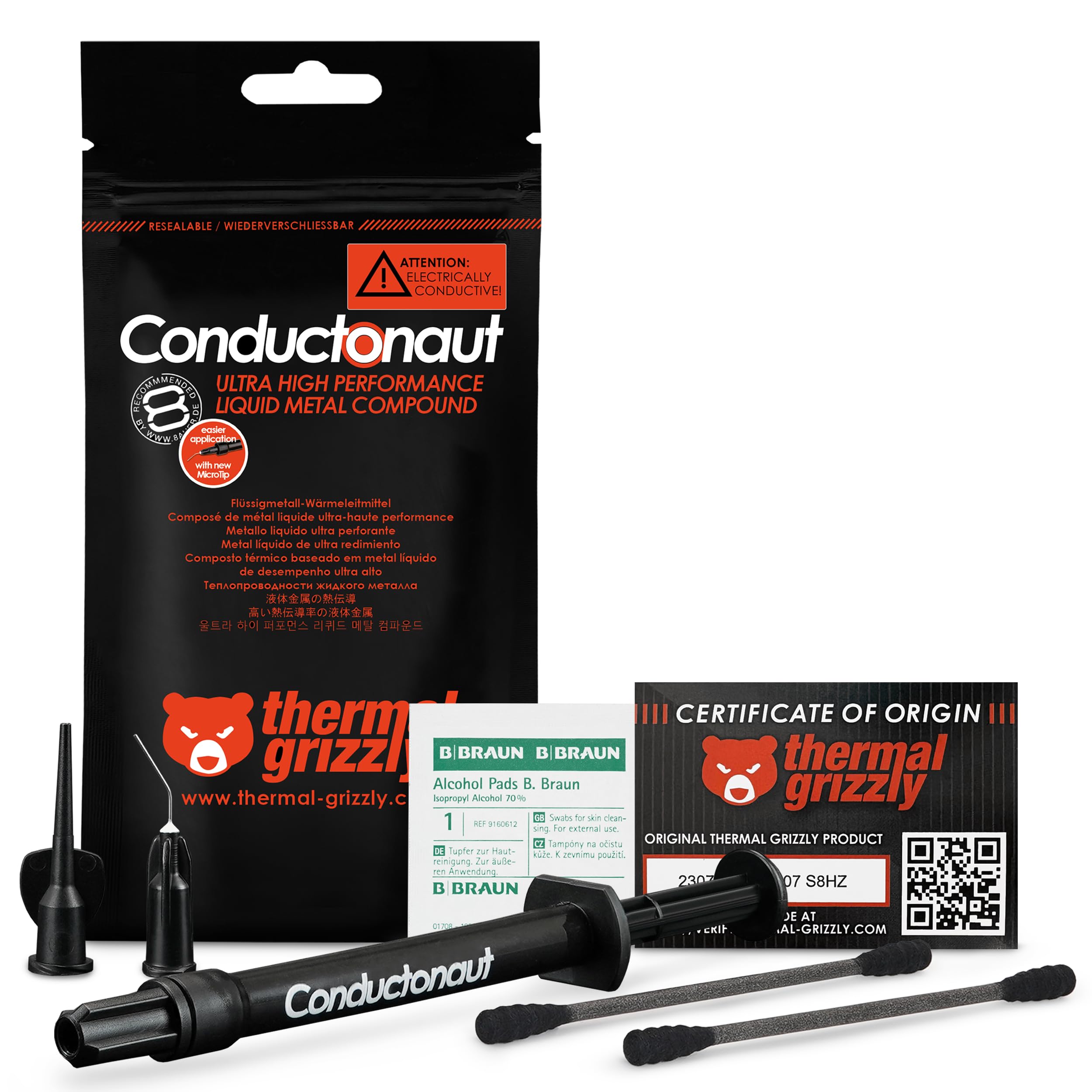
🔥 Cool like a pro, perform like a legend.
Thermal Grizzly Conductonaut is a 5-gram liquid metal thermal paste designed for maximum heat transfer efficiency. Trusted by overclockers and hardware enthusiasts, it dramatically lowers CPU and GPU temperatures—often by 15-20°C—enabling safer, higher performance. Compatible with a wide range of processors and gaming consoles, this premium thermal compound is the ultimate upgrade for serious cooling and overclocking projects.


| ASIN | B01EO2V332 |
| Are Batteries Included | No |
| Best Sellers Rank | 119,681 in Computers & Accessories ( See Top 100 in Computers & Accessories ) 13,256 in Components & Replacement Parts |
| Brand | Thermal Grizzly |
| Colour | Black |
| Computer Memory Type | DIMM |
| Customer Reviews | 4.7 4.7 out of 5 stars (313) |
| Date First Available | 24 April 2016 |
| Guaranteed software updates until | unknown |
| Item Weight | 5 g |
| Item model number | TG-C-005-R-2 |
| Manufacturer | Thermal Grizzly |
| Product Dimensions | 10 x 10 x 10 cm; 5 g |
| Series | Conductonaut |
D**N
Brings down the temperatures massively!
I bought a 5g tube of liquid metal so I can start delidding multiple CPUs as a hobby. I have never seen such massive improvements on temperatures until I have used this! Running an i7-4790k @ 1.3V was registering 81°C, whilst the same settings, although delidded, and with this applied, the temperatures dropped to 62°C! Stock temperatures have also dropped around 17°C! A more recent project, delidding an i3-8350k, showcased a drop of 13°C on stock clocks - there's quite a bit of difference as the i3's die is smaller than the Haswell Refresh i7s. If you are considering on delidding a processor, this is probably the best material you can get! Best results on processors with larger die area!
M**N
Best temps in game and burn tesr
This stuff is the bolkocks like my temps droppes 20c using liquid metal and my cpu is a i7 8700k runing at 4.8ghz volts 1.36v Standard intel burn test the first 4 passes temps onky hit 49c max and at 1.325v i7 8700k on reached max temp of 44c using intel burn test so adjusting vokts up and down is a must and doom 2016 in temps 47c max at 4.8ghz Vokts at 1.36v so awesome motherboard aorus gaming 7 z370 and belive me its good
C**I
this liquid metal it's very good, but please be carefull when you apply this ...
this liquid metal it's very good, but please be carefull when you apply this thing, when i tried to get some liquid out it suddenly splashed a high amount, so i had to ''succ'' it back in, i also delided my cpu with this, it dropped almost 30*C, a good product overall. IMPORTANT: dont use with aluminium heat sinks/ coolers
P**R
very good stuff
the 8700k runs hot but after delidding with this stuff it has dropped to around 60c from 93c did used it between the heatsink and the cpu just to make sure i had good thermal contact. basically if you want to drop your temps big time use this stuff.
B**N
Great Thermal Performance
You need to be really careful when applying this Do not apply too much pressure to the plunger and be very careful and mindful of using this around other components the slightest drop could connect with small traces on mainboard
V**S
Amazing!
The best stuff ever. BE CAREFUL when applying, use nail varnish on capacitors nearby if applying near to the circuits :D
A**E
Alles gut
J**S
CAUTION: This is the first time I have used liquid metal thermal grease. Using this "liquid metal" is scary, because it behaves as if it were both liquid and solid. It can fly 1m across the room with just a gentle flick of the finger. This stuff comes with 2 black Q-Tips and they work great...but so do regular Q-Tips so just use what you have. DO NOT USE DRY PAPER TOWEL to pick it up - it can disperse into smaller balls of the 'liquid metal' around the surface its touching, making a larger mess or stain. Always have paper towel damp or soaked with 70% Isopropyl alcohol and cut it into small sizes. You will understand why the advice is so specific because this stuff can permenantly stain your furniture if your unaware of its physical properties as you apply it. Even opening the tube the first time it can squirt out so pay attention to where you point the end or you will regret every time you press down too hard on the plunger. For the people who would care about how to properly handle this stuff I cannot stress enough how much this liquid metal stuff can brick your hardware if the material somehow finds its way onto 2x resistors (1x resistor you're probably OK), which surround a CPU/GPU die, you can short the two resistors and you might have problems getting into the OS after that. REVIEW: I have a Zotac GTX 1080 AMP! Edition with a RAIJINTEK Morpheus II and 2x Noctua NF-P12 120mm fans. When I first took the graphics card apart I noticed that the most of the the stock thermal paste is on the sides of the GPU die, touching the resistors and not the the die itself. The application that was most likely done by a human employee was terrible! I really looked forward to this because even with an aftermarket cooler, my GPU temps would throttle at 82c @ stock clocks and I could not maintain 99% GPU utilization and often going as low as 80%. Thermal Grizzly Conductonaut is friggin amazing if you apply a perfect thin layer on both the component and the VGA cooler plate. I have done 3 attempts to experiment to figure out how much is too much and how little is too little. I finally managed to get the peak performance outta this thing. my temps went from 82c to 67c with overclocking. Think about it like this - apply a small pinhead size drop and move it around a bit, then put more, do some more painting and keep doing this until you have the thinnest layer you can possibly see and there shouldn't be any "puddle" texture visible, go for a 'wet floor' appearance. Regardless of how much or little the tempurature difference is, as long as the card isn't throttling - your good! A little more information on the temps - Its summer time in Canada right now, so it can be really humid some days. The ambient room temp during these tests was 27c which is too uncomfortable for me. My PC is in my closet, to minimize noise but temps go up as much as +3c. After 3 consecutive attempts, I learned that too much is really bad, but too little can be as well. There truly is a perfect amount per surface area. My current maximum temp is 72c (with OC) with 26.5c ambient temp of the room (small beroom). Taking into consideration that my PC's environment is not ideal, I cannot believe that this liquid metal stuff can drop temps this much. These results were conducted using 2x Noctua NF-P12 120mm fans @ 100% RPM: Stock Core Clock: 1680MHz Stock Core Clock (Thermal Grizzly): 1911MHz OC Core: 2025MHz - it peaked at 2076MHz! Stock Memory Clock: 5006MHz OC Memory Clock: 5562MHz I'm using my 8700K stock (no delid + MX-12 thermal paste) with 1x 140mm fan and a 120m stock case fan beside the CPU and 1x 140mm on the other side of the case. I'm using a Fractal Define C with 2x SSDs and 2xHDDs installed. This case is smaller than most mid tower cases and in a way I think it helps with the airflow. Thats everything in my case. FINAL THOUGHTS: This stuff is expensive, but it was worth it for me. If you try this and you don't get good temps, you're doing something wrong. Side note: I applied this stuff to my PS4 Pro and it helped alot - the fan is noticably quieter.
H**L
De las mejores marcas para pasta térmica y metal liquido.
T**O
Ich habe nun knapp über 20 Laptops und Rechner (CPU+GPU) damit überarbeitet und dabei keine 10 Gramm Flüssigmetall verbraucht. Das Zeug ist ergiebig! Es ist recht einfach zu handhaben. Vergesst nicht mit etwas Nagellack die umliegenden Kontakte zu benetzen um eventuelle Kurzschlüsse zu vermeiden und dann kann fast nichts mehr schiefgehen. Es wird sehr dünn aufgetragen und der Effekt ist gigantisch. Fast jeder Laptop hat nun eine 20 Grad geringere Kerntemperatur. Bspw. Ist bei meinem XPS 13 die maximale Taktrate von 2,2GHz (thermal throttling bei 101° C) auf 3,5GHz gestiegen bei ~80-85°C. Die Lüfter und Kühlrippen waren davor schon sauber und es ist so nur auf den Effekt des Flüssigmetalls zurückzuführen. Selbst bei einer guten Wasskühlung sind nochmal ein paar Grad damit rauszuholen. Das ergibt bei modernen GPUs wie der 1660 Ti oder 2080 nochmal ein paar MHz mehr Takt. Wobei ich allerdings sagen muss, dass mich das +/-1 FPS nicht interessiert, sehr wohl aber die gesunkenen Lautstärke und auch die gesunkene Temperatur. Ich benutze es auch schon seit über einem Jahr und habe noch keinen Nachteil feststellen können. Seitdem nutze ich es fast ausschließlich.
M**G
TL;DR: AMD Threadripper 2950x paired with Corsair H115i Platinum RGB water cooler, 'balanced' fan mode speed (~1100 rpm) on radiator. Corsair OEM, pre-applied thermal paste - idle 104F, load 157F. Conductonaut applied - idle 98F, load 149F; both tests 10-15 minutes of Prime95. MAIN REVIEW: I have the AMD Threadripper 2950x 16c/32t paired with the Corsair H115i Platinum RGB cooler. The 2 Corsair fans on the radiator are spinning at ~1100rpm each. My typical workload consists of running 2 Windows VMs simultaneously on a Windows 10 host. I initially used the pre-set thermal paste from Corsair pre-applied to the copper-block and idle averaged ~104F. Disassembled, cleaned, and added the Conductonaut and now seeing idle temps average 98F, with temps dipping as low as 89F. Room ambient temperature is 72F. Threw up some Prime95 testing and prior with the stock thermal paste, I hit 157F after 10 minutes. After 10 minutes with the Conductonaut, maxed out at 149F. Both radiator fans were spinning at 1260rpm, pump at 2420rpm; the fans were set at a 'performance' level of 'Balanced' within the iCUE software. I set the performance-mode for the fans at 'Extreme', they both started spinning at ~2150 rpms. After 5 minute the temp bounced between 141 and 143F. For the last 3 minutes, temp hit and sat at 149F. The CPU of all cores was bouncing between 3650 and 3700 MHz. iCUE reported the water temp at 30.8C. For another 5 minutes I let Prime95 continue running. Temps did not change. For anyone who has ever messed with Gallium in its liquid form will know what to expect from messing with Conductonaut. Try to pinch Gallium (or Conductonaut) in your hand and it'll just pop out the side...the same thing will happen when you assemble your heatsink base to the CPU block; which there is a reason the instructions say "apply a pin-drop" and [try] to spread it out. Put too much on and it'll spit out the sides! Don't put your heatsink on slowly and it can actually splatter out the sides as well. Take your time and be patient while trying to spread the liquid metal around - it will naturally glob-up and stick to the supplied Q-tip at times. Try your best. For a little pin-hole application, the results can be quite impressive! For my system, I do not plan to de-lid anything (no point for the CPU since AMD uses Indium solder between dies and heatsink). What I get out of this are some degrees cooler temps running and also longevity, not having to re-apply thermal solutions every few years due to the thermal solution drying up and/or losing its thermal conductivity efficiency over time. THINGS TO CONSIDER: Use the supplied Q-tip to spread the liquid metal around the heatsink as it's quite compacted unlike regular Q-tips that give off some fibers. A teeny-tiny application goes a long way! Also, make use of the additional supplied adapter-tip to suck up any excess application. Keep the plunger open-end and pointed up until it is over where you will be applying it. The liquid metal can fall out and splatter all over, even a little droplet! The liquid metal is very reflective and shiny. Try to examine afterwards with a flashlight after the heatsink is applied if any of the application plopped out the sides - I was able to see a shiny reflection just under the heatsink that I sucked up and cleaned (before plugging and turning system on). Be careful when moving your computer chassis. Any excess that is not spotted and cleaned up could fall and bounce around in your chassis during transportation. Wear latex/nitrile gloves if you mind your hands staining; if you get some liquid metal on your hands they'll be gray for a little bit.
Trustpilot
Hace 2 semanas
Hace 5 días