We remain fully operational. Our teams are working around the clock to ensure your deliveries continue safely.

Descargar la aplicación


Servicios al cliente
Sobre nosotros
Copyright © 2025 Desertcart Holdings Limited
Descargar la aplicación
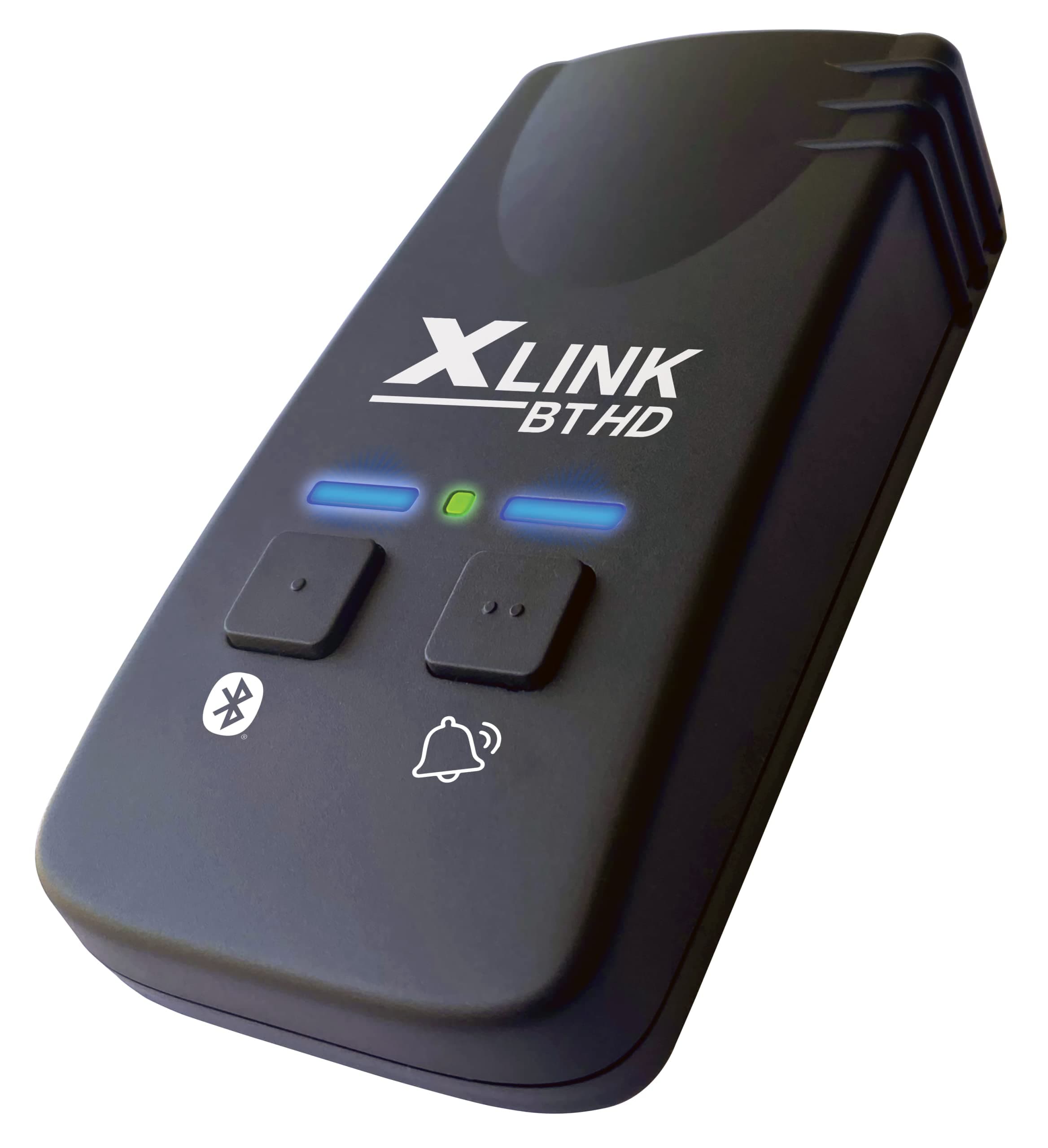
☎️ Stay classic, sound futuristic with XLink BT HD!
The Xtreme Technologies XLink BT HD is a Bluetooth 5.0 adapter that connects your cell phone to any home telephone, enabling HD 16KHz audio calls with automatic wireless syncing. It supports both modern and vintage pulse/rotary phones, offering a seamless, user-friendly solution for professionals seeking crystal-clear call quality and effortless integration between mobile and home devices.



| ASIN | B0BDZ2GYLN |
| Best Sellers Rank | #16,178 in Office Products ( See Top 100 in Office Products ) #7 in VoIP Telephone Adapters |
| Brand | XLINK |
| Color | Black |
| Compatible Devices | Cell Phones, Home Telephones |
| Customer Reviews | 4.3 out of 5 stars 454 Reviews |
| Is there Caller ID | Yes |
| Item Weight | 0.2 Kilograms |
| Manufacturer | Xtreme Technologies |
| Multiline Operation | Single-Line Operation |
| Power Source | Corded Electric |
| Telephone Type | cellular |
| UPC | 627987194982 |
C**E
Well worth it!
This device exceeded my expectations, especially when it comes to ease of use. It feels so a little cheap, but honestly seems well worth the money. Setup was incredibly simple—so much so that even my elderly parents were able to connect it to their smartphone without any help from me. My dad was able to walk away with his cell phone when he needs to leave home, and when he gets back home it automatically connects back up for him! The ability to link a cell phone to a home telephone is such a convenient feature, and the call quality has been clear and reliable. It’s a great solution for anyone who prefers using a traditional home phone but still wants the flexibility of a mobile connection. If you’re looking for something user-friendly and dependable, this is a fantastic option—especially for older users or anyone who isn’t very tech-savvy. Worked great with the phone we purchased as you see in the photo.
R**M
It Works Well
It's what the other people say, it installs fast and works well. I had mine working in 15 minutes. Sound quality is noticeably better than Panasonic Link2Cell. I don't like cell phones much, but I have to have SMS. With this device, SMS goes to my PC, voice is all over the house, and I can carry the cell outside if I need to. One phone number for everything. XLink isn't perfect, but it's better than any other solution.
J**R
It works!! Your cell is now your land line.
I love this. It actually works great. I wired it to my existing home phone lines, just make sure you disconnect your house lines from the street/ pole line. I have an old rotory in the garage, the kitchen wall phone and 1 in the spare bedroom. They all ring. And you can dial out on your old home phones to, even on the old rotory. Just dial the area code and number, dont dial 1. Im going to buy more old phones for my other jacks in the house, see if it has a limit.
P**E
Works reliably, as described, and the sound quality is excellent
This XLINK HD product worked right out of the box. I thought we would need to find an installation manual to install it, but it turns out that there is almost nothing to do (you follow a very simple installation description which comes with the phone.) This XLINK HD works well with good voice quality with our up-to-date cordless multi-handset phone system -- our "housephone handset system". And the XLINK also works with a very old ATT pulse phone. Background: A while ago, we moved our landline number to a cell phone (because of poor landline provider support). We had expected to use the new cell-phone with our housephone handsets. This multi-handset product was supposed to work with cell-phones over bluetooth. This did work sometimes, but it was unreliable. After several weeks of attempting to make it reliable, we gave up and just used the new housephone cell-phone by itself. But, when I saw the XLINK product details, I decided to give it a try -- to connect our housephone handsets to the new cell-phone with our former landline number. The XLINK product immediately worked! Reliably! The house multi-handset product now functions just as it would with a landline (it doesn't know it is not connected to a landline). And the home answering machine is now back in service (but you need to adjust the number of rings so that the answering machine will answer before the cellphone goes to voice-mail). Finally, you can also use the cell-phone directly to make or receive a call if you choose, without disrupting the XLINK set-up. You can even take the cell-phone away from the house, and when you come back the XLINK will automatically reestablish the setup. There are 2 buttons on the XLINK BT/HD. The leftmost button establishes the bluetooth connection. The rightmost button is only used if you want to upgrade the software on the XLINK device.
N**G
Easy and effective, with cable saving, when you want to be able to answer calls with cordless
Cut the cable, including the cable company’s landline “house phone”. So we had to choose a cel to handle service people, emergency numbers, medical and other stuff. I lost, so my phone became ‘it”. It is possible to tie 2 cels to a cordless system, but that would create confusion for us. Also I am hearing impaired, and the cordless call quality is better than our Iphone’s for me. We have a good Panasonic cordless with remotes around the house but the documentation for it's “link to cel” feature is poor, and we abandoned use of the feature, when we first installed the phone. We looked at the cel2jack and the Xlink BT products. I was concerned about call quality over the interface. Amazon shows Xlink BT HD (High Definition audio) as “Amazon’s Choice” based on ratings 4*+, purchased often, and infrequently returned. Everyone’s house and family is different. We have a reasonably large 4 bedroom, 3 1/2 bath house with 2 tech/WiFi/Bluetooth users living in it full time. We have an Alexa “Smart home” with a fair bit of home automation, security and entertainment tech working, so there is tech that sometimes interferes with other tech (like 2 TVs streaming football, while the family is here watching surfing, working or whatever). Users and their tech create EMI/EMC (electro magnetic interference/electro magnetic compatibility) problems. There is a commercial engineering rule of thumb that problems increase proportional to the product of users time devices (2 users time 2 devices =4 , 4 users times 6 devices = 24). Bluetooth and WIFI and cellular are susceptible to this problem. Also house architectures and materials (including metal, glass/ceramic, and rock and brick) cause signal attenuation (blocking/reduction). Xlink has a 10 foot guideline for maximum planning distance between the Xlink BT device and the connecting Cel Phone. Our cordless “base station” is located in the center of the house to provide a good connection to all of the remotes. We spend 95% of our time in 3 corner rooms with remotes, where the cel phones charge. The distance between and where the cel phones sit/charge is 20 feet, through 2 TVs, a glass/metal/ceramic fire place and a wall. I thought it would be a problem. It is not. Twice Xlink’s recommended distance with interfering material, without a problem. I also thought pairing BT/setup might be an issue. It was not. Call clarity is better than my iphone normally is. Pays for itself (cable bill savings) in one month.
G**C
Works well except for a few inconveniences
I’ve had a land line for many years, and I’ve kept it even though my wife and I both have mobile smartphones. The reasons are that I want incoming callers announced anywhere in my house without carrying my mobile with me, and I want to be able to conference call with family without using a speaker phone. Finally, I don’t want junk calls going to my mobile phone. (We get an average of 5 or 6 junk calls every day.) My cordless phones allow me to block all calls from a particular area code; my mobile phone won’t do that. More and more businesses want to verify my identity when I call. They do that by sending me a code. I’ve been using my land line to receive such codes with a phone call. But now the businesses are wanting to send texts rather than calling, and a land line can’t receive texts. So all this led me to search for a way to keep my land line phone number but be able to receive texts, get announcements, block a range of junk callers, and conference call with traditional handset phones. That’s when I discovered the Xlink BT HD. I purchased an inexpensive smart phone and activated service with a no-contract carrier. I ported the land line phone number to that smart phone and bought the XLink BT HD. The BT HD drives my traditional cordless phone system (two base units with a total of five handsets throughout the house). It works well, and it will save me about $250 per-year because the no-contract service is less expensive than my land line. Here are my impressions of the BT HD: The call quality is good if there isn’t too much distance between the mobile phone and the BT HD. Originally, I put them in different rooms separated by about 50 feet, and the call quality was poor. Now they’re about ten feet apart, and the quality is fine. This might be a distance limitation of Bluetooth. The cordless phones can answer and initiate calls with no issues. But texts can’t be received or initiated by the cordless phone. This is a bit of an inconvenience, but I only need texting about two or three times each week. I placed the mobile phone near my computer so I can see and hear a text come in. So I’m comfortable with that arrangement. A caller ID phone number comes through the BT HD just fine. The BT HD passes the number through, and the cordless phone uses its contact list to identify the caller. If the caller is someone not in my contact list but has their name listed with their phone service, their number comes through but not their name. (The name will be shown on the mobile phone, however.) Call forwarding works intermittently unless if I set it up at the mobile phone. If I try to activate it from the cordless phone, it sometimes doesn't work. This could be an issue with the inexpensive mobile phone I bought. But I only use that feature when I’m out of town. So that inconvenience isn’t too important. If a call comes in and I don’t answer, the cordless phone system answers and records the caller’s message. But if I’m on a call using the cordless phone and a second call comes in, the smart phone will take a voice message using the voice mail at the mobile service provider. So incoming caller messages could be stored in either of two places, depending on whether the cordless phone is available to answer the call. This isn’t all that different from before because my land line provider had voice messaging which would store messages if I was on a call when a second one came in. The difference is that with the land line, I’d get a notice on the cordless phone that I have a message on the provider’s server. I don’t get that with the BT HD. So I have to look at the smart phone to see if it has any messages waiting. Of all the little inconveniences, this is the most bothersome one. I’ll have to get in the habit of checking the mobile phone for messages regularly. All in all, the BT HD allows me to do what I want. I don’t regret switching my land line in this manner. But it would be nice if the BT HD could somehow notify the cordless phone that a voice message has been recorded by the mobile phone.
E**T
Excellent, just excellent
I purchased this to test (and use) an old rotary phone from the 70's that I found many years ago. I never knew if the phone actually worked. But, now I know it does! This device has to be the simplest hookup I have ever encountered. Plug in your phone, hold the BT button, pair with your cell. Done. Really it is THAT simple. And, it works as you would expect. Pick up the handset and you hear the old dialtone. The only thing it is not re-creating is the "siren sound" you would hear if you had the phone off the hook for a period of time. The dialtone just lasts forever. Xtreme team, please add this to a next firmware! While the website of the Xtreme Xlink BT says that if you buy direct you won't have to update the firmware, that is not true. This arrive today on 12/3/2024 and the firmware was v30. The latest was v32 and that update (through the web interface on their website) took five or so minutes. But, it's easy and not a hassle. You can do it through their website or via a downloadable application for Windows. And, you want the app (or to use the web interface) as there are options to do lots of stuff. Most importantly ADJUST THE VOLUME of the headset and speaker. This is a great device, works great, reliable...just awesome to use an old phone again in an easy modern way. My hats off to the Xtreme team. Really...great job!
M**2
Good and bad
I have a house phone for using my antique phones.. and i never really liked talking on a cell phone. Problem is most people just call my cell instead of the house phone because the cell is the number they text. So i wanted to still use my antique phones while having just one phone number. Set up was easy. It's a standard bluetooth pairing. All phones ring and dial out just fine and the connectivity range is petty great. I have the xlink in the central area of my one floor home and no matter what room my cell is in, the connection is good. The sound quality is ok, but not amazing. I'm not sure what makes this HD. It has the standard "tinny" sound that all bluetooth headsets seem to have. I can hear people find and the can hear me but it's not as smooth as using the land line or just the cell phone. I'm also not a fan of the fact google assistant won't work when it's on... rather i won't hear the response. The response will only be heard through connected phones not my cell speaker. This can be corrected by telling google assistant to turn off bluetooth then give my voice command.. but then you have to turn bluetooth back on. Is it the worst thing in the world? No.. but it is annoying. I'll keep it for a few weeks and see how it works out before canceling the land line.
Trustpilot
Hace 1 mes
Hace 1 mes