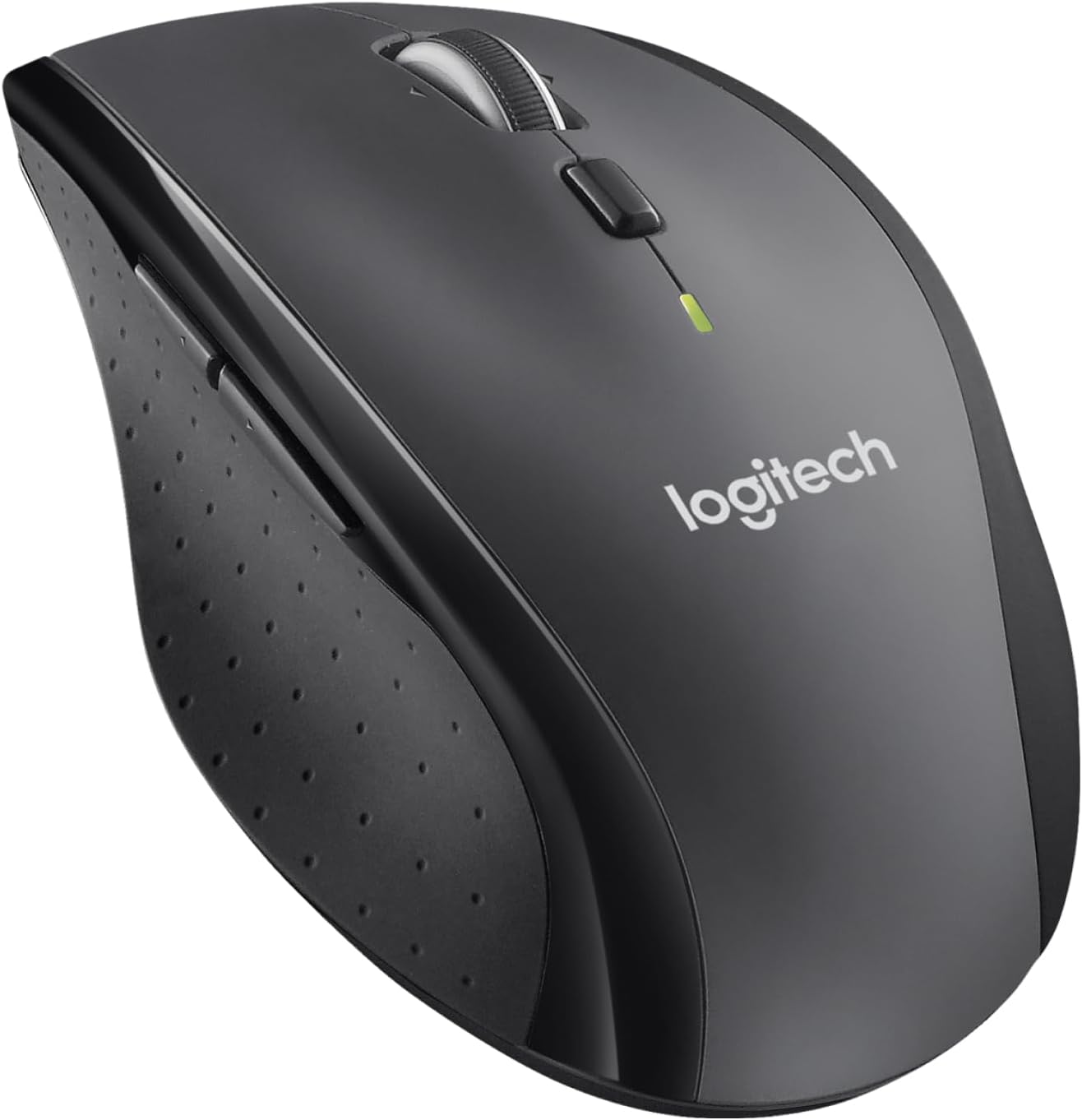
🚀 Power through your workday with the marathon mouse that never quits!
The Logitech M705 Marathon Wireless Mouse combines a remarkable 3-year battery life with 1000 DPI laser precision and 7 programmable buttons, designed ergonomically for right-handed users. Its USB Unifying receiver supports up to 6 devices, ensuring seamless compatibility across PC and Mac platforms. Ideal for professionals seeking comfort, efficiency, and long-lasting performance in one sleek package.


| ASIN | B003STDR1E |
| Antenna Location | Office |
| Are Batteries Included? | No |
| Are Batteries Required | Yes |
| Battery Average Life | 3 years |
| Best Sellers Rank | 7,059 in Computers & Accessories ( See Top 100 in Computers & Accessories ) 97 in PlayStation Legacy Systems 218 in Mice |
| Box Contents | other |
| Brand | Logitech |
| Brand Name | Logitech |
| Button Quantity | 7 |
| Colour | Black |
| Compatible Devices | Mac, Personal Computer |
| Connectivity technology | USB |
| Customer Reviews | 4.3 out of 5 stars 16,521 Reviews |
| EU Spare Part Availability Duration | 3 Years |
| Embellishment Feature | Logo |
| Enclosure Material | Rubber |
| Global Trade Identification Number | 05099206023901 |
| Hand Orientation | Right |
| Hand orientation | Right |
| Hardware Platform | PC |
| Item Dimensions L x W | 10.9L x 7.1W centimetres |
| Item Type Name | Logitech M705 Wireless Optical Mouse |
| Item Weight | 4.8 Ounces |
| Item height | 12 centimetres |
| Manufacturer | Logitech |
| Model Name | Marathon Mouse M705 910-001949 |
| Model Number | 910-001949 |
| Mouse Maximum Sensitivity | 1000 Dots per Inch |
| Movement Detection | other |
| Movement detection technology | other |
| Network Connectivity Technology | USB |
| Number of Batteries | 2 AAA batteries required. |
| Number of buttons | 7 |
| Operating System | Windows 10, Windows 11 or later, macOS 10.5 or later |
| Power Source | Battery Powered |
| Product Warranty | 2-year Limited hardware warranty |
| Range | 10 meters |
| Style Name | Retail Box |
| Theme | Video Game |
| Unit Count | 1.0 count |
M**A
Excellent mouse; does everything I need it to (as well as things I didn't realise I needed, until now)
I bought this mouse to use with my laptop (which I primarily use at home and don't tend to take out and about with me). It's the first battery-powered mouse I've ever purchased, having only had rechargeable mice in the past, but I found that I wasn't getting much more than 5-6 days on a charge. After reading the reviews (and Q&As on Amazon), I decided to take a chance on the fact that this mouse has a three-year battery (it came with 2xAA Duracell batteries). Although I've only had this mouse for a week, I'll update this review when the batteries need replacing so others can judge how realistic this claim is, but I'm optimistic. It appears that a few other reviewers don't like the scroll options, yet I specifically bought this as it has the option of toggling between "click scroll" and "frictionless scroll"; perfect for navigating through longer PDFs, websites or spreadsheets with a small movement of my hand. I also love that I can use the scroll button to navigate left or right through a spreadsheet (or move the cursor back/forward a few characters as I'm typing), as it not only clicks and scrolls vertically; it can be nudged left or right, as well. This is a feature I didn't realise it had when I purchased it, and it's been a massive help, seeing as I spend so much time working on spreadsheets. The back and forward buttons on the left side (just above the thumb rest) are another reason I chose this particular mouse, as it assists greatly when I'm navigating through websites at speed. The buttons are ideally located, and do not get in the way (i.e. they're placed in such a way that it's hard to click them accidentally, unlike other mice I've had in the past). I plugged in the receiver and it worked straight out of the box without any need to tweak settings. I'm rather particular about my mouse set-up, so I did make a few small adjustments, but they're certainly not necessary for the average user. Overall, this is a great mouse, and I'm delighted with my purchase. It was just under £33 and it was, I feel, money well spent.
D**B
Happily buy another one!
I spend most of my day sitting in front of a computer for work, and the comfort of a mouse has never really meant much to me. after using the M705, I find it impossible to use other peoples computers, as the shape and style of their mouse just does not seem to fit into my hand. This mouse appears to be perfectly designed to fit the shape of your hand, and works with great ease....as long as you are right handed. The 'SetPoint Settings' software was a great surprise also. the 8 different buttons on the mouse can all be programmed to do whatever you wish. This can also be changed to have different operations, depending on which programme you are running at the time! Where two buttons may be forward and backward on the web browser, can then become, copy and paste on a word document. this in itself has increased my productivity at at work, as it has saved me using pesky keyboard shortcuts on various other programs. The 8 functional buttons are not overly sized, or too busy and clumsy either. The scroll wheel has its standard click down button, along with a left and right click. all three are useful, and I personally have them set for different things depending on the program in use. However, i do feel that sometimes, the left and right click of the wheel can sometimes be pressed accidental, while trying to use the centre click down button. this in itself is no great issue, but does sometimes mean I end up Zooming on pages when simply trying to select something. All in all....great piece of kit! The three buttons on the thumb side are quite smoothly in place. the fairly standard 'page forward and page backward' buttons are there. with ease of use, there is no complaints with these. the third button is below your thumb. To start with i didnt even notice it was there. it is designed into the shape of the mouse, and is easily miss-able. had it not been for the the small grey mark near the bottom. this is no way a complaint, as it just just shows how well another function can be hidden into the mouse. All in all....great piece of kit!!
C**W
Great mouse... Eventually
I've just had this mouse delivered. It's frustrating to use straight out of the box - what the buttons do by default doesn't seem natural, the screen jumps when you try to click a link with the scroll wheel in your browser (to open in a new tab), it wasn't picked up automatically by the Unifying Receiver I already use with my keyboard but, I downloaded the Unifying Receiver software from Logitech's website and it picked the mouse up straight away. I downloaded Logitech's SetPoint software too and, with a little tweaking, it's spot on now. You can change just about anything - so now, I have nudging the scroll wheel left/right to do the same as pressing the left or right arrows on the keyboard and I switched off smooth scrolling (which has stopped it jumping when I middle click) and it's perfect. The scroll wheel's fine, whether it's set to free scrolling or not (you click a button on top of the mouse to switch and it feels natural enough to change this on the fly, depending on what you're doing or what website you're on). Having so many buttons, it makes doing just about anything - especially browsing the net - much quicker. There's the scroll wheel that I use for middle clicking and nudging sideways to scroll through things, there's the 2 buttons on the side that I use for Back and Forwards (for now, at least, I'm sure they could do something more useful) and you can click the mouse where you rest your thumb too (it opens an application switcher by default; I've set it to minimize all windows). It feels really solid (not too heavy, not too light) and it's a really comfortable to hold - good shape and size, nice rubbery material on the sides and smooth, solid-feeling plastic on top. It's bigger than it looks in the photos - it's 11cm long and 7cm across at its widest. I highly recommend this - great mouse, great features, comfortable to use. All I've marked it down on is having to fiddle about setting it up.
G**O
Excellent mouse. (updated)
This is a good mouse, there's no mistake about that, but now that that has been said, I do have a few issues with it. First the pros: This is a comfortable mouse. The position of the hand is bang on. But those who have big hands do try it first if possible. The weight is just right for me allowing me complete control over it. The feet glide effortlessly on my hard surface mouse pad and the laser tracks brilliantly. The buttons are in the right position and they have a nice feel. Battery life seems to be durable, it lasted the 3 years that they state. The cons: When it arrived the feet seemed like the had glided over an abrasive surface cause they seemed already a bit worn. Odd... The wheel wobbles around 1mm in "free spin mode" which is odd and in "stepped mode" if you lift the mouse and move sideways (and this does not have to be very fast, just normal speed) you can hear the wheel moving sideways. No biggie but really odd. The right side rest for the farthest fingers is nothing but a grip. You wont "rest" your fingers there... Although the buttons seem nice, the left and right click buttons are "loud". I moved from a Microsoft 5000 Desktop BlueTrack Mouse that was already a bit loud. This one takes the crown. For as of this moment is is the loudest mouse I've ever had. So, final thoughts. Do I recommend it? Absolutely! It's a nice mouse and it will get the job done. The batteries have been lasting for over 3 years with daily use.
J**E
The best wireless mouse I've ever used
Firstly, I have experienced over 50 different mouses over my experience of computers. Never have I had or tried any mouse like this one (although I'm not an enthusiast for mice, so I might be obliged to tell if there are better ones). The performance is good, the batteries have been in use for 3 months now and the batteries have 95% of their capacity left. The switch on the bottom of the mouse is very handy, if you take the mouse along with your laptop. The only fault for mouse is that in Autocad and on some other drawing utilities the mouse is not as accurate it could be to work with. Maybe Logitech will understand this sometime soon, or then I might just buy the most accurate mouse there is which obviously costs some $$$. For the price, it might be the best there is. The other fault comes from the Logitech software which is crap as usual. You'll do fine without it. By the way, I don't know why the other reviewer acclaimed that this isn't the Marathon M705, because at least mine is. And my "ultra-fast scrolling wheel" works like a charm. No bugs whatsoever. + When you order from the Amazon.co.uk, I've heard that they are one of the best companies regarding any warranty issues. Solely recommended product!
P**N
Decent mouse! Er.. I've changed my mind!
I've only used the mouse a few days so I can't comment on the claimed 3 year battery life. No usage assumptions are provided with the product to support the 3 year claim but hopefully it won't eat batteries. I find the mouse comfortable to use. Some reviewers have criticised the mouse wheel for being unpredictable and for causing the page to move erratically when using the wheel as a centre button. I get that too when the wheel is in the 'free' mode but it's fine when it's in the 'clicky' mode, which I prefer. My only other minor criticism is that the 'clicks' sound a bit plasticky / cheap compared to other non-budget mice I've owned. I have no idea whether that is indicative of quality or likely durability. All I can say is that currently I'm very happy with the mouse. Oh finally, Amazon, why was your price £35.14 on the day I placed my order and £29.88 the next day? Seems quite a reduction - lucky for some, but not for me! UPDATED A YEAR LATER: ==================== After a year of 8 hours a day use of this mouse I have down-graded my review to 3 stars at best. I think I was a little hasty in my initial positivity. The reasons for the rethink all relate to the mouse wheel / centre button: - In free-spinning mode the centre wheel has a mind of its own and is completely unusable. - In notched mode it is just about usable. I have used this mode for the last year and got by on it. - The centre mouse button (i.e. pressing the wheel down) is unreliable. Sometimes it registers, sometimes not. What's worst is when it's worked and the underlying page is scrolling, you then click it again to switch this mode off and it fails to register. I have now replaced it with a 1byone wired, 15 pound mouse sourced from Amazon. It has none of the above issues. It's not that the M705 was a budget mouse. It's a mid-market to premium price item. It definitely should not have these issues. There are a lot of similar complaints about the centre button for this product. I wish I'd returned it when I first received it. Logitech has lost a customer from its brand.
G**E
I had heard good things about this mouse and was not disappointed
I had heard good things about this mouse and was not disappointed. I have used a couple of Logitech MX400 wired mice for a long time and before that a MX500 wired mouse. The M705 is just as comfortable - if not more so. Sits very nicely in the right hand. The click action is similar to those other mice and very satisfactory. The wheel takes a little getting used to. I have been using it in free-wheel mode. The wheel continues to spin after a flick which allows you to skim through pages without laborious finger-driven mouse-wheeling. The wheel can be stopped easily just by touching and is very light in action. However, if you spin and then move the mouse point over, say, your browser tabs you'll find yourself rapidly cycling through the tabs or maybe zooming your browser page. The mouse wheel can be switched into a normal mode where is has a notched feel - not unlike other Logitech mice. However, it doesn't quite feel as nice as the older mice so I keep it in freewheel mode. I hope this mouse lasts as long as the other mice and will update this review at some time in the future to report.
J**Y
Free rolling scroll wheel!
I bought this mouse because I wanted a decent wireless mouse, and Iv'e always found Logitech hardware to be good quality and reliable. it's just the right size for my large hands, and feels decently weighted with the batteries in it, but the best part for me is the scroll wheel, there is a button on the top of the mouse that you press and it makes the scroll wheel roll freely so you only have to flick it and it keeps spinning, this is brilliant for scrolling down long documents or even social media. there are newer versions of this mouse but they cost loads more, and i think for the average user this mouse is fine and i find it to work fine in games as well. the response time is pretty good and i find no issue using it in first person games. it comes with the small Logitech Unifier dongle that you can use for multiple devices, so it works with my K780 keyboard, meaning I don't have to have more than one receiver.
Trustpilot
Hace 1 mes
Hace 2 semanas