We remain fully operational. Our teams are working around the clock to ensure your deliveries continue safely.

Descargar la aplicación


Servicios al cliente
Sobre nosotros
Copyright © 2025 Desertcart Holdings Limited
Descargar la aplicación


🎮 Light up your game with speed and style!
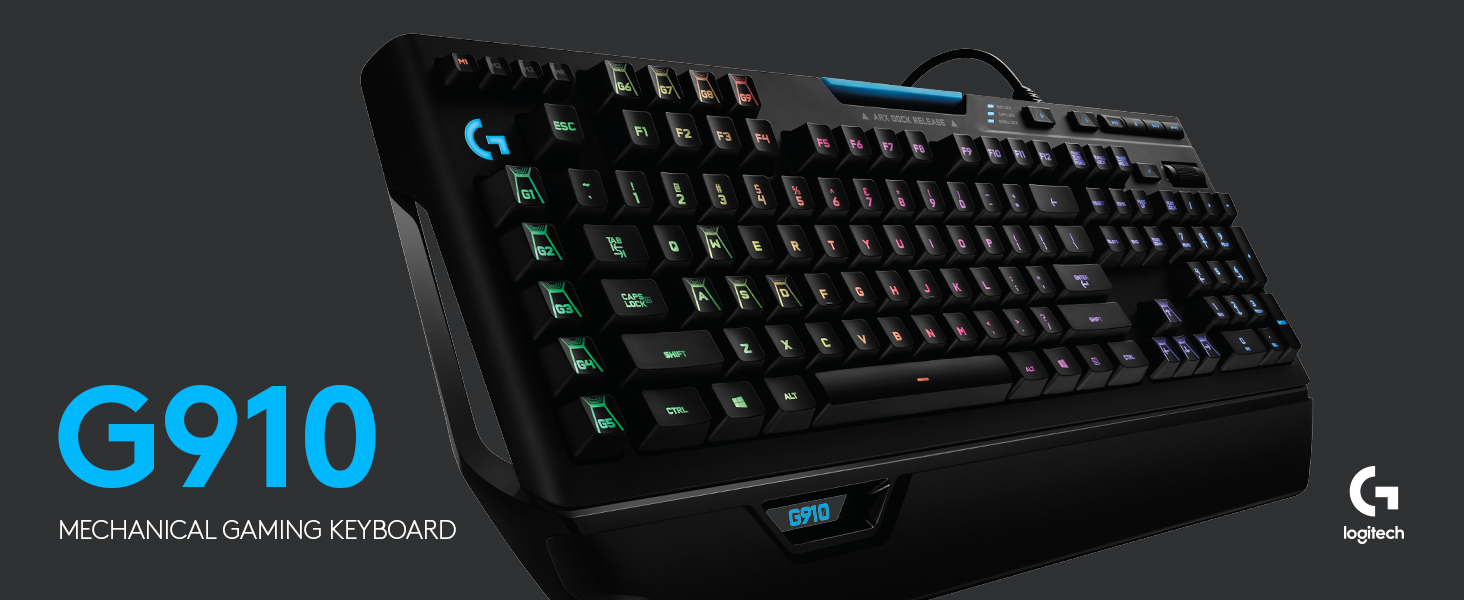
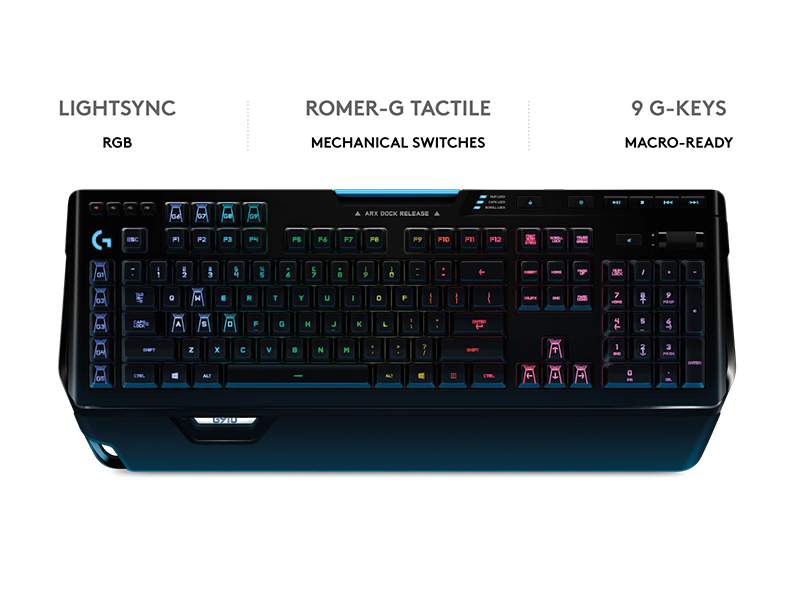
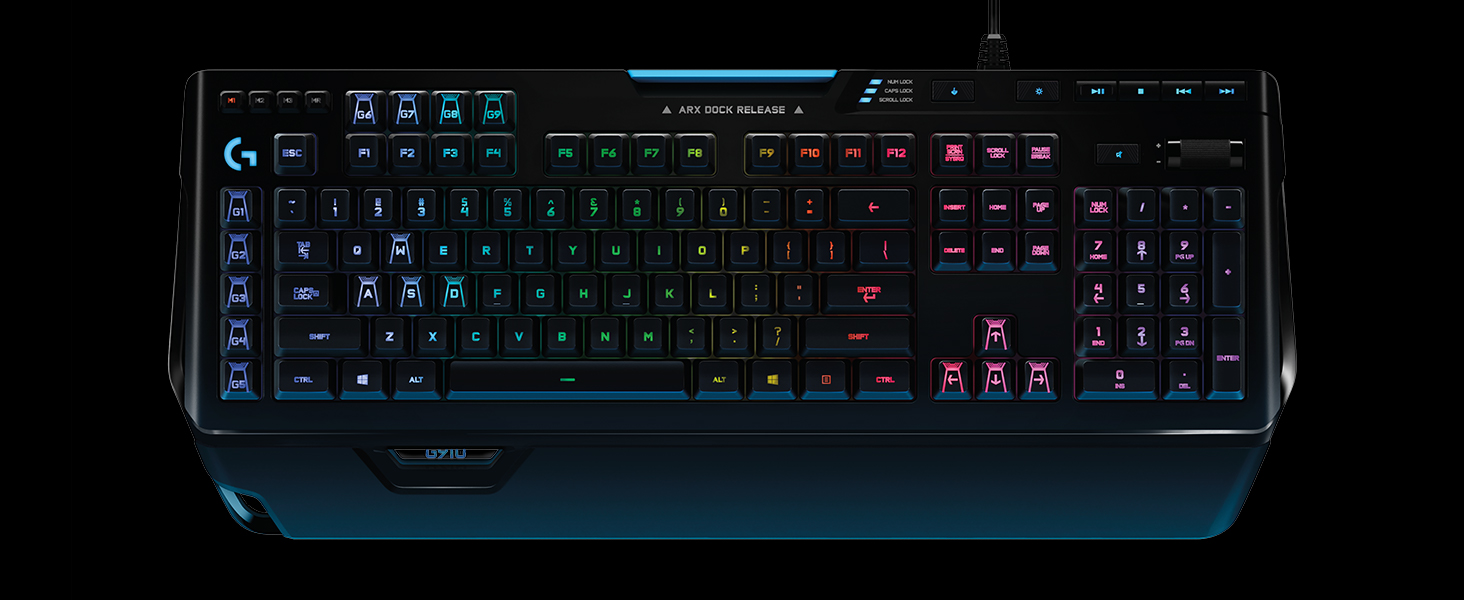
The Logitech G910 Orion Spectrum is a premium mechanical gaming keyboard featuring ultra-responsive Romer-G switches that deliver 25% faster actuation. It boasts fully customizable RGB backlit keys with 16.8 million colors, 9 programmable G-keys for instant macro execution, and Arx Control technology for real-time mobile updates. Designed for serious gamers seeking precision, speed, and immersive lighting, it integrates seamlessly with Logitech's gaming software for personalized performance.
| ASIN | B01G5Y27VY |
| Antenna Location | Gaming |
| Best Sellers Rank | 15,586 in PC & Video Games ( See Top 100 in PC & Video Games ) 601 in PC Gaming Keyboards |
| Box Contents | Mouse |
| Brand Name | Logitech G |
| Button Quantity | 9 |
| Colour | Black |
| Compatible Devices | PC/server |
| Connectivity Technology | USB^Wired |
| Customer Reviews | 4.4 4.4 out of 5 stars (10,237) |
| Enclosure Material | Plastic |
| Global Trade Identification Number | 05099206064287 |
| Hand Orientation | Ambidextrous |
| Item Dimensions L x W x H | 21L x 50.5W x 3.6H centimetres |
| Item Weight | 1500 Grams |
| Keyboard Backlighting Color Support | RGB |
| Keyboard Description | Gaming |
| Keyboard Layout | QWERTY |
| Manufacturer | Logitech |
| Model Name | G910 Orion Spectrum |
| Model Number | 920-008017 |
| Number of Keys | 9 |
| Number of Sections | 2 |
| Power Source | Corded Electric |
| Product Features | Backlight^Backlight type^Full-size keyboard^LED indicators^Numeric keypad^Windows keys^Wrist rest^Yes |
| Style Name | UK Layout |
| Switch Type | Romer-G Mechanical |
| Theme | Rainbow |
J**O
Fantastic all-rounder without compromise
Having gone through many keyboards in recent years, trying to find my the best all round keyboard for me, this is the one that I would hands down recommend as the best all around mechanical keyboard - the only caveat being the switches and personal tastes in this area. My favourite characteristics are: -Dedicated media keys and scroll wheel volume control -9 macro keys -3 profiles for the macros -Stable customisation software compared to the competition -Comfortable keycaps for typing on and clearly marked -Built like a complete tank -Phone dock (use this all the time!!!) A flaw in many of the competing products at the moment I feel is the amount of effort being put into making it a 'gaming' keyboard, or a 'professional' keyboard. The ASUS ROG Claymore looks like it is being built to military spec to take into war, and it and other similar boards use fonts that look like they have just come out of the latest Sci Fi series on Netflix or something. I personally hate having to rely on a Fn modifier key to enable me to change the volume of my computer with my keyboard, or play and pause songs, so Ducky is out of the question. Though Das Keyboard has a keyboard with a sensible aesthetic that could be fit for the workplace and at home, whilst maintaining most of the media functions that I look for, it is lacking the macro area that is seemingly only found on a 'gaming' board. Customisability of the keyboard interface, be that colours or key functions, is easily achieved with the Logitech G software, with it being stable on both my Windows and macOS computers, something that I have had problems with in the past with Corsair and Razer. I switch between playing games occasionally, typing out long segments of text, and doing CAD work, and having the ability to add a macro in for a specific command line in AutoCAD that is either easily forgettable, or buried within other commands is great. This macro key then pro-actively switching over to sending out a specific ping in Battlefield or League is then very useful. For on the fly customisation, or where you are using a computer that you are unable to install the software on, at work for example, the macro record function and the in built memory mean that you are still able to change the functions of the G keys as and when desired, without being locked into a software suite. It isn't perfect - the switches are not quite as 'magical' as Cherry Blues for example, though I prefer them to Browns, and the aesthetic is still undeniably more 'gamer' like than the Ducky or Das alternatives. But these are small points - the switches are still a total joy to use, Blues are fun sounding and feeling, hence why I like to type on them, but the Romer switch is quieter and almost as tactile, with minimal travel distance, making it a better suited switch for the workplace if you are in an office with other people around. The lights can be turned off as well, leaving you with a board that is larger than conventional boards through all the extra functionality and buttons on the panel, but without looking out of place as much as ASUS or Corsair alternatives might. If you can look past these subjective weaknesses, and want something with all the functions with little compromise, this is definitely worth a look at!
H**E
Excellent for gaming and perfect for typing!
Only had this keyboard for a day; I love it! Never have I been so eager to write a review. I purchased this keyboard to replace my Logitech G510 that had ceased to work after 2 years (surprised it lasted that long after the multitude of spillages it was subjected to). The other few brands of keyboards I have tried before this one always disappointed me, often not to the fault of the keyboard but to them not suiting my own preferences. Regardless of how well built, designed and usable a keyboard is - if it doesn't appeal to the way in which you want it to perform under your hands then it will only be a regrettable purchase. This keyboard has excellent mechanical keys that produce the smooth 'clickety-clack' sound you would expect without being too loud, they are soft to the touch and won't tire your fingers. The ability to customize the keyboard is what sold it to me. I spent a fair bit of time finding the right colours to match those of my computer and mouse. Of course, I couldn't justify buying a high-end keyboard like this one for general use. The fast response times and flashy design make it ideal for gaming but I suppose it would also be well suited for typing enthusiasts or anyone who wants to show off. The optional lighting and effects are good for touch typists but would likely cause issues for anyone who looks down at the keys as they type (although with a colour that is easy on the eyes this shouldn't be an issue). The macro keys are conveniently placed out the way and don't look messy like they did with the G510, if you take the time to add some actions to them with the software they can serve to be very useful. Finally, the volume control, pause/play and skip options are a treat for anyone listening to music in the background whilst gaming. Makes it simple and easy to skip songs you're not in the mood for, edit the volume or stop the music completely (important for those intense moments) without having to tab out the game and potentially break the immersion. Excellent for gaming and perfect for extended typing sessions. Definitely recommended!
M**L
Por primera vez, ahora que tengo un trabajo decente, me he decidido a comprar un teclado de más de 20€. Qué decir, por supuesto he quedado encantado con la compra. En primer lugar, compré el teclado con el layout de américa. Al poco tiempo de comprarlo, empecé a ver las diferencias que tenía con respecto a, en ese momento, mi teclado actual. Me puse a buscar información al respecto y lo único que decía todo el mundo es que había que poner el idioma de Windows en Inglés Internacional (o algo así) y aprender una serie de algoritmos para poder escribir correctamente. Además, la tecla de enter era distinta, cosa que no me convencía. Finalmente, tomé la decisión de cancelar ese pedido de 130€ y comprar el teclado inglés, que costaba 170€. Me llegó y, bueno, no puedo estar más contento. Tal y como había visto en varias reviews, cuando pulsas la tecla que hay a la derecha de la letra "L" sale, por supuesto, la letra Ñ, cosa que, como veis, puedo escribir perfectamente. Para mí personalmente, no es ningún problema, ya que hace unos meses decidí ver un par de vídeos de mecanografía y, autoformándome, y obligándome a escribir correctamente en el teclado, he conseguido una buena velocidad de escritura sin necesidad de mirar el teclado en ningún momento, así que si no sabes hacer eso, mi consejo es que lo intentes, ya que a mí solo me costó un par de días acostumbrarme y un par de semanas empezar a escribir con cierta fluidez, sin tener que pensar mucho las teclas. Una vez aclarado este punto, he de decir que este es el mejor teclado que he probado nunca, tanto en comodidad a la hora de escribir como por funcionalidades. Tiene hasta 9 teclas G dedicadas para macros. Tengo algunas ya configuradas, como pueden ser cerrar la sesión para cuando me vaya, cortar, pegar, abrir un juego, abrir un documento de Word... Es una maravilla poder hacer todo esto con un solo botón. No le he dedicado mucho tiempo a pensar para qué usar el resto porque de aquí a dos semanas voy a comprar un pc nuevo, por lo que tendré que configurarlo de cero. Una vez hecho eso, estoy totalmente seguro de que le sacaré muchísimo más partido. El soporte para el móvil, sorprendentemente, me resulta muy útil, ya que puedo tener el móvil sin que apenas ocupe espacio mientras hablo por whatsapp, por ejemplo, y no molesta a la hora de poner la mano ni nada. Probablemente, lo único malo que tiene el teclado es el software. Tenía el Logitech Gaming Software, pero a la vez que este teclado compré un ratón (más concretamente, el G502 HERO). Logitech Gaming Software reconocía fácilmente el teclado, y podía configurarlo a mi gusto sin mayores problemas... Pero el ratón no lo encontraba de ninguna forma. Finalmente, he tenido que descargar otro programa, específicamente el Logitech G HUB, y me parece muchísimo menos intuitivo, y por ejemplo no sé crear perfiles para cada uso, ni configurar macros distintas entre las 3 opciones que tiene (arriba a la izquierda, M1, M2 y M3). Supongo que será cuestión de buscar cómo hacerlo, aunque apenas tengo tiempo libre, lo cual supone un problema a corto plazo, pero vamos, estoy seguro que más pronto que tarde esto se va a solucionar, ya que, a decir verdad, tampoco he invertido demasiado tiempo en ver cómo funciona (principalmente porque, como he dicho, voy a cambiar de pc). PROS: -Iluminación suficiente para ver perfectamente las teclas durante la noche a oscuras. -Comodidad a la hora de escribir. -Hace ruido, pero no es para nada algo que pueda llegar a molestar. -Teclas dedicadas a macros extremadamente útiles. Puedes hacer prácticamente lo que te de la gana con ellas (pegar un texto, configurar una combinación de botones, abrir un archivo/juego/navegador/aplicación. -Tiene un apartado para el sonido desde el que puedes subir y bajar el volumen del pc con una rueda que viene en la parte superior derecha, siendo extremadamente cómodo. -En el layout inglés puedes escribir en español sin ningún problema. -La propia iluminación del teclado es más que suficiente para poder escribir a oscuras. -Si tienes algún amigo envidioso, de estos que siempre quieren comprar algo mejor de lo que tengas tú, enséñale este teclado y lo vas a meter en un apuro curioso, ya que puede comprar algo más caro, pero mejor no va a ser. CONTRAS: -Si no sabes escribir sin mirar el teclado, es muy posible que no vayas a disfrutar demasiado este teclado. -Si tienes un espacio muy limitado deberías revisar las dimensiones del teclado y pensar si merece la pena, ya que es bastante voluminoso (aunque si hay espacio suficiente, como es mi caso, no afecta en absoluto). -Los salientes de las teclas "J" y "F" son, quizá, un poco pequeños, por lo que alguna vez me he equivocado al poner los dedos para escribir sin mirar. Lógicamente, también ha podido influir que mi anterior teclado era mucho más pequeño, por lo que es cuestión de acostumbrarme al tamaño, pero supongo que puede ponerse en los contras para quienes le den mucha importancia. -Si tienes una familia muy antigua y cabezona, te van a dar mucho la lata por comprar un "teclado de esos caros con lucecitas"... Mejor no les digas cuánto te ha costado o serás el tema central de conversación en la próxima reunión familiar.
K**N
My favourite keyboard. Good buttons, great ilum, and lots of progr. buttons.
M**E
Si toi aussi tu es un ancien gamer qui a gardé son clavier de l'époque (qui était top, mais dont certaines touches effacées collent un peu ou s'enfoncent mal à présent) sans jamais passer au clavier mécanique, et que tu hésites, lis ce message. Il y a 2 semaines, j'ai franchi le pas, serrant un peu les dents d'acheter un clavier à plus de 100 euros... Une fois le clavier reçu sans souci, je déballe. L'encombrement reste égal à mon ancien clavier, ouf, ça commence bien. Mais il faut dire un truc, il a de la gueule, ça fait solide, ça donne envie de l'utiliser, c’est beau, c’est bien du Logitech ! Evidemment niveau sensation, les touches Romer-g, ça fait tout bizarre quand tu écrits à ton assureur ou que tu réponds à Tata qui demande des nouvelles. Tu te dis que tu t'entraineras à écrire en laissant un commentaire positif, chose que tu ne fais que trop rarement. Bon, certes, tu admets ta faiblesse/vieillesse quand tu mets la touche "ctrl" en macro sur la touche G5 car à chaque fois que tu veux faire "ctrl", tu vas au bout du clavier comme avant sauf que c'est la touche de macro G5... Mais tu compenses rapidement quand les copains du merdeux passent dans ton bureau et s'exclament sur ton clavier « han il a trop un clavier de ouf », résonnant plusieurs jours dans ta tête comme les lointains échos d'un passé glorieux et mémorable. Ensuite, tu progresses, tu te fais une config couleur pour quand tu écris, une pour les fps/rpg, une pour les jeux de bagnoles et tu te dis qu'un jour, tu testeras starcraft avec les macro :p Tu hésitais à acheter car seules les touches « zqsd » étaient customizées et que toi, ancien puissant joueur de mmo tu utilises bien sûr « esdf » : grâce à la colorisation du rétroéclairage, ça passe ! Le son des touches n’est pas trop bruyant et le son n’est pas moche, à part éventuellement la barre espace. Tu t’imagines la taper avec le front suite à un vieux mouleshot à l’artic du fin fond de de_aztec mais bon… ça me convient globalement. Tu t'empresses de tester en jeu, bon sang, comme c'est agréable et précis. En effet, le méca, c’est la vie, c’est toi qui gère vraiment la touche, quel confort. Le feu sacré qui ne s'est jamais éteint en toi se ravive. Au bout de ces doigts usés se trouve l’action grandiose, le coup d’éclat, d’aucuns diraient… le génie. Te voilà prêt à en découdre, un jour, demain peut-être… quand t'auras l'temps... Humpf. Les plus : + le confort et la précision des touches + la qualité Logitech des anciens temps + la partie customization avec le logiciel + le retroéclairage sans défaut dans une pièce sombre + le gadget via ARX pour quand tu n’as qu’un écran + le bouton pour éteindre les touches Les moins : - il manque une touche sur le clavier pour passer d'un profil de couleur à l'autre sans retourner sur G-hub - pas de touches normales de remplacement pour « zqsd » - la molette sans cran - la police d’écriture des lettres (je vais sûrement m’habituer rapidement) - repose poignet un peu juste sur l’Orion
A**I
كيبورد رهيب وخامته وجودته ممتازين للغاية، صراحه ماشفت افضل منه مع العلم ان الازرار صوتها جميل واخف من السويتشات الحمراء وغيرها والأهم هو الـRGB رهيب رهيب يمديني اعدل عليه من برنامج لوجيتك وأشكر امازون على الدقه في التوصيل.. وصل في الوقت الي قالوه
L**K
Jag har haft säkert 15 stycken och de är de bästa på marknaden! De får inte sluta tillverkas! Jag har bara 7 kvar!
Trustpilot
Hace 2 semanas
Hace 4 días