We remain fully operational. Our teams are working around the clock to ensure your deliveries continue safely.

Descargar la aplicación


Servicios al cliente
Sobre nosotros
Copyright © 2025 Desertcart Holdings Limited
Descargar la aplicación

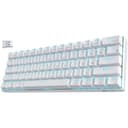


⌨️ Compact power, endless play — your desk’s new MVP!
The RK ROYAL KLUDGE RK61 is a sleek, ultra-portable 60% mechanical keyboard featuring versatile triple-mode connectivity (Bluetooth 5.0, 2.4GHz dongle, and USB-C wired), hot-swappable blue switches for effortless customization, and a high-capacity battery delivering up to 13 hours of continuous use. Its dynamic single-color backlighting with 17 modes enhances your setup with subtle style, making it the perfect choice for gamers and professionals craving performance and portability.


| ASIN | B0731CJ4ZJ |
| Additional Features | Backlit, Hot-Swappable, Portable |
| Antenna Location | Gaming |
| Best Sellers Rank | #1,568 in Video Games ( See Top 100 in Video Games ) #36 in GEM Box Microconsole #150 in PC Gaming Keyboards |
| Brand | RK ROYAL KLUDGE |
| Built-In Media | USB Cable |
| Button Quantity | 61 |
| Color | White |
| Compatible Devices | Gaming Console |
| Connectivity Technology | BT5.0, Wireless 2.4G, USB-C |
| Customer Reviews | 4.4 out of 5 stars 9,526 Reviews |
| Enclosure Material | Acrylonitrile Butadiene Styrene |
| Hand Orientation | Ambidextrous |
| Item Dimensions L x W x H | 11.5"L x 4.02"W x 1.54"H |
| Item Type Name | keyboard |
| Item Weight | 780 Grams |
| Keyboard Backlighting Color Support | Single Color |
| Keyboard Description | Gaming |
| Keyboard Layout | QWERTY |
| Language | English |
| Manufacturer | RK ROYAL KLUDGE |
| Model Name | RK61 |
| Model Number | 8541667752 |
| Number of Batteries Required | 1 |
| Number of Keys | 61 |
| Power Source | Battery Powered |
| Recommended Uses For Product | Gaming |
| Series Number | 8541667752 |
| Special Feature | Backlit, Hot-Swappable , Portable |
| Style Name | Modern, Compact |
| Switch Type | Pushbutton Switch |
| Theme | gaming |
| Unit Count | 1.0 Count |
B**G
Overall a good starter 60% Bluetooth Mechanical Keyboard, especially given the price!
PRO * Very affordable 60% Mechanical Keyboard, especially given the Bluetooth connectivity. * OEM Keycaps are actually fairly thick in comparison to other mechanical keyboards in this price point. When measured with digital calipers the factory OEM keycaps were around 1.3mm. (EnjoyPBT or GMK keycaps are 1.4 and 1.5mm respectively). * Keyboard has fairly standard keycap sizes which makes switching to an aftermarket keyset easy and painless. * Surprisingly sturdy build especially given the price point. * On/Off toggle switch for the Bluetooth radio on the bottom of the keyboard. * LED indicator under spacebar for when keyboard is charging. CON * Bluetooth is Bluetooth version 3. However, for general typing use this shouldn't be an issue and wasn't an issue in any of my experience. However, if used for gaming you might want to play plugged in via USB to avoid any latency. * As I generally use fully programmable keyboards or keyboards such as the HHKB Professional BT where the Control key is where the Caps Lock key is placed, I'd really like to be able to reprogram the keyboard layout via a desktop application or perhaps via an Android/iOS application such as what is present on the Anne Pro from Obins. This is also true of the arrow key placement as I'd prefer to use HHKB style arrow clusters or at least vim arrow keys (hjkl). IMPROVEMENTS * Would like to see different switches offered such as Gateron Silents. * Perhaps switch to white LEDs as this would be more pleasing and would match with aftermarket keysets better. * See misc improvements or changes I'd personally prefer to see throughout the review. MISC FEEDBACK * The model I am reviewing had a generic Cherry MX Blue switch in it. Normally, I'm not one to use a clicky MX switch as I tend to prefer Cherry MX Silent Blacks (Linears) or Zealios (67g Tactile) or Topre style switches. * Personally, I'd prefer to have paid $5 more to obtain this board with a different selection of switches (Gateron Silent Blacks for linears, maybe Silent Gateron Browns for Tactiles?) over the switches included. * When utilizing the LEDs the Caps Lock key is not turned on by default, unless caps lock is active. I'd prefer to have all keys lit if LEDs are activated and when caps lock is turned ON to have the LED shine a different color via an RGB LED in this switch.
T**G
good quality
good
J**N
Quality of the switches, Wireless
update (2020.4) : I am not changing 4 star rating but I could fix the issue by myself. so here is few tips for the users suffering similar issue. The popping key cap could be fixed using adhesive residue that I could scrap from tape. I could use a glue but at the time I didn't have it. and it could smear into switch mechanism to ruin the switch. This little amount of adhesive scraped from tape worked perfectly and safely. And another tip for Mac users. hard to type due to complicated combination of keys to type "?" could be solved through letter replacement under keyboard setting in Mac OS. I personally have set two exclamation mark to be replaced to question mark. I hope this helps. this keyboard is a joy to use and joy to hear. It was little challenging to figure out short cuts at first. But once it’s done, this keyboard has become one of my favorite keyboard of all time. It just has perfect combination of everything. Size, quality, wireless and price. I didn’t even expect this keyboard to be this good. 4 stars : I'm adjusting minus 1 star from previous 5 star rating. some key caps pop out if I type really fast. I'm thinking about putting some glue to those key caps to switches. Other than that it's OK 3 stars : I have been using this keyboard as a 2nd keyboard. so the mileage wasn't too long. but one of the key is not working now. I'm sad that this keyboard couldn't keep up with real use.
S**R
Unbeatable for the price.
After much searching, I finally decided to pull the trigger on and RK61. I had trouble finding anything for the price, wired or not. Those devices that were close in price, were wired, didn't have comparable features, or were simply ugly. Given the price point, I was skeptical, but after several weeks, I can happily report a happy purchase. The only issue I encountered was mentioned in the reviews, there was a very noticeable wobble, as one of the four rubber pads on the underside, was slightly more recessed than the other three. The quick and easy fix was prying up the pad with a knife point, removing the adhesive pad (shown in picture) and adding a couple dabs of hot glue, before pressing the rubber pad back in. I then flipped the keyboard over and pressed gently to make sure it leveled with the other three. Presto, no more wobble, I hope this helps if anyone was on the fence for that reason. Bluetooth range is good, I can easily use the keyboard across the room. Bluetooth compatibility in windows and a recent linux distro has been great, no pairing issues. One quick hotkey swaps between wired and wireless modes. You can easily cycle through the backlight modes, or turn them off entirely. I tend to use a constant glow on lowest brightness, and at least for me it's not overpowering in a dark room. The swapping between number keys/ arrow key, and their default functions takes a bit of getting used to, but after you adapt it's not a problem. Check images in customer reviews for the hotkey settings that allow you to swap between. I had an odd issue where Num Lock was enabled by default on delivery. It took me a few minutes to figure out what the issue was, and that there is no way to toggle this setting from the RK61 at least from what I've found. Solution for me was a backup keyboard used to deselect the lock. It hasn't re-occurred, just make sure you have another keyboard handy when you're setting up. Haven't used the keyboard for gaming as of yet, but I will update the review once I've tested the keyboard for rollover. 5-key is what was advertised, I can attest to at least three, by nature of several hotkey functions built into the firmware.
A**K
Nice quality, small keyboard for touch typists in a small workspace.
COVID has me working in my small home office. I have my work MacBook, my Windows Laptop, and my old iMac all jammed onto a small desktop. Wanting to clean up my desk, I was looking for a Bluetooth keyboard that would work with all three. Which brought me to this small, wireless keyboard with the ability to pair with three machines. Here's the good news, this is a well-made keyboard. It's fast. If you have the ability to type very fast, the switches on this keyboard have strong tactile feedback that allows you to actuate each key without fully depressing the key. If you aren't a touch typist, this probably isn't the keyboard for you. If you are a touch typist, you have three key combos that you will need to learn, or the benefits of this keyboard miss you entirely. This is a noisy keyboard, for a reason. If you are a touch typist, you may like the audible click each keypress makes. This is, however, not a friendly keyboard for use in a shared workspace. This is a small keyboard, but it has full-sized keys. This is great if you are a touch typist with a small, private, workspace. It does require some tradeoffs. In order to make the keyboard small, but retain full-sized keys, there are fewer keys than a standard 101 keyboard, this machine has multiple functions or layers for many of the keys. This keyboard has full-sized arrow keys that occupy one layer. Press Fn+Enter and that layer is disabled and now the up arrow becomes the /? key. Left arrow becomes the right Alt key and the Right arrow becomes the right CTRL-key. (I'm not sure what the down arrow becomes.) Tada! In my case, I also need to flip the functions of the keyboard from windows to Mac. To do that, I hit Fn+A or Fn+S Then I have access to all the windows or Apple functions. I can use Fn Q to switch to my work laptop, Fn W to switch to my windows laptop and Fn E to switch to my old iMac. Kudos to this keyboard for having EXCELLENT Bluetooth management and excellent power management. It reliably stays connected to the machine I want it connected. It reliably switches on command. It reliably reconnects after it has gone to sleep. In this regard, it is even better than my old Apple wireless keyboard. Finally, the top row of keys acts both as your regular numeral row and your Function keys. To toggle that layer, I hit Fn+Ctrl to flip back and forth. Admittedly, Remembering these three key combos takes a little getting used to. The instructions are sparse, but they exist, and the keyboard functions as advertised. This is a loud, clicky keyboard. I kinda like it, though I have to close my office door or my wife will comment on the noise. The keyboard has survived its first week of use on one charge, so that seems acceptable. It charges through its included USB cable. The battery is permanent and not hot-swappable. The key switches are permanently soldered in, so they aren't swappable either. The keycaps are swappable, and I may just buy a new keycap for the "WIN" button. Oh, it has amber lights. I have the black version of this keyboard and they look nice, though I don't really need all the wavy patterns. The layers thing doesn't bother me too much, but it is hard to get used to my wife laughing whenever I type. _____ I've spent a bit more time with this keyboard and I've added a start. It was easy for me to add the Fn+Enter to toggle the arrow keys and Fn+Ctrl to toggle the function keys. I'm super happy with the ability to switch between three devices on demand. This really is a great keyboard for the money, and the seller did a great job getting the keyboard shipped promptly. They even sent a personal follow up email to ensure everything went well and that all my questions were answered.
J**Y
Would recommend
Good quality works just as well as the Royale kludge I bought off their site and it shipped a lot faster than their site did although RGBs only have one color u have to buy the RGB version for the multi colors
J**.
Five years in, still going strong
I moved to South America and I bought a couple of cheap(ish) mechanical keyboards for work. I have been using this one daily for almost five years, using it with my Mac Mini. The keys feel great to type on, the RGB (Or in my case, just blue) light can be toned down so that it is elegant and not "hit you over the face" with bright lights. I sometimes use it with my iPad, as it is pretty easy to switch between bluetooth devices. It is fairly light, but I don't really travel with this very often, so it's not a factor for me. I'm happy that it has lasted this long, didn't expect it considering its somewhat low price (At least compared to other wireless mechanical keyboards). Will happily buy another one when this one eventually breaks.
B**.
A Keyboard Enthusiast's Opinion
Today I am reviewing the Royal Kludge 61. This keyboard seems to have a lot going for it. An entry level price at forty-five dollars, mechanical switches, backlighting, and Bluetooth. Let’s see how it holds up in real world use though. Initial Impressions: Things I noticed right off the bat. First, it is much heavier and more premium feeling than I expected. Second, the leds are brighter than I expected. Third, the switches feel okay for a keyboard of this price. I would say that they are more tactile than my Dell AT101W’s black alps, but not as smooth as my IBM Model F. Something that I noticed, but do not like, are the keycaps. They are really trying to push the “gamer” aesthetic. I would just like some plain keycaps, black with standard font. I also noticed that most of the caps were not fully depressed onto the stem of the switch. It wasn’t an issue to fix and took me only seconds, but that shouldn’t be an issue with a new keyboard. First typing: I would say here is where the keyboard begins to fail. The first thing I noticed was that it wobbles when you type on it. This is unforgivable with a keyboard. The wobble makes me feel less confident with each keystroke. I was able to correct this by putting eight sticky notes underneath one of the offending feet. Secondly, the layout is terrible! If it could be reprogrammed it would be very usable since it is a stock ANSI format. Here are some things that I see wrong with it initially. First, the escape key is the primary key on the top left corner. This makes it very hard to access the ` and ~. To get to these keys, you need to press the function key then it acts like it should. I would prefer to press function to get escape. Speaking of the function keys, F1-10 are in a line. Then it is interrupted by the led brightness buttons. F11 and F12 are in the next row down. I am a combination of confused and disappointed. First, why would your breakup something that has the perfect amount of space to complete? Secondly, why would you put the led control buttons in the function row? It really doesn’t make sense. Another major issue I see is the up arrow, the / key, and the ? key. This key is, by default, the up arrow. This makes typing questions a much more finicky process as you now must press 3 different keys! That’s an inexcusable error. Arrow keys should always take lower priority to main punctuation. Other than the outrageously horrible examples I provided above the rest of the layout is all but standard and is simple to use. Design thoughts: I have already discussed my dislike of the keycaps, that’s personal though. Things I would have like to have seen that wouldn’t have been too expensive to implement. Charge indicator leds! I would love to know when I need to charge my keyboard. The caps lock key not illuminating when it caps lock is not on is a good idea. It sort of takes away from the generally nice lighting though. I like the idea of having higher edges on the case. Many keyboards in this price range are not including a case that comes up to the bottom of the keycaps. Since this is a keyboard that people may carry around, I think that this was a smart move to protect the switches. Since the keycap layout is standard layout getting new keycaps for it would be a breeze. The spacebar is even standard size, something that is often not the case with smaller keyboards. The keycaps are a standard profile, no issues there. A few gripes with the keycaps. First, they don’t really have much texture. I sort of felt like my fingers slid a bit too much. Still very usable though. The keycaps also have glossy black plastic on the sides. This causes them to collect fingerprints and dirt easily. The glossy plastic does create a cool shining effect though. The tops of the caps aren’t glossy so I wouldn’t count this against them, just understand that you might be cleaning your keyboard more than you expected to. Switches: The keyboard comes with blue Jixian switches. They have a satisfying click and tactile bump. The pitch is much higher than my buckling spring keyboard, but also much lighter. I would say that they are smooth enough for general use. If you are an enthusiast you might not be completely happy with them, but if you are coming from rubber domes you will be very satisfied. Comparing them to my Outemu browns they are significantly more tactile, to the point where my browns feel linear. This was very good. I was able to type on this keyboard without bottoming out, something I was unable to do on my Outemu browns. The wobble in the switch is acceptable for the price range. None of the stabilized keys seem to bind or have issues with off center keypresses. Off center keypresses are not an issue with these switches. I think this key switch works great for typing! It felt very similar to my Cherry MX Blues in a Das Keyboard. However, the click sound was higher pitched and the switch didn’t feel quite as stable, but still very usable. I had a few family, friends, and coworkers test this keyboard and tell me their opinions. Some have used mechanical keyboards some haven’t. Generally, they liked it and said it felt and sounded good. Bluetooth: Setting up Bluetooth the first time was a pain. The directions didn’t seem to help. When I contacted the seller, they said to press FN + Tab to enter Bluetooth mode. That would have been nice to see in the manual. After doing so pairing was much easier, but still took a few tries to get it right. I initially paired it with my Samsung S8+ and that was a nightmare. It seemed to send the function layers instead of the actual letters. This made it unusable. Pairing it with my Surface Pro 4 was the same as a wired connection. Summary: For $45 dollars I think this keyboard makes an interesting option. It does a lot right. The case feels solid, the switches sound and feel nice, and Bluetooth is a huge plus. However, the keymapping is the worst I have ever used. I think it is absurd that anyone thinks that I should use a function key, on top of my shift, to type a question mark! If they changed this, or allowed end users to remap the keyboard, I would have very little to complain about. Some nitpicky things that I have to say about it include the use of glossy plastic on the sides of the keycaps and how the manual should be rewritten to better explain the Bluetooth pairing process. In the end, I would recommend this keyboard, if and only if, they change the keymap. That was the part of the keyboard that I could not stand.
Trustpilot
Hace 1 semana
Hace 2 días