We remain fully operational. Our teams are working around the clock to ensure your deliveries continue safely.

Descargar la aplicación


Servicios al cliente
Sobre nosotros
Copyright © 2025 Desertcart Holdings Limited
Descargar la aplicación





Buy anything from 5,000+ international stores. One checkout price. No surprise fees. Join 2M+ shoppers on Desertcart.
Desertcart purchases this item on your behalf and handles shipping, customs, and support to Colombia.
📸 Scan Smart, Share Fast!
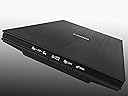
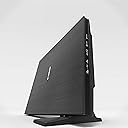
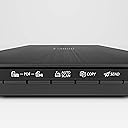
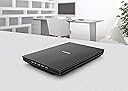
The Canon CanoScan LiDE400 Document Scanner is a versatile, USB-powered scanner designed for professionals. With its advanced Z-Lid for thick media, 4800 DPI resolution, and cloud integration, it streamlines document management while being lightweight and energy-efficient.
| ASIN | B07GPS69KF |
| Best Sellers Rank | #268,996 in Office Products ( See Top 100 in Office Products ) #292 in Document Scanners |
| Brand | Canon |
| Color Depth | 24 bits |
| Connection Type | USB |
| Customer Reviews | 3.8 3.8 out of 5 stars (877) |
| Greyscale Depth | 16-bit Internal / 8-bit External |
| Item Dimensions D x W x H | 4.92"D x 6.7"W x 1.42"H |
| Item Weight | 4.92 Pounds |
| Light Source Type | LED |
| Manufacturer | Canon |
| Media Type | Photo |
| Minimum System Requirements | Windows 7 |
| Model Name | CanoScan LIDE 400 |
| Optical Sensor Technology | CCD |
| Paper Size | A4 |
| Resolution | 4800 |
| Scanner Type | Book, Document, Photo |
| Standard Sheet Capacity | 100 |
| UPC | 013803306538 |
| Wattage | 4.5 watts |
J**M
A good solution if you have a lot of old family photos to scan.
Recently I needed to scan crates of old family photographs before I put them in storage or sent them on to relatives. I already had a scanner but it wasn't good for the job. The Canon LiDE 400 was the solution I needed. QUALITY OF THE PHOTOS The LiDE 400 gives me good-quality scans of my photographs. It is good enough for family photos that I will pass on to other relatives and probably never touch again. The maximum resolution is 1200x1200 dots per inch. I can scan tiny pictures at that resolution and enlarge them to see details I would have missed otherwise. (Although this depends on the quality of the original pictures.) AUTOMATION The LiDE 400 has an auto-scan feature, which makes it easier to get through a lot of pictures. You can put a photograph on the scan bed and press a single button. The scanner will automatically scan the picture at 300 dpi, crop and rotate the picture, and place it in a folder on your computer. Sometimes the auto-scan feature doesn't do exactly what I expect. Sometimes it crops off the white boarders in a weird way. Occasionally it decides to make my photos into PDF files instead of JPEGs. If this becomes a problem, you can use the ScanGear software that comes with the scanner, which gives more control over the process. or you can use your own software, like Photoshop. The scanner is also good for creating PDFs of old documents. You can scan multiple pages into one PDF file. OTHER NOTES The scanner was easy to set up and use. It has a single USB-C cable. There is not separate power cord. When I plugged the scanner into my computer for the first time, Windows downloaded the driver automatically and the scanner was ready to go. If you are in a similar situation, I think this scanner will work well for you too.
T**E
Avoid Canon if possible
First off, let me start with saying I wanted to like this product. That was short lived. Right out of the box the installation was easy and then it went downhill. The driver that connects the scanner to the computer does not work. Even after being on the phone with Canon for 30 minutes. I tried Windows and Mac with no success. All I keep getting is Code 2,156,33 which no documentation exists for these particular errors. The real kicker however is the terrible support structure for the product. In order to contact Canon you need to create an account and register your product. This is where I had even more trouble. When I tried to register my product it did not recognize my serial number, so I could not complete registration. But you cannot get support options until you register. So I was stuck in this loop and it became very frustrating. Finally I found Canons number on google. It went to the sales team, so they transferred me to customer service. Once connected I received an automated agent requesting the phone number associated with my account. Well since I could not complete registration, the phone number did not exist in the system. After attempting to put my phone number in several times and verbally saying representative, the automated system hung up on me and I immediately went into blood boiling mode. I then tried calling the number several times again and sat on the phone for 30 a piece trying to reach someone again with no luck. I then proceeded to call the general Canon number and an automated system pushed me to the customer service line where I had to put my number in again. Back to the loop. I called the general number again and went the sales route. From there I was begging the sales rep to put me in contact with someone because I am at my office space moment with this product. Luckily he did get me in contact with someone and I troubleshooted with Canon for a little over 30 minutes. No luck. They didn't know what the problem is and told me to contact Microsoft. OK THAT'S IT. I'm done. I will be returning this product and walking away from the Canon brand all together. I suggest people be aware of the troubles you may face if your product does not work.
P**R
Simple scanner produces great results (updated)
Minimalist scanner produces excellent results. I have used it to OCR scan several books in Norwegian. Frankly, it's the best OCR scanning I've ever done. It has trouble properly interpreting superscripts, confuses g with q and occasionally some capital letters like M which becomes IU. So I have to quickly edit the text, but I just run it through a Norwegian spellchecker and quickly fix the few that occur. With previous OCR, I spent so much time editing, it was often faster to just retype the text instead of scanning it. I also use it for scanning other documents as jpgs or pdfs and the quality is excellent considering how inexpensive this scanner is. I have not used it for color photos, so I can't vouch for this, but it outperforms every scanner I've had in the past so I suspect color photo scanning is at least as good. Update: 2/13/2026 Just had to share this. After over 3.5 years of flawless use, my cats knocked the scanner off of a 4' high shelf onto a hardwood floor. The front plate over the front switches flew off. I figured out how to snap the plate back on, and plugged it in to assess the damage. No damage. Not even a scratch. It still scans perfectly. I'm not going to claim it's cat-proof, but this little scanner has been a workhorse. Possibly the best one I've ever had. Highly recommended.
K**M
For thew price point, a decent product
I have been using this scanner for a few months - mainly for documents. Performance-wise, it does what I need to do - occasional document scanning. I would have liked a heavier lid as I need to be careful as the build is a little flimsy. Price point was good so I cannot complain. Profile is low, but takes up real estate on your desk. Was somewhat challenging to set up with my Mac, but I worked it out. A little noisy, but so are the others I have used. Good to go.
G**R
as promised it is delivered and it is working good
I**Y
Compré el Canon LiDE 400 para digitalizar documentos e ilustraciones y me sorprendió lo bien que funciona. Es rápido, silencioso y permite escanear imágenes a alta resolución sin perder detalle, incluso en dibujos con líneas finas. También es ligero y práctico porque se alimenta por USB, sin cables extra. El software podría ser un poco más intuitivo, pero cumple. La paquetería llegó perfectamente protegida. En general, es un escáner confiable y muy útil para quien necesita buena calidad de imagen, colores muy fieles, adjunto algunas ilustraciones que escanee sin necesidad de trabajo de postproducción, aún no lo he probado con fotografías, pero espero resultados igual de buenos con unas antiguas que quiero preservar.
A**I
Loved my aging Canon CanoScan LiDE 220 it served me well but did not provide drivers for Windows 11. Loving this CanoScan LiDE400, its more compact and way faster and the quality of the output is much better. Setup was dead simple. I'm really enjoying using this machine.
J**R
Good
V**G
Excellent scanner. Almost 3-4 times faster than my ancient HP scanner. Scans only upto 600dpi. No 1200dpi option like my HP flatbed. WIA driver not working well but TWAIN driver is ok. I find colour scanning suboptimal.
Trustpilot
Hace 2 semanas
Hace 1 mes