We remain fully operational. Our teams are working around the clock to ensure your deliveries continue safely.

Descargar la aplicación


Servicios al cliente
Sobre nosotros
Copyright © 2025 Desertcart Holdings Limited
Descargar la aplicación

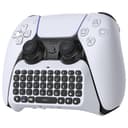

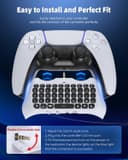


🎮 Level up your PS5 chat & control—type, talk, and conquer like a pro!
This Wireless Controller Keyboard for PS5/PS5 Pro combines ergonomic design with Bluetooth 3.0 connectivity, a built-in speaker and microphone, and a rechargeable battery. It snaps onto your PS5 controller for seamless messaging and voice chat during gameplay, enhancing communication without the need for additional headsets. Lightweight and portable, it offers easy installation and automatic pairing, making it an essential accessory for serious PS5 gamers.


| ASIN | B092MCLQBZ |
| Additional Features | Wireless Controller Keyboard for PS5/PS5 Pro |
| Antenna Location | Gaming |
| Best Sellers Rank | #3,888 in Video Games ( See Top 100 in Video Games ) #353 in PlayStation 5 Accessories |
| Brand | MENEEA |
| Built-In Media | Wireless Controller Keyboard for PS5/PS5 Pro |
| Button Quantity | 47 |
| Color | White |
| Compatible Devices | for Playstation 5, for Playstation 5 Pro |
| Connectivity Technology | Bluetooth |
| Customer Reviews | 4.1 4.1 out of 5 stars (1,567) |
| Enclosure Material | Plastic |
| Hand Orientation | Ambidextrous |
| Keyboard Description | Ergonomic |
| Keyboard Layout | QWERTY |
| Manufacturer | MENEEA/Forward Technology HK Co., Ltd |
| Model Number | JYS-P5121 |
| Number of Keys | 100 |
| Power Source | Battery Powered |
| Unit Count | 1.0 Count |
| Warranty Description | 1 |
R**6
Mini Keyboard also Indirectly Enabled Apple Keyboard
Pleasantly surprised this mini keyboard could help authenticate (code) for my Apple keyboard, which has been useless on PS5. Now I could also type on a regular keyboard, albeit the keys don't map special characters perfectly--usable--good enough. Easy setup. Enter PS5 bluetooth code slowly is key.
D**E
Keyboard, Mic
Works well. It does make me sound too loud though to other people when using the microphone. However this is a case by case basis, if you have friends there are noise sensitive be cautious when using. Besides this, enjoy! Keyboard works too! Just have to get used to the letter sizes.
A**R
Good first impression. Very light weight. Needs improvement in practicality.
So at first use, setting it up was super simple. Instructions were clear. It hooks up to the remote very nicely. There's no play or looseness around it. Feels nice in the hand and it doesn't get in the way. The buttons are also good. They make a click sound when you push them. And they are not too small. The letters however are a bit small, especially the blue colored ones they use for the secondary functions. They're kinda hard to read. They should've used green or orange. The blue just blends in with the black keys. When in use the keys are fast and there's no lag that I noticed. The blue tooth pairing is virtually instant and as it turns out you don't have to plug in the keyboard into the remote to use it. Which is probably how I'm going to use it because of one quirk which is pretty annoying. When plugged in, the audio jack steals your sound from the TV and it comes out the little speaker in the back. That means you have to go into the settings every time and switch to HDMI out if you want the sound from the tv. Even more annoying is that when you want to use Bluetooth headphones, you have to go back into settings and switch that to headphones. So I don't even bother plugging the thing into the remote. Which is really lame since I was hoping to use it that way. Oh well, maybe their next version they'll figure out how to fix that quirk. Over all I'll continue to use this as it's very handy even if it's a little awkward to hold on it's own.
V**X
Glad I got it!
Takes getting used to if you've never used an addition like this, but its very handy! Easy to install, and 'just works' and never had any issues with compatibility on any of my controllers, so I'm very happy with it. it may 'feel cheap', but you have to keep in mind, there isn't much technology in this thing so it's mostly hollow, and we do have this idea in our head that 'heavy = quality" and that isn't always true. Good value for the money!
B**Y
Very basic PS5 controller keyboard
Basic keyboard for PS5. Very lightweight. Fits the PS5 controller like a glove once the headphone jack is lined-up. -> Buy this if you need a basic keyboard for the PS5 but do not expect a game-changing experience. Keyboard works with/without PS5 controller once paired by bluetooth. Auto-Sleep function is nice to save battery but the very small battery is only 500mA. If you forget to turn it off the previous night, it will need to recharge before next use. *Packaging instructions say charging port is Micro-USB charging but the controller is definitely USB-C (neither cable is included). Negatives: Alternative keys such as : ! @#$%^&*() , are dark blue against the black keys... it is impossible to see the alt characters, especially in darker conditions. You must 'hold' the Shift key while using your punctuation marks which is very annoying. This is not a product feature but it would be fantastic if the keyboard could illuminate. Does not light up/is not LED backlit which makes low-light use *extremely* difficult. When docked/connected to the PS5 controller, the keyboard's tiny speaker (hidden beneath) sounds very tiny and is not suitable for gameplay audio. Occasionally, the keyboard missed keystrokes or added unintended double-letters. PS5 "Mute" button becomes increasingly difficult to press with the keyboard attached. I returned this PS5 keyboard and will look elsewhere for a more suitable product.
D**Z
Completely Useless
The device came with little packaging and promises of plug and play capabilities. It technically works as a speaker when plugged into the PS5 controller, but could not get the OS to recognize the keyboard. Even when attempting to pair through Bluetooth, my Playstation was still unable to use properly. Its speaker defaults to the loudest setting, making it very clunky for your first time using and forces you to turn the volume settings down to make it tolerable. Microphone worked, but I believe that is in spite of the device as it doesn't really seem to interrupt the controller's inherent microphone. No matter what I did, the keyboard never sent any input, and I'm an IT specialist so I did a lot of troubleshooting. The whole reason I bought the device was for the keyboard making this thing completely useless.
M**E
Easy to install
Very simple to install. Plug and play. It works great. Just know, it adds quite a bit of weight to the controller. Takes a bit of time to get used to it. But it’s not bad.
D**N
Perfect Fit
The portable wireless chat pad for PlayStation controllers is a handy accessory for gamers who need a quick and convenient way to send messages without using a full keyboard. It attaches seamlessly to the controller without adding too much bulk. The Bluetooth connection is stable, ensuring minimal lag, and keys make typing in low-light environments easier. While the keys are small and may take some getting used to, they’re responsive enough for quick chats and in-game communication.
M**R
Assez satisfaite de mon achat
A**R
Smashing little thing for my ps5. Fits prefect easy to use
K**R
Tolles Teil reagiert super liegt gut in der Hand, nur zu empfehlen
ر**ج
لكن وضح جودتها جميله
プ**4
説明書は英語と中国語で他のレビューした方が書かれているように日本語の説明は有りませんでした。 購入する際はその点を注意しましょう! しかし、iPhone のカメラ機能を使うと英語も中国語も翻訳できる(機種によってはできないかも知れません)ので私は翻訳して使用するつもりです。 海外の方のレビューでは普通にチャットしてゲームしてるようなので、どちらかと言うと英語を理解してる(中学程度の英語)方向けなのかも知れまん。 追伸、Bluetooth 接続できない方はPS本体の設定→周辺機器→確認できる周辺機器の表示に 「JYS Bluetooth Keyboard 」の表示をクリックすると(商品の電源をONにしBluetooth ボタンを3秒以上押しておく)パスコードが表示されるので商品のキーボード⌨️でパスコードを入力すればOK!。接続できるまで電源ONからやり直しパスコードを30秒以内に入力する必要があるので注意❗️ 接続できれば普通にローマ字入力出来た。海外の方も「慣れれば使える」と投稿してた通りだったのでお試しあれ👍また、商品の充電も忘れずに2時間程度でフル充電🔋。
Trustpilot
Hace 3 semanas
Hace 3 semanas