
Descargar la aplicación


Servicios al cliente
Sobre nosotros
Copyright © 2025 Desertcart Holdings Limited
Descargar la aplicación

🌟 Own the 360° revolution — don’t just watch, be everywhere at once!
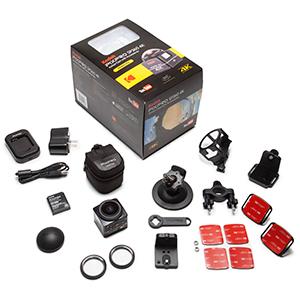
The Kodak PIXPRO SP360 4K Premier Pack VR Camera is a compact, lightweight 360-degree video camera featuring a 235° ultra-wide lens and 4K-equivalent video capture. Designed for social media creators and VR enthusiasts, it offers wireless control via iOS/Android apps and includes desktop editing software for Mac and PC. While it delivers immersive panoramic footage and versatile mounting options, users should be aware of some reliability and software limitations. Ideal for early adopters eager to pioneer 360° content creation with a ready-to-go kit.




| ASIN | B01EABUA1I |
| Batteries | 1 Lithium Ion batteries required. (included) |
| Best Sellers Rank | #196 in Webcams |
| Customer Reviews | 3.6 3.6 out of 5 stars (215) |
| Date First Available | April 15, 2016 |
| Is Discontinued By Manufacturer | No |
| Item Weight | 3.68 ounces |
| Item model number | SP360 4K-BK3 |
| Manufacturer | JK Imaging Ltd |
| Product Dimensions | 2.06 x 1.88 x 1.96 inches |
K**L
... hard to get them to work if one went bad you have to start over
I have used 10 gopro's and worked hard to get them to work if one went bad you have to start over... Gopro Hero 4 Black heats up fast... The Kodak 4K s two camera takes pretty darn great video.. This 360 thing is vert hard and tricky, the camera are the easiest part the editing can be tough. The software when it works is pretty darn good.. however is quicker.. I use Autopano and that is much harder to use, I mean harder to learn... I have been trying for two weeks to understand the Key frame for stitching... I use the 4k for everythinjg so I am working daily.. and the 4k is pretty good i mean pretty darn good.. its pretty strong in low light compared to gopro's and the other models... for 1000 bucks.. I am getting ready to buy two more...Solid 360 will change everything... be on the cusp instead of behind...you can GoPro or you can "Kill it with Kodak"!
C**S
Too unreliable, unpredictable, and low res output; this is probably not worth your money, time or frustration
If I could give it 2.5 stars I would but I am rounding down for several reasons - to be explained Overall, the camera seems to have decent build quality and looks like a good idea in theory. However, it seems as though there's a way to go with this technology before it actually gets good. This camera leverages the 4K name but don't be fooled by labels... the output is FAR from 4K resolution or clarity. The form factor is nice and the included accessories in the Premier pack are reasonably well thought out, with a few hitches. For the price, I don't think this camera delivers on its value proposition. Aside from the video quality being less than expected and ostensibly advertised in the name, there are also reliability issues that came with my unit anyway. If you absolutely MUST have a 360 camera, this may be a good option due to its relatively low price but if you are looking to get in the pool just because there is a pool - wait; the water will undoubtedly get better over time. In detail: I purchased this camera 20 days ago and have experimented with it over several of those days. My primary reason for purchasing it was two-fold: 1 - To use it as a security camera for my wife's car as we suspect someone may attempt to damage it in the lot where she has to park for work. My intention was to leverage the motion detection to monitor activity around her car and if any damage were to show up, we'd have video evidence with which to hopefully nail the perp. 2 - I train and coach in all forms of driving. One of those forms is running a teen driving school. My intention was to use this camera to capture time out on public roads and document when people in traffic were doing good things or bone-headed things so I could show the video in a classroom setting and talk it through for my students. I also planned (haven't done yet) to put the camera in some of our training cars to evaluate how my instructors are doing and/or again use that footage for classroom conversation as a teaching aid. As a security camera, one of the really annoying things about this camera is when you switch on the motion detection mode, if you power the camera off, you have to dig your way through the complex menu to switch it back on - every time. Too cumbersome. Indeed, it doesn't seem to remember ANY settings other than resolution and aspect ratio between power cycles. I find this frustrating and short-sighted on the mfg's part. Secondly, every time I've used the camera in motion detection mode (it sits idle until it detects motion in the frame and then records for 10 seconds, then goes back to idle/sleep and waits for motion), it has arbitrarily turned itself off/powered down for NO reason. It had plenty of battery left, and no one changed anything; it just 'died.' This tells me that there's some problems with the camera's code/programming/BIOS. Perhaps it's hitting an exception in its code and its reaction is to power down. Which of course means, if caught mid-day, once powered back on we have to take a while to navigate the cumbersome menus to get the settings back, including motion detection. VERY FRUSTRATING and useless as a security camera because of this bug. I've actually had it just power itself down while recording in 'normal' mode (not motion det. but manually hitting record.) I've been recording, thought I'd caught something worth keeping, looked at the display only to find it was entirely blank as the camera was no longer on. That's called SUCK. When driving with it mounted in the car, I use the suction cup mount and run a car charging cable to it that is within spec according to the manual and what I've found online (the REAL manual - what it ships with is an all but useless quick ref.) The camera gets VERY hot when it is plugged in and on - whether recording or not... if it's powered up and plugged in, it gets HOT. Not sure what that's all about... Speaking of the mounts... They give you a nice array of mounts that look like GoPro mounts with the camera. I thought this was great until I went to mount the suction cup to the sunroof (as the suc sup mount will NOT allow you to mount the camera upright on the windshield - they expect you to use it in "Front" mode which is NOT 360, it's just a really, really wide framed shot of what's in front of you/the camera. Again... useless based on the camera's stated intent and name. Anyway, when I mounted the camera to the sunroof, it wasn't low enough and the rear-view mirror blocked too much of the frame, as did the door sills from the roof in the back doors. I figured, no worries - it's a GoPro style mount, I'll just get one of my shorty extensions from my myriad GoPro kit and add it to the stalk. Come to find out, the Kodak camera REVERSES the GoPro attachment tech - where GoPro uses 3 prongs to receive the camera's 2 prongs (the part you put the tightening screw through), Kodak uses 2 to receive and 3 on the device. So you can't readily use the camera with any of the GoPro mount tech. I got around this by digging out a screw and removing the receiver nut from my GoPro mount (otherwise you have a nut on each side and nowhere to run the screw through to attach it all), and offsetting the two mounts, then running my found screw through it all to "McGyver" something together. Perhaps GoPro has a legal lock on their mounting tech, I don't know but this was a relatively frustrating surprise but obviously not insurmountable. Lastly, the built-in image stabilization is good for low frequency vibration but higher freq's like that experienced when driving on a concrete interstate or road under construction overwhelms the camera's capability. You wind up with video that could make the saltiest of sailors motion sick from watching the results. There are a lot of complaints out here about the software and the instability of the camera's WiFi. I've certainly experienced the WiFi instability and it can be annoying when it is frequent. I just used the WiFi to frame shots and make sure the camera is not being blocked where I need visibility, so on, check, and out/off. While it acted up on me some, I could still get what I needed done. As for the software... it IS very basic but I didn't expect much based on reviews. It DOES get the job done and you don't have to upload to YouTube, etc. You can get a very good idea of the camera's results through the PixPro software. It allows you several perspectives and is quite easy to use. Personally, I found the viewing software the least annoying thing about the whole setup. Granted, I am only using one camera. For those who are attempting to double up to get a true spherical visibility and presentation, perhaps the software is much worse a solution. In summary: Overall, for $500 I am not impressed enough. I am very seriously considering returning the camera before my Amazon 30-day window expires. My only hesitation is there is nothing else out yet that does motion detection like this camera does for security purposes but as mentioned, this camera is quite unreliable in that function due to gross failure/arbitrary power-down when battery, etc. are all good. My advice - WAIT FOR SOMETHING ELSE. This will no doubt become a very competitive marketplace and prices will only come down over time. Unless you have a pressing need and a "low" budget, keep holding out as this camera will likely take more of your time fuffing with the device itself (overly cumbersome menu & logic), and/or being disappointed or frustrated at the missed opportunities, lesser quality output, or unpredictable results than you will enjoying the output of the product. Or, of course be outright worried that the dang thing is going to catch fire because it's so HOT! ** UPDATE ** Well, I chose not to return the camera and continue on with it to give it another chance - hoping that new firmware would resolve the issues I had experienced. It's now a year since I purchased the camera and the firmware has not corrected any of these issues (unexpected power-down, heat, poor resolution, etc.) and attempts to get support from Kodak and/or the PixPro team have come up fruitless - and NO offers to replace the potentially defective since new unit. In short; I wish I would have returned it. The arbitrary "power off issue" was not just with motion detection, the unit powers itself off for no apparent reason (even when it's not so hot, temp-wise) and usually at the worst possible times during recording. I have missed more shots that I thought were being recorded than I have actually collected when putting this unit into service. Doing what I do, that can be expensive both monetarily and reputation-wise. When a customer expects video that cannot be produced because of unreliable equipment, they don't blame the camera, they blame you - the service provider. The result: this camera sits on the sidelines, a waste of time, effort, and money while more reliable and less expensive equipment takes its place, albeit without the 360 degree capability. The unpredictable power-down issue (battery status and/or direct power attachment make NO difference whatsoever) has made this camera so useless for my needs that I rarely use it for anything. I just threw $500 down the toilet, basically... No matter the price when you read this, please learn from my expensive mistake and avoid repeating it yourself. I'm dropping my review to 1 star because at the end of the day, a camera that is unreliable and unpredictable - esp. at $500 - is worse than no camera at all... I would NOT purchase this camera again, nor can I recommend it to anyone. Maybe someone from Kodak will respond to this review and offer me a solution that will allow me to update and raise my rating but honestly, my expectation for that is about as high as being able to actually USE this camera for more than 5 or so minutes without it turning itself off for no reason. I've gotten better support and information from the user-supported forums than any of my attempts with Kodak PixPro support.
G**E
You better buy ones of these before they are gone, chip shortage is killing cheap VR.
There are some quibbles (like I wish the charging ports was easier to access while on a mount) but for under $300 you cannot beat this package. The best part is if you get yourself a Dual Tripod Bracket here on Amazon you can also make 3D 180 VR. Making 180 3D requires a bit more effort in the post production, like you cannot stitch with the included software because its not make to for SBS, but there are plenty of rendering options to make it happen. Video posted shows a SBS render I completed, on YouTube it's in either 2D 180 VR on a phone or PC but 3D VR with a headset. Pretty cool.
A**R
This camera is great!! The software works just fine but if ...
This camera is great!! The software works just fine but if you want to get more technical you can buy other programs to stitch the videos better. Cant complain about any of its features since in my opinion its the best camera under $1000 as today.
A**R
Works well enough
Originally this was going to be a very negative review, the first units we were sent had clearly been tampered with (both lenses scratched and missing the duel camera mount) but amazon support is awesome and we have a new pair today (the next day). Many reviews here are bad mostly due to the included stitching software, but in my experience it is definitely good enough. Its no videostitch or autopano video yeah, but its free and I was able to go from shooting to premiere to Youtube in about a half hour, video quality is good and stitching was decent. The reason for the 3 stars is the included mounts and battery solution. The duel and single camera mounts both require the camera to be completely removed in order to get at the battery, sd card and ports making shooting test shots a big pain. The kit also only comes with a single battery charger for the two cameras essentially doubling the time it takes to prepare for a shot. Two cameras that are meant to operate simultaneously should have a means to charge simultaneously. All in all, if you need to shoot 360 video RIGHT NOW, this is probably your best bet for under $1000
L**Y
Die Dual PixPro bietet mir einen guten Kompromiss mit ordentlicher Bildqualiät und einfachem Handling. Auch die dazugehörige Software zum Stitchen lässt sich leicht bedienen.
W**N
We had a micro wedding, and I used this camera to to record the service for all those who would have wanted to join us. The quality was incredible. Everyone loved wearing the VR headset and stepping into the wedding. Great for us too to seethe service from a different perspective. I just need a longer battery life, and/or easier access to load a fresh battery.
S**K
Prezzo giusto, buona qualità ma si vede che oramai è un prodotto fuori mercato, troppo vecchio e superato da prodotti più recenti
P**E
A really bad camera in almost every way. Pros The lens - if you need a lense this wide, like I did, the 220° wide angle is good. Cons Where to start... The menu interface is terrible, really hard to navigate, and the buttons are difficult to use and not intuitive. Ejecting the battery relies on a flimsy plastic tag which gets folded and creased in normal use, so within weeks it becomes unusable. You have to have good fingernails after that. The 4k badge is a bit of a cheat, because it's not the 4k format you want, it's a square format which probably doesn't do what you hope it will, and then only in 'spherical' mode, which probably isn't what you wanted either. You can't power the camera from an external power source, so you're reliant on battery life. There's no internal battery for retaining the date and time, so every time you change the main battery you need to set them again. *** After 7 months, the LCD screen on mine suddenly stopped working *** so I have to change the settings from memory. Just a really bad camera.
B**Z
Vino mal la cámara, una batería no duraba nada y la cámara recalentaba.
Trustpilot
Hace 1 mes
Hace 3 semanas