
Descargar la aplicación


Servicios al cliente
Sobre nosotros
Copyright © 2025 Desertcart Holdings Limited
Descargar la aplicación

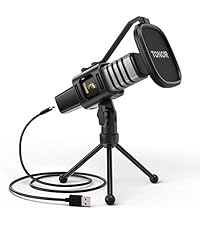
🎧 Own every meeting moment with flawless sound clarity!
The TONOR TM20 USB Conference Microphone delivers professional-grade 360° omnidirectional audio capture with built-in noise reduction, perfect for online meetings, classes, and calls. Featuring a convenient one-touch mute button with LED status and plug & play USB compatibility for Windows and macOS, it ensures effortless setup and crystal-clear communication in any environment.


| ASIN | B08NDB5NWP |
| Antenna Location | Video Conference |
| Audible Noise | 78 Decibels |
| Best Sellers Rank | #48 in Computer Microphones |
| Brand | TONOR |
| Built-In Media | 1x USB Condenser Microphone, 1x USB Cable (2m), 1x Manual |
| Color | Black |
| Compatible Devices | Personal Computer |
| Connectivity Technology | USB |
| Connector Type | USB |
| Customer Reviews | 4.4 out of 5 stars 1,968 Reviews |
| Enclosure Material | Polycarbonate |
| Hardware Platform | PC |
| Impedance | 2200 Ohms |
| Item Dimensions | 5.79 x 5.79 x 1.3 inches |
| Item Weight | 400 Grams |
| Manufacturer | TONOR |
| Microphone Form Factor | Boundary |
| Model Name | TM20 |
| Model Number | TM20 |
| Number of Batteries | 1 Lithium Ion batteries required. |
| Number of Channels | 1 |
| Polar Pattern | Omnidirectional |
| Power Source | Corded Electric |
| Recommended Uses For Product | Video Conference |
| Signal-to-Noise Ratio | 78 dB |
| Special Feature | Mute Function |
F**R
Looks so good. Works so well. Seamless integration w/macOS
Pros: - Great talking to AI (saves a lot of time over typing) - Hears everything. Responds well to macOS settings input volume adj. - Looks fantastic. - Mute button is perfect. Cons: - Can't think of any, just note it's about 5" or so, so you aren't surprised (and it makes up for it with its low-sleek good looking profile, so it's easy to 'stash') I double-sided taped it to my reclining zero-g desk, somewhat hidden under the monitor when reclining, yet picks up the sound perfectly. Thus I don't have to stare at it constantly when working (e.g. no light in my eyes) but easy to see if it's on mute and toggle mute with the slightest tap. As opposed to directional mics which stick out and or don't have mute buttons or just aren't as easy to see state or access. It's just the most stylish one I've seen. It may be a feature of macOS, but I noticed the mute button doesn't work on lock screen! That may be a security feature. Not that it matters, you can toggle it as long as you're working.
P**C
Great Value ! Worked well in my situation. I would recommend
This worked well for me. I used it in a small auditorium that seats 200 people. the Microphone was attached to my computer at the front of the room and it was able to pick up speakers sitting in the last row about 30ft. I was using some AI software to take notes and transcribe the meeting. So any missed transcription could be due to an AI error. But 95% of the transcription was there. The room has good acoustic so that could have benefited the recording. Your milage may vary. Overall a good investment so far.
U**E
ASTOUNDING SOUND!
I am usually quite critical of items I review and always try to do my best in helping you decide. So my reviews are not based on a FREE item given to me but ones I have purchased and used. I have been using this TONOR USB Conference Microphone for almost a year now. I use it weekly in our church service. We have a small old country church that we live stream our services on and needed an omni directional microphone for those on Zoom. I had tried a couple of other microphones that worked okay. Each had different issues which we were not completely satisfied with. Then we purchases the TONOR microphone and tried it. Let me say that it is the BEST microphone by far of the ones we tried. The microphone picks up sound from all over our church (which is what we want...especially when doing prayer requests). The sound is crystal clear even when people are talking quietly. The mute button in the center works great when I need to use it! We also run it from the front our church all the way to the back (about 75 feet) using a USB cord and it works flawlessly. There is never a lag. It is very durable. It has been accidently dropped a few times but no dents or damage and the sound quality remained excellent. I usually don't give such high praise for an item but this microphone has worked perfectly over the last year.... and I believe it will last for MANY years! We are COMPLETELY SATISFIED and would HIGHLY RECOMMEND the TONOR USB Conference Microphone! A+++
T**N
Microphone Only, No Speaker
Good for Microphone but I did not realize it does not include speaker, it is a Microphone only.
J**T
Great Distance Capture!
This Omnidirectional Microphone is excellent for people who need to give conversations while moving around, or perhaps there are multiple people in the room trying to have a say. In my case, I will be building a microphone booth, and want to try to test a conversation from my table, to the person sitting in the room. This Mic is a USB type C device, which is great for the new devices coming around. It comes with a Type C to Type A ( the regular rectangle USB port ) So you can connect it to computers or laptops that require that port if needed be. The Mute function works with the touch of the finger, and clearly gives you a red, or blue indication to show if it is muted, or active. Visual indications are a blessing for those who don't want the mic active for different reasons. My only negative point about the microphone, would happen to be the White noise ( Signal Noise Ratio ) at higher levels. In the video, I show how low of a signal around 0dB feels, and how it becomes more apparent as the level rises up. But for a $30 microphone, it is totally understandable. Not to mention, this is a microphone for conversation and movement. It is not meant for a professional recording of sorts. That is why I would still give this a 5 Star rating. If the microphone were to be a higher price, then I would have marked down for it. I can definitely see this being a easy to use Microphone for Teachers who wish to teach Online, while using the traditional Chalkboard ( or whiteboard ) while teaching students. I hope this video and review was helpful to you all who are considering purchasing one for yourselves! ^_^
B**A
Works great!! Make our zoom meeting so much more productive!!
I purchased this for my office. We have a computer hooked up to a bigger TV screen. However, when we need to use this for Zoom meetings we can hear the other person but they can't hear us. This has worked out perfectly. Makes the meeting go sooooo much smoother.
3**O
Out of three tested, this has best voice level with lowest background noise.
TONOR USB Conference Microphone, 360° Omnidirectional PC Computer Condenser Mic with Mute Button for Online Meeting/Class, Zoom Call, Skype Chatting, Plug & Play (TM20) Sold by: TonorDirect US for: $32.99 on March 14, 2025. TLDR: I prefer the Tonor with a windows setting of 99. My reviews all always 100% honest personal opinions on items I purchase for my own use, I am not given anything nor do I receive anything in exchange for my reviews. In this review I compared three microphones, the CM-1000, the Veetop and the Tonor. I was sitting in a recliner in the same place with the microphone on a table 3ft away in the same place talking at normal levels with Windows microphone setting at 100 for all measurements. The results are: -30-25dB Average for the CM-1000 -25-20dB Average for the Veetop -20-15dB Average for the TONOR The CM-1000 has two 1/8” inputs for two additional microphones while the other two do not. The other two have weighted bases, a touch sensitive mute button in the center and a USB type C port while the CM-1000 does not. I prefer to use one of these “hockey puck” desktop microphones versus mounted torpedo type microphones for DIY/review video recordings and video/audio conferencing here at or around (within 10ft) of the PC. For on the go recordings, I use the built in camera microphone or when away from the tripod, a wireless lavalier microphone. I remember windows (7 and earlier?) having a setting for +20dB gain but it is no longer there in the current version Windows 11 64bit 24H2. I honestly don’t know if that was a factor of using a 1/8” analog input microphone versus a USB microphone. With that said, I find for whatever reason there is a noticeable difference in setting Windows microphone gain setting to 99 versus 100. I prefer the Tonor at a windows setting of 99 as it achieves the most voice gain with the least background noise. YMWV Hope this helps.
J**L
False advertising but Honorable Seller
Have tried several laptops, old and new and NONE will recognize and connect. It gets power but does not work! UPDATE: The seller has agreed to process a FULL REFUND so they get credit for that response.
Trustpilot
Hace 2 semanas
Hace 1 semana