We remain fully operational. Our teams are working around the clock to ensure your deliveries continue safely.

Descargar la aplicación


Servicios al cliente
Sobre nosotros
Copyright © 2025 Desertcart Holdings Limited
Descargar la aplicación


Buy anything from 5,000+ international stores. One checkout price. No surprise fees. Join 2M+ shoppers on Desertcart.
Desertcart purchases this item on your behalf and handles shipping, customs, and support to Colombia.
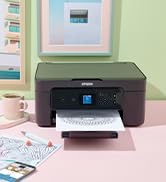
🚀 Elevate your office game with Epson’s powerhouse A3+ all-in-one!
The Epson WorkForce WF-7840DTW is a versatile A3+ multifunction inkjet printer designed for busy professionals and small businesses. It delivers fast, duplex printing at up to 25 ppm black and 12 ppm color, with high-resolution output up to 4800 x 2400 dpi. Featuring Wi-Fi, Wi-Fi Direct, and Ethernet connectivity, plus a user-friendly touchscreen, it supports printing, scanning, copying, and faxing with cost-effective separate ink cartridges. Ideal for remote and mobile workflows, it combines professional quality with efficient performance.






















| ASIN | B08FCQW5NJ |
| Additional Printer Functions | All In One |
| B&W Pages per Minute | 25 ppm |
| Best Sellers Rank | 63,577 in Computers & Accessories ( See Top 100 in Computers & Accessories ) 133 in All-In-One Printers |
| Box Contents | Epson WorkForce Pro WF-7840DTWF, Cartridge |
| Brand Name | Epson |
| Color Depth | 24 |
| Color Pages per Minute | 12 ppm |
| Colour | Black |
| Compatible Cartridge | Series 405 |
| Compatible Devices | Smartphones |
| Control Method | Touch |
| Controller Type | Push Button |
| Customer Reviews | 4.2 4.2 out of 5 stars (609) |
| Display Type | LED or LCD |
| Dual-sided printing | Yes |
| Duplex | Automatic |
| EU Spare Part Availability Duration | 2 Years |
| Global Trade Identification Number | 08715946668390 |
| Hardware Interface | Ethernet |
| Initial Page Print Time | 5 seconds or less |
| Ink Colour | Black |
| Item Dimensions D x W x H | 20D x 5W x 20H centimetres |
| Item Type Name | Multifunction Printer |
| Item Weight | 20.6 Kilograms |
| Manufacturer | EPSON |
| Maximum Copies Per Run | 99 |
| Maximum Copy Resolution Black and White | 2400 |
| Maximum Copy Resolution Color | 2400 x 1200 dpi |
| Maximum Copy Speed Black and White | 25 ppm |
| Maximum Print Resolution Black and White | 1200 x 4800 dpi |
| Maximum Sheet Capacity | 250 |
| Maximum Supported Paper Size | A3 |
| Maximum print Resolution Color | 4800 x 2400 dpi |
| Model Name | WF-7840DTWF |
| Model Number | C11CH67402 |
| Model Series | WF |
| Network Connectivity Technology | Ethernet |
| Number of Drivers | 3 |
| Number of Ethernet Ports | 1 |
| Number of Trays | 3 |
| Other Special Features of the Product | touch screen; duplex printing; printing of mà³viles devices, copier, fax, scanner |
| Output sheet capacity | 250 |
| Paper Size | A3 |
| Power Consumption Size | 10 Watts |
| Print media | Paper (plain) |
| Printer Output Type | Colour |
| Printer Type | Inkjet |
| Processor Count | 1 |
| Resolution | 4800 x 2400 |
| Scanner Type | Sheetfed |
| Series Number | 78 |
| Specific Uses For Product | home office, small business, professional use, remote working, mobile working |
| Total USB 2.0 Ports | 4 |
| Total USB 3.0 Ports | 2 |
| Total USB Ports | 1 |
| Unit Count | 1.0 count |
| Warranty Type | limited warranty |
| Wattage | 3600 kilowatt hours |
H**Y
Really good printer
We are a small business and use this printer daily. Bought it 6 months ago and it works flawlessly - good quality prints produced quickly and easily. Yes, the inks are expensive but if you only pay £225 for a bit of technology this complex and sophisticated, where else is the manufacturer going to make their money..? Highly recommended.
Y**A
Great product
One thing I needed was a manual paper slot at the back which solves the problem with alignment of paper and different paper sizes. 👌 It now prints what I need. Also this accepts XXL ink cartridges for a lot of printing like 2200 pages.
R**D
Good for artwork & photos, ink expensive
My second Epson A3 print, scan, copier. Print quality very good for basic prints, photos & high resolution artwork. Scan quality excellent. A capricious machine!! - prone to paper jams, but clear instructions & processes to clear them. The touch screen for setting paper settings in the 3 trays is fiddly & to print, you must match settings in your print spec. But have found some ways round it! Inks v expensive. Don't update firmware if you want to use non- Epson inks. It suits my artwork & photo needs v well.
N**S
Excellent printer 🖨️
Exceeds expectations. It's copying my art work beautifully. It's enabling me to be far more creative.
B**N
scan is incompatible with Photoshop 5 and other
Scanning provision is poor in comparison with my previous MFC (Brother). They do not use WIA scanner software, so Adobe Photoshop won't connect to import from scanner. Setting scan dimensions at preview is automated and inflexible. It will crop irregular shapes or include stuff you may not need, rather than allowing the user to set a scan box to encompass what they desire. You can work around this, but it is less convenient than it needs to be. The print function is very good but it’s irritating that it tries to put you off using compatible inks, but thankfully, does not prevent it. I use perfectly good open market compatible inks at a third of the price. The Epson ink deal would be wrong for me and the cost of normal Epson ink cartridges is extortionate. You have to program the paper type (size and quality) on the machine when it would be nice to reset the paper quality from the PC
A**S
Inks are tooooo expensive and short life
Sad to have this product
M**.
Great printer - but
Loved this printer till the print head got blocked. The only issue I found is you had to manually close the print receiving tray and the copies produced when using the. Auto feeder were slightly ‘not straight’ Apart from that my printer broke, I’ve copied below the feedback given re-ink cartridges This is a warning. I purchased a printer for over £200 used this ink system and now the printer is junk because of this ink system. Ok so what happened. After months of research I decided to buy a new printer for over £200, how ever I found the genuine ink cartridges way over priced, so I decided to use this ink system. I purchased this system the ink and started to use it. All was great for a while but suddenly the printer would only print thin cyan streaks on the paper not what was expected from this cartridge. After a ton of cleaning and print head cleaning I thought the cyan ink cartridge may be faulty, so I purchased a ‘proper’ ink cartridge, installed it but found no difference. I then consulted several specialists who all agreed that there must be a foreign object blocking the ink jet. So I now have a very expensive none working printer, the manufacturer does not sell print heads, the ink system company says not our problem, but still nothing works. So you have been warned about this system. Me, I will try to flush the cyan ink system, but then will thoroughly flush all these ink cartridges, and filter all the bottled ink through filter paper - it’s going to be a pain but I now believe it’s the only way to go. It all depends on getting the printer working though. No printer, then the whole ink system is just trash. YOU HAVE BEEN WARNED
R**T
Good quality prints but tries to be too automatic
It has too many 'auto' features which are overly complicated for the normal user and actually slow down the printing process by the time you have worked your way through correcting its automatic choices. I am capable of just pressing an A3 / A4 button to choose print size, it often gets confused. Another stupid feature is the paper receiving tray that has a motor to slide it in or out! What the hell for? I can do that myself. Sorry but too complicated and a bit 'plasticky' compared to my WF7525 that it replaced. Print quality is very good. Scanning interface on PC is now more difficult to use than before. Have had Epson printers for years and always been 100% but this one I have to say 80%. Its getting a bit like the newest cars are now...too automated, too complicated.
N**M
Bra kvalitet. Enda negativa. Bläcket svindyrt
N**T
imprimante A3, recto verso automatique, scanner automatique recto verso; rapide. Seul défaut l'absence de cassette format A3 (les feuilles A3 doivent être alimentée par le chargeur vertical arriere). Sinon encre par cartouches. J'aurais préféré des cartouches rechargeables.
G**E
Presa per sostituire modello precedente. Questa stampante è un pò più compatta, pesa sempre tanto ed essendo una A3 è comunque ingombrante. Il vantaggi sono sempre quelli delle Epson, stampa economica e di buona qualità, ottimi i servizi di rete e web. Il sistema trascinamento e gestione carta resta un tantino indietro rispetto ad HP ma questa per il prezzo da già tanto.
H**N
Funciona perfectamente, muy versátil al imprimir en muchos formatos y desde varios dispositivos inalambricamente. Las fotos también salen bastante bien
T**B
Wer kennt es nicht - man sucht ein Gerät welches allen Bedürfnissen gerecht wird. Man nimmt ja an, dass es online leichter ist. Grundsätzlich ja, wenn alle Hersteller wie auch Verkäufer alle relevanten Angaben publizieren würden :) Aufgabenstellung: Ich wollte einen kostengünstigen Farbdrucker mit A3 Druck UND Scanner. Und wichtig: Dass der A3 Scanner nicht nur mit Einzug, sondern auch mit Flachbett funktioniert. Warum? Ich habe wertvolle Sammlerdokumente welche ich gerne auch digitalisieren möchte und bei einem Einzugscanner besteht die Gefahr, dass ein Dokument beschädigt werden kann. Die Suche gestaltete sich schwierig wegen meinem "Killerkriterium" (mit Flachbettscanner A3). Leider war anhand Produktefotos und Beschreibungen nicht immer ersichtlich, ob er auch A3 mittels Flachbettscanner scannt ... Ich kämpfte mich durch zahlreiche Produkteinfomrationen inklusive Bedienungsanleitungen welche ich im Internet zusammensuchte (da war teilweise nur nebenbei vermerkt, ob er A3 mit Flachbett scannt oder nicht). Und es gibt viele die aussehen als könnten sie A3 via Flachbett scannen, können es aber nach Prüfung aller Angaben trotzdem nicht. Ich fand dann den Epson WorkForce WF-7840DTWF (auch hier war nicht auf den ersten Blick sofort ersichtlich, dass er auch via Flachbett scannt). Preis/Leistung schien mir sehr gut. Und da ich schon gute Erfahrungen mit Epson gemacht habe (z.B. ET-2721) habe ich ihn bestellt. Lieferung schnell und gut verpackt - wie gewohnt via Amazon. Er ist GROSS und SCHWER! Wirkt absolut wertig und gut verarbeitet. Ich persönlich bevorzuge so ein Teil als ein "Leichtbau". Die Inbetriebnahme ging auch einfach und schnell (dank der Kurzanleitung) via APP und Handy. Die ersten Probedrucke A4 und A4 (mit der mitgelieferten Erstausstattungs-Test-Tintenpatronen) verliefen einwandfrei. Auch die Druckqualität/Leistung finde ich gut. Natürlich reichen die mitgeliferten Erstausstattungs-Test-Tintenpatronen nicht weit (daher habe ich auch gleich reguläre Tintenpatronen bestellt). Ich konnte aber trotzdem damit 15 A4 und 5 A3 drucken (vollfarbig). Er ist nicht der schnellste Drucker den ich je hatte, aber auch nicht der langsamste. Für mich absolut OK. Das Angebot "inkl. 6 Monate ReadyPrint Flex Tintentarif" habe ich nicht genutzt da es sich in meinem Fall nicht lohnt (drucke nicht so viel) - ansosten sehr interessant und preiswert! Scanner: Funktioniert einwandfrei - mit Einzug UND Flachbett :) Und mit der Qualität bin ich auch zufrieden. Ein kleines, nerviges Detail für mich: Bisher habe ich den Drucker nur via Handy/App bedient. Funktioniert einfach und einwandfrei. Nur etwas nevig ist, dass wenn man mit dem Handy und dem Drucker verbunden ist (mittel "eigenem" Wlan-Kanal des Druckers"), kann ich nicht gleichzeitig mit meinem Handy "reguläres" Interenet verwenden (da der Drucker sein Wlan Netz verbindet). Sprich: Während der Verwendung des Druckers mit dem Handy bin ich offline mit dem Handy/Internet. Aber da man es weiss kann man sich daruf einstellen. Es ist ein Detail und da sonst alles top ist kann ich mich damit anfreunden. Ich finde es ein super Teil mit einer top Preis/Leistung. Sollte sich noch etwas ergeben in der Langzeitverwendung (womit ich nicht glücklich bin), dann würde ich es hier ergänzen.
Trustpilot
Hace 1 mes
Hace 3 semanas