We remain fully operational. Our teams are working around the clock to ensure your deliveries continue safely.

Descargar la aplicación


Servicios al cliente
Sobre nosotros
Copyright © 2025 Desertcart Holdings Limited
Descargar la aplicación






Buy anything from 5,000+ international stores. One checkout price. No surprise fees. Join 2M+ shoppers on Desertcart.
Desertcart purchases this item on your behalf and handles shipping, customs, and support to Colombia.
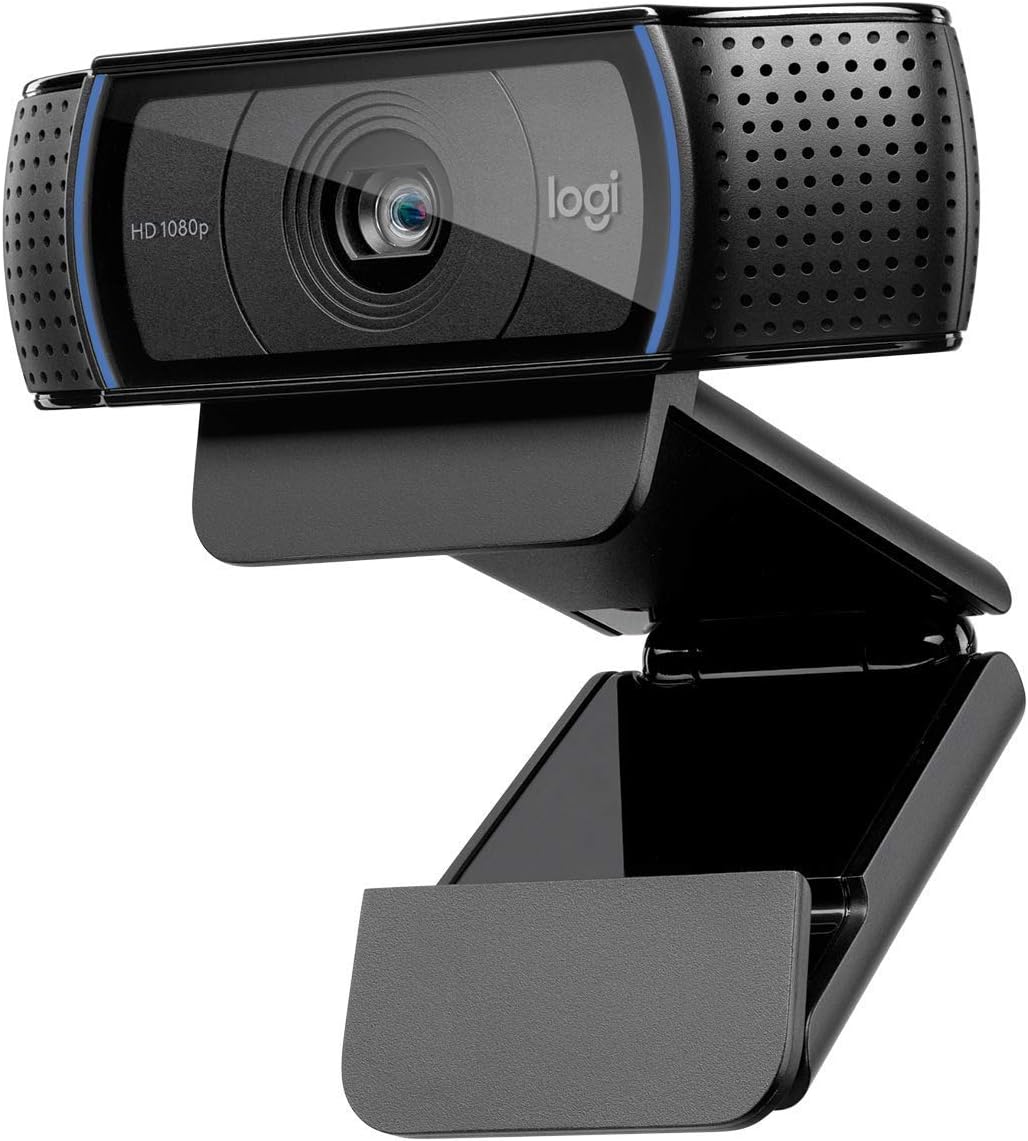
🎥 Elevate your video presence — because your image deserves pro-level clarity!
The Logitech HD Pro Webcam C920 delivers professional-grade Full HD 1080p video calling and recording with advanced H.264 compression for smooth streaming. Featuring a five-element glass lens with precise autofocus, dual noise-reducing microphones, and automatic low light correction, it ensures crystal-clear visuals and natural stereo sound. Compatible with Windows, macOS, Chrome OS, and Android, it supports all major video conferencing platforms. Its durable build and tripod-ready clip make it a reliable, long-lasting choice for professionals seeking standout video quality.
| ASIN | B006JH8T3S |
| Antenna Location | video calling and recording |
| Are Batteries Included | No |
| Best Sellers Rank | #38 in Webcams |
| Brand | Logitech |
| Built-In Media | USB Cable, User Manual |
| Camcorder Type | Webcam |
| Color | Black |
| Compatible Devices | Personal Computer |
| Connectivity Technology | USB |
| Customer Reviews | 4.6 out of 5 stars 32,649 Reviews |
| Digital Zoom | 3 x |
| Display Resolution Maximum | FHD |
| Effective Still Resolution | 15 MP |
| Effective Video Resolution | 1080 Pixels |
| Exposure Control Type | Automatic |
| Features | Auto Noise Reduction,Auto Low Light Correction,Autofocus |
| File Format | JPEG |
| Flash Memory Speed Class | C10 |
| Flash Memory Type | Micro SD |
| Flash Memory Video Speed Class | V10 |
| Focus Type | Auto Focus |
| Form Factor | Webcam |
| Global Trade Identification Number | 00097855074355 |
| Has Image Stabilization | No |
| Image Aspect Ratio | 16:9 or 1.78:1 |
| Image Capture Speed | 30 fps |
| Image stabilization | Digital |
| Item Dimensions D x W x H | 3.7"D x 1.7"W x 2.8"H |
| Item Weight | 113 Grams |
| Lens Type | Glass |
| Manufacturer | Logitech |
| Maximum Aperture | 2 f |
| Minimum Aperture | 2 Millimeters |
| Model Name | Logitech HD Pro Webcam C920 Video Calling and Recording 1080p Camera |
| Model Number | 960-000764 |
| Number of Batteries | 1 Lithium Polymer batteries required. |
| Operating System | Windows 7, Windows 8, Windows 10, macOS 10.10 or later, Chrome OS, Android 5.0 or above |
| Photo Sensor Technology | BSI CMOS |
| Screen Size | 3 Inches |
| Sensor Type | BSI CMOS |
| Shooting Modes | Autofocus |
| Style Name | C920 |
| Supported Audio Format | AAC, MP3, WAV |
| Supported Image Format | Likely includes: JPEG (for still images), MP4 or MOV (for video) |
| UPC | 097855074355 |
| Unit Count | 1.0 Count |
| Video Capture Resolution | 1080p |
| Video Resolution | 1080p |
| Warranty Description | No Warranty |
| Water Resistance Level | Not Water Resistant |
| White Balance Settings | Auto |
| Wireless Compability | 802.11a |
| Zoom | Digital |
D**T
Going strong, two years later
I'm puzzled when I read the negative reviews, about this camera not working with [x]; this is my 3rd Logitech camera, and I've never had a problem getting them to work when I've reviewed the system requirements and made sure I was on a compatible machine running appropriate software. I've split use of this camera between my Mac Mini and my Macbook Air, and had no problem getting it to work on either machine, nor have I had any issue switching back and forth between them. Picture and sound quality are excellent, and there's a free Logitech app in the App Store that lets me adjust the zoom, lighting etc that's also effective and simple to use. What's really blown me away is that it's also just as impressive now as it was almost two years ago, when I first started using it. I bought it in October 2016, to replace another Logitech camera; the cord connected to the back of the camera had frayed over time as a natural consequence of adjusting the angle over and over, making the older camera only work sporadically, and I fully expected something of that nature to happen to any camera I purchased. Not so with this one. The cord has held up, and not because I've babied it; it's just a sturdier design and tougher than the model it replaced. And while we now have Ultra HD/4K cameras and better, this 1080p is still respectable quality; it's not like the old "high def" TV a friend of mine has that's 12 years old but whose picture now looks grainy and not at all impressive compared to other newer TVs. I've used a projector as a monitor for my Mac Mini and broadcast the video from this camera onto a relatively big screen (bigger than any TV I've seen) and the picture quality is still impressive. (I hope I don't jinx myself!) I'm not accustomed to peripherals like this maintaining their function over time. Either the gadget breaks or it becomes obsolete because newer versions of it do the job so much better that it becomes a relic. Not so with this camera. I spent more than the current price (not quite double what it's going for now) and still really feel like I got my money's worth. If I needed another camera I would consider buying another one, it's that good. It's nice to not have One More Thing that needs to be replaced, that just keeps working. So yeah, take the time to look at the system requirements, and make sure you're using a Mac running the stated minimum version of MacOS (or better), or a PC running the stated minimum version of Windows (or better), and your processor is fast enough and you've got enough room on your hard drive and all that, before you buy it. If you're planning to use it for a specific app, perhaps you should check with that app's developers to be sure that it's compatible with it, but I can vouch for Mac versions of Skype, Zoom, ezTalks, and of course FaceTime and Photo Booth, as well as browser plugins for Firefox, Safari, Vivaldi and Opera: it works with all of them. I can't say enough good things about this camera. Unless you just absolutely have to have 4K/Ultra HD quality video, it's well worth the price it's currently going for, and I am happy to recommend it.
H**N
Nice HD Webcam! Here's some tech details.
I've been testing and using the Logitech C920 for a week now. This is really a nice little camera! It takes good, sharp video, and the Logitech Webcam Software (LWS), works fine, though a bit limited in settings. For those wanting some tech specs, I ran a bunch of tests and analyzed the files with MediaInfo. LWS provides 4 modes: 360p (640x360 WMV), 480p (864x480 WMV), 720p (1280x720 MP4/AVC), and 1080p (1920x1080 MP4/AVC). In "Preferences," under the "Quick Capture" tab, it provides 3 audio and 3 video quality settings: Audio: Good (16) -- 16kHz at 20kbps (mushy) Better (32) -- 32kHz at 48kbps (fine for voice) Best (48) -- 48kHz at 191kbps (DVD quality) -- These only matter at 360p and 480p. -- In the higher modes, the audio (AAC) is always 48kHz at 99kbps (vbr), no matter where you set the audio quality setting (bug?). kbps and frame rates : ( 360p WMV / 480p WMV / 720p MP4-AVC / 1080p MP4-AVC ) Standard (small file): 549 at 15 / 1155 at 15 / 2000 at 30 / 3000 at 30 High Q (medium file): 943 at 15 / 2848 at 15 / 3000 at 30 / 4000 at 30 Lossless (large file): 1723 at 15 / 3848 at 15 / 4000 at 30 / 6000 at 30 -- In 360 and 480, the video bit rate will vary quite a bit depending on the amount of motion in the video. Frame rate is constant at 15. -- In 720 and 1080, the bit rate is constant, and the frame rate is constant at 30, tho MediaInfo sometimes shows it as variable. So you can see the highest quality mode is 1080p at 6000kbps at 30fps, which is probably what you wanna use if you're gonna pull it into an editor, and then spit out the results at say, 2000, which makes a good quality video at a reasonable file size for uploading to YT, etc. I don't know what they mean by "lossless," because what the software calls "lossless" is a mere 4-6 Mbps, highly compressed by the camera. But it's more than good enough. For the two AVC modes, the camera is putting out profile Baseline @ L4.0, no CABAC, 1 Reference Frame, CBR, and CFR. The color model is YUV 4:2:0, 8-bits, Progressive, as expected. This profile is widely compatible with many consumer HD video devices and software players. If you're gonna simply downsample the bitrate with Handbrake, you should make a profile that matches what the hardware in the camera puts out. Make your Handbrake (v0.9.6+) profile like this: -f mp4 -O --crop 0:0:0:0 --strict-anamorphic -e x264 -b 1500 --vfr -a 1 -E copy:aac -B 0 -6 auto -R Auto -D 0 --gain=0 --audio-copy-mask none -x bframes=0:8x8dct=0:cabac=0:weightp=0:ref=4:psy-rd=1.00,0.15 --verbose=1 (where -b = bitrate and -E copy:aac = audio pass-through). Note that I set RefFrames to 4, as it falls back to L3.1 if the ref is left at 1. What about other video resolutions and modes? Running other capture software, like BB Flashback or AVS Video Recorder, you can pick all resolutions from 160x90 to 2304x1536 (at 2 fps) and the C920 will switch to any of them -- so, yes, it will do all the 4:3 modes like 640x480, but not with LWS. There's no reason they couldn't put some common 4:3 modes in it, because the camera will do'em all, and wide-screen isn't always desirable. Does the camera put out raw video in the non-AVC modes, like a regular webcam? In LWS my processor (dual 3.06GHz) runs about 25% capturing 1080p, but about 45% capturing 480p. In other capture software, capturing 1080p in mjpeg or mpeg2/xvid maxes out the processor and stutters badly. So it would appear that the camera's hardware compression only kicks in with 720p and 1080p AVC, and a good thing it does! My computer (and its USB2) won't handle raw 1080p/30 video. Snapshots, using LWS (all JPG, Q unknown and not settable): Low: 1920x1080 (2MP, 472kB), a bit blurry in the details Med: 2304x1536 (3MP, 649kB), the native resolution of the image sensor Lrg: 3280x1845 (6MP, 1047kB), interpolated Max: 5168x2907 (15MP, 1984kB), interpolated -- I can see no detail difference in medium, large, and max, so interpolation is useless (as expected). -- I took the sharpest snapshot at 2304x1536 (its native res.) in another capture program that will save a BMP (uncompressed). Indeed, I took that and up-scaled it to 15MP in IrfanView, then saved it as 80% jpeg, and it's half the file size and better quality than what LWSs "Max" setting provided. IrfanView took the 45 meg BMP down to a 1 meg JPG (at 80% Q) and I can't see any difference in details. Now for the little complaints: None for the camera, but the LWS software could use some 4:3 resolutions and finer-grained controls, like setting the bit-rate of the audio and tweaking some AVC profile settings, more video containers like AVI and MOV, and an uncompressed (BMP) option for snapshots. RightLight: Doesn't seem to do anything. Either the Exposure and Gain are in Auto or not, and you have to uncheck RightLight to uncheck Auto. In auto, the exposure slider usually stays at 9 (of 14) clicks, and the gain varies. Fast motion is nice and smooth, though blurry. With ample lighting, you can improve the video a little by going to manual and putting the exposure at about 5 clicks and then up the gain for a normal picture, and there will be much less motion blur, just like setting a faster exposure on any camera. I found one little bug in LWS: When you put the Gain in manual, it will slowly creep down, about 1% per second. It's annoying. Auto White Balance: Makes you look cold and dead. Set your lights, hold a white card about a foot in front of it, then turn off AWB, and you'll look about right. Also, reducing the Color Intensity a bit makes faces look more natural. YMMV, so don't be afraid to put it all in manual and set it just right for your lighting. And remember, no "auto" stuff will completely fix every lighting situation. I'm using a 45-watt, 5500K, CRI-91 full-spectrum Alzo CFL, and still need manual tweaking. RightSound: A simple auto-volume that cuts the volume to about half if you get too loud. Seems to take about 1-2 seconds to respond. LWS has no VU bars or mic test, so you have to run something else to see what it's doing. There is a mic level slider in Preferences and I found it to be too loud at the default mid-point; putting it at about 35% made the audio better. There are no audio equalization settings, and it's just a bit "boomy" for my ears. A simple bass and treble filter would be nice. Stereo: If you're right in front of the camera, it sounds mono, but if you move around, you sure can hear the difference! But the software should have a mono setting, for those times when it's pointed at something besides your face (like, your hobby on the table), and you're talking beside the camera. Autofocus: The range is from about 1.4 to 14 inches, and everything beyond that is infinity. To get it to macro-focus, you have to move in slowly, and the object needs some detail, or it just loses it and goes back to infinity. Better turning it off and setting manually for the task at hand. But if you're talking within the 14 inches, the AF tracks pretty well and is reasonably fast. Face following: Because it's just moving the image around on the sensor, you have to be zoomed in some for it to work, and it only works in 360 and 480 modes. At most, it only "follows" for a few degrees of angle. Didn't try any of the "Effects" -- not my cup of tea. You cannot use them at 720 and 1080, only 360 and 480. Didn't try video phone or chat, so can't comment on that. Overall, I'm very impressed with the C920, and happy I made the purchase. And glad I didn't get the C910, because my computer won't handle raw 1080p. --kv5r
M**N
Excellent Quality and Easy to Use!
This webcam is fantastic! The video quality is super clear and crisp — 1080p looks great even in lower lighting. It was incredibly easy to set up and worked right away without any complicated software. The widescreen view is perfect for video calls, meetings, and recordings, and the built-in microphone picks up sound really well. Overall, it’s a high-quality, reliable camera that’s perfect for work or personal use. Highly recommend!
L**I
I am happy to report that the camera works great with Windows ...
I was a bit leery about ordering this since I read that some users appeared to be having issues with the camera working with the Windows 10 Creator Update. I am happy to report that the camera works great with Windows 10. I already had the latest Logitech software (LWS280 - ver. 2.51) installed on my system since I was upgrading to this C920 from an older Logitech Quickcam Pro 9000. (The camera does not come with any software but it can easily be downloaded from Logitech's website.) All I had to do was plug the camera in and everything worked fine. One small annoyance, the mirroring feature does not work at the higher resolutions. You have to go to a lower resolution (480p or lower), enable mirroring, then you can go back to the higher resolution; do the same to turn mirroring off. I don't use this feature much so the few extra steps is not a big deal. Although the specs show this to be a 15 mp. camera, in reality I have read in other reviews that it is much lower at I believe 3 or 5 mp., with software interpolation to mimic 15 mp. Video streaming at full HD (1920 x 1080p) was very smooth due to the camera using internal H.264 hardware compression. Overall picture quality was good. Autofocus seems to have a bit of latency in response, but I used fixed focus most of the time since I use the camera primarily for video chatting with family and sit at a more or less fixed distance. A small plus is the ability to mount this camera either on top of your monitor, or on a small tripod through the bottom of the stand. Using the "RightLight" feature of the camera, it seems to adjust to different lighting conditions very well. Although the auto white balance seems to lean towards the blue side, it can be turned off and manually adjusted towards "warmer" colors. Video recording was smooth, but does not quite have the sharpness you would expect at true HD1920 x 1080 when viewing the recorded video at full screen, so not sure if it is actually true HD or again just interpolated. Audio recording quality through the built-in stereo mics was fair. Overall, I will say it works well right out of the box and the quality is as good or as better as what you would expect for a camera in this price range and would recommend it to anyone looking for a decent webcam without breaking the bank.
R**Z
Very good HD WebCam.
Very good product, very decent audio and and video. This has been on top of my display monitor for years, still very good for videocalls, even for today standards.
I**N
a good camera, worth the money.
this camera's picture quality (see first photo) is definitely superior to that of the iSight camera built into my mid-2011 MacBook Air (see second photo), as well as to that of most, if not all, other webcams i've seen images from - though the Logitech's colors are a bit washed out due to its light sensitivity. the mounting system is pretty ingenious - or so it seems to me, who's been out of the standalone webcam loop for probably 10 years now - allowing you to mount it on top of a flatscreen monitor of just about any thickness, lay it on a flat surface such as the top of a CRT (if anybody still uses those) or an LCD's sunshade - the camera has a rubberized bottom surface and a little bit of weight to it so it won't slide around easily - or to mount it on a mini tripod (not included). it has dual (i.e., stereo) mics which sound decent, though you won't get great sound from them unless you're in a very acoustically dead room, since their integration with the body of the camera means you're going to be at least a foot away from them most of the time, so they're going to pick up any reverberation present and many background noises. i choose to stick with my Blue Yeti for sound input as i can put it closer to where i'm sitting...plus it's just a better-sounding mic to begin with, as well it should be. the camera can be pivoted up and down about 45 degrees, and while it can't be pivoted side-to-side when mounted atop a flatscreen monitor, that's mitigated somewhat by the fact that it's a widescreen camera, so it captures a wider area side-to-side without being pivoted. if lateral pivoting is really important to you, you can mount the camera either on a flat surface or a mini tripod as mentioned before. on the Mac, it's 100% plug-and-play; plug it into an available USB port and you're in business. FaceTime, Photo Booth, Messages, Skype...it just works, and well. Windows users just go to the URL given on the instruction sheet, download and install the software, and i imagine from there on out their experience will be similar. the unit itself is very nice-looking and, again, produces a picture most other webcams can't match. i think Logitech's set a new standard here, and it won't be long before all new webcams on the market produce an image at least this good. at the $71.00 and change i paid, i consider this camera well worth the money. i'm sure i'll be using it for years to come.
D**A
This webcam is great!
I purchased the Logitech C920 and I'm very happy with it so far. After reading lots of reviews, I decided to purchase this webcam because 1) with software you could get 15 megapixel image quality and 2) you could use a tripod with it. I had read many reviews with some saying that the C910 had better image quality because it had 5 megapixel true whereas the C920 had only 3 megapixel true. That was a concern for me at first. Also I was concerned about reviews that said it is very good for close-ups but not good quality for the background. I found it was high quality for both close-ups and background. Also, some had said that the camera only "sits" on top of the monitor. Well, that is NOT true. There is a clip and it allows it to fit any monitor thickness which is a plus. You can even have it sit on top of you CPU tower on on the tripod (which you must purchase separately -- important because I thought that the tripod came with it). I purchased this webcam to replace my much older Logitech 4000 webcam. As I expected, the image quality of this webcam is so much better. I don't get the blur and it isn't as grainy as my older webcam. I took a video of me holding up my credit cards and you could read the numbers on the credit cards very clearly. It blew me away because I wasn't even using zoom. I even made a video with the lights off with just the monitor on and the image quality of my face was super! I love the widescreen to it and I love the hi-def. I also read about the noise quality -- I think all webcams have this issue, but this one is much better. Some said that this is not a good webcam for travel. I disagree. This webcam folds up and it will fit any thickness of monitor you need it for, and if you have one of those dinosaur monitors, you can just have it sit on top of it. Only 2 negatives I see so far is that it does not have 360 degree turn or any turn for that matter. But for sitting on top or my monitor or on a tripod (which I need to purchase), it does great. My old Logitech 4000 that did rotate was always turning when I didn't want it too. Very annoying I must say. With the 920 I can adjust it going up and down, just not side by side, so it is not a problem for me. Other negative is that if you want to do a video call with someone they have to be using the same software and I don't yet know how the image quality would be with other software since it is the Logitech software that gets it to 15 megapixels. I need to try that out too. Could I get a better webcam? Sure, if I wanted to pay a lot more! For the price, this is a great webcam and so far it is doing what I need it to do. I only did a few test pictures and videos today (only received it today), but so far I love it. I still need to see how it works for web calls and such. I also need to learn how to make some of the great effects it has. All in all, this webcam beats any of the other ones in the Logitech line for features and image quality. This is also my first review ever. I felt I needed to write a review because there were so many negative reviews on this product. I am ready happy with my purchase and I'm glad the negative reviews did not sway me to not purchase it. I'll play around with it a bit more and see if I still love it :)
T**S
I still use this
Great product. I still use this. I've owned it for a long time.
Trustpilot
Hace 2 semanas
Hace 2 semanas