We remain fully operational. Our teams are working around the clock to ensure your deliveries continue safely.

Descargar la aplicación


Servicios al cliente
Sobre nosotros
Copyright © 2025 Desertcart Holdings Limited
Descargar la aplicación




Buy anything from 5,000+ international stores. One checkout price. No surprise fees. Join 2M+ shoppers on Desertcart.
Desertcart purchases this item on your behalf and handles shipping, customs, and support to Colombia.
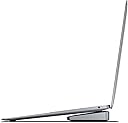
🚀 Elevate Your Setup with BrydgeStone II!
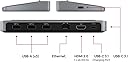
The BrydgeStone II USB Hub Docking Station is a powerful and stylish solution for expanding your workspace. With 7 ports including USB-C, USB-A, HDMI, and Ethernet, it seamlessly connects to MacOS, Windows, and Chrome devices, delivering stunning 4K display capabilities. Designed with a minimalist aesthetic, it not only enhances functionality but also complements your desktop. Plus, enjoy a one-year warranty and dedicated support for a worry-free experience.


| ASIN | B08DG8CP1Q |
| Best Sellers Rank | #270,858 in Electronics ( See Top 100 in Electronics ) #2,186 in Laptop Docking Stations |
| Brand | Brydge |
| Color | Space Grey |
| Compatible Devices | brydge Stone II |
| Customer Reviews | 4.2 4.2 out of 5 stars (88) |
| Hardware Interface | Ethernet |
| Item Type Name | Brydge BRYSTONE2 Mini Docking Station Suitable for Brand (Notebook Docking Stations): Apple |
| Item Weight | 308 Grams |
| Manufacturer | Brydge |
| Number of Ports | 7 |
| Total Number of HDMI Ports | 1 |
| Total Usb Ports | 7 |
| UPC | 787790155447 |
| Unit Count | 1.0 Count |
| Warranty Description | Manufacturer Guarantee. |
| Wattage | 40 watts |
M**A
Great product, great quality & works well
This is a great product. It is a bit expensive compare to other hubs but the qualityand fucntionality are great. I have a Brydge keyboard for my iPad so I knew what I was getting into it. I have my MacBook Pro connected to the hub, a big monitor, USB webcam and a MacMini. I used the ethernet on the hub to connect the back to MacMini server. Customer service from the vendor has been great, no phone, all web/email but they have been pretty responsive. Good product, good quality, I will certainly buy again in the future.
A**R
Great design
Great for my Macbook Air
J**S
Great Brydge product!
The quality of material is what I would expect from this brand and price. It's slim but powerful. I have used other USB-C adapters and hubs, but I like this style because it stays in one place and the connector cable is all that moves.
D**K
Great dock. Video Quality? Meh.
This dock really simplified my current setup. Something I didn't expect to dislike was the 30 Hertz for the HDMI port. I ended up using my second USB-C port on my MacBook Pro for the HDMI output to my 4K monitor. The 30 fps was disorienting. BUT, besides that, I love it. It connects my Webcam, Legato HD60 S+ capture card, and USB switch for things like my microphone. It's small, out of the way, and I love that there is only one USB-C cord that I usually attach to my MacBook Pro. If you're not picky about frame rate, this is perfect. If you are, upgrade to one of the more expensive models. I plan on using this dock for another year before trying out another dock of theirs.
D**D
Great Docking Station
I really like this docking station to use in my home office and it is small and light enough to travel with it.
P**C
Failed to work out of box
Will be returning. Even following manufacturer provide support on diagnostic and troubleshooting, the USB A ports never worked. Tested with two MacBook pros (2016 and 2020 editions) without multiple usb-a and c peripherals, cables, etc. USB A stubbornly refused to work (no power, no device detection, no device communications). Seems like a dud. Replaced via direct order to manufacturer without issue.
G**A
Should have bought the bigger one
With just the 3 inputs, I find myself wanting the larger unit.
A**R
Idiosyncratic, annoying
I resent Apple for making us use these. Added expense, clutter, wires, fumbling, figuring out, etc. That out of the way, this device has a beautiful physical design and is aesthetically satisfying gear. Brydge did not skimp on the physical end. It is solid. Feels good. As you'd expect, it does work well as a wedge/prop for the laptop. At first it didn't seem to, but eventually I figured out that it can work. There are puzzling sequences to which you must attach devices and cables. Examples: I connect a USB mixer to laptop via Stone II and then must turn the mixer power on. If I turn it on before it is connected, the audio signal will be pitched down about 2 notes (very curious!). You can run power to the laptop (2020 Macbook Air) through it but you can't charge your phone from it even when laptop is plugged in. Most of the time the USB mouse works with it. Each time I plug it in I must test it, because I don't trust it. It is fussy and not reliable with the mouse. There's some 'first do this then that, then it'll work' to learn. Not intuitive. But it will work. It's annoying when working fast and we don't want to fuss with finicky equipment. Very idiosyncratic, lots of trial and error. I am stuck with it and must use it regularly. Configurations change on a regular basis. Devices are getting connected and disconnected routinely. Its secret rules add resistance. If you get one, prepare to get to know its distinct wants and needs and be ready to give it special attention in the middle of your workflow. This is my first hub so I'm not sure if it's unique to this design or this is a known issue with hubs at large. Not sure if the pricier model above this one would get around some of these issues by having its own power adapter. If you're using it for accessing external hard drives, you'll likely be happy with it. Although I've found drives don't like ejecting when told to. I'll live with it.
A**E
Was a bit annoyed with it at first because it was not working and I couldnt figure out why. It turns out that there is a USB-C port that connects with the computer (input) and another that would connect to devices. I plugged the computer into the output USB-C and it would not generate a signal on the external monitor i was trying to connect and i could not figure out why. After some time troubleshooting i figured it out but wasnt happy with the waste of time.
X**R
Très bon dock pour un MacBook Air. Permet une utilisation à la fois nomade et fixe sur bureau. Tous les ports fonctionnent sans problème et rapidement.
D**L
I use a Brydge with my Mac air and it worked a treat. When work changed from Citrix to office 365 it was time to get a big monitor cut the number of screens and de clutter so I could use a windows laptop. It would not recognise the laptop. Long story short you need 60watt PD to power the hub then an equally heavy duty USBC to USBC to laptop. Still it would not connect, turns out is is a windows issue the USBC port should if an error rebuild on restart. Took an IT technician to sort it. So if your windows doesn’t work with it then it is not the hub but your £1800 windows laptop. All working now and does a great job allowing me finally to close the windows laptop and work with a bit less constant heat in the office…of course also work with Mac but that is already hooked in using previous set up.
F**S
Llego en buen estado, cerrado pero me ha costado trabajo encontrar el cargador de este mismo, deberían ofrecer tmb el cargador.
X**A
Unfortunately the USB hub functionality lasted less than 24 hours before it failed. The HDMI and network functionality continued to work but overnight the ability to recognise USB devices failed. Tried multiple devices and usb-c hosts all with the same result.
Trustpilot
Hace 1 día
Hace 1 mes