We remain fully operational. Our teams are working around the clock to ensure your deliveries continue safely.

Descargar la aplicación


Servicios al cliente
Sobre nosotros
Copyright © 2025 Desertcart Holdings Limited
Descargar la aplicación


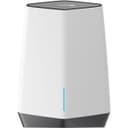
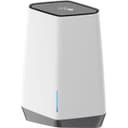


🚀 Elevate your workspace WiFi — speed, security, and coverage that means business.
The NETGEAR Orbi Pro WiFi 6 Tri-band Mesh System (SXK80) delivers cutting-edge AX6000 WiFi 6 speeds up to 6Gbps, covering up to 6,000 sq.ft. with support for 60+ devices. Designed for small businesses and home offices, it features business-grade security with VLAN and QoS, seamless mesh roaming on a single SSID, and remote management via NETGEAR Insight. Expandable up to 18,000 sq.ft. with additional satellites, it supports 2.5Gbps ISP connections and comes backed by a 5-year limited warranty.


| ASIN | B08FXSBN11 |
| Antenna Location | Business, Gaming, Home |
| Best Sellers Rank | #67,021 in Electronics ( See Top 100 in Electronics ) #392 in Whole Home & Mesh Wi-Fi Systems |
| Brand | NETGEAR |
| Built-In Media | One (1) Orbi Pro WiFi 6 Router (SXR80), One (1) Orbi Pro WiFi 6 Satellite (SXS80), Two (2) wallmounts with screws, One (1) 2m Ethernet cable, Two (2) 12V/3. |
| Color | white |
| Compatible Devices | Gaming Console, Laptop, iPhone |
| Connectivity Protocol | ethernet, wi-fi |
| Connectivity Technology | Ethernet, Wi-Fi |
| Control Method | App |
| Controller Type | amazon_alexa, vera |
| Coverage | Up to 6,000 sq. ft. (expandable to 18,000 sq. ft. with additional satellites) |
| Customer Reviews | 3.7 3.7 out of 5 stars (256) |
| Data Transfer Rate | 6000 Megabits Per Second |
| EU Spare Part Availability Duration | 5 Years |
| Frequency | 5 GHz |
| Frequency Band Class | Tri-Band |
| Is Modem Compatible | No |
| Item Dimensions L x W x H | 16"L x 9"W x 12"H |
| LAN Port Bandwidth | 6000 Mbps |
| Manufacturer | Netgear |
| Maximum Upstream Data Transfer Rate | 4000 Megabits Per Second |
| Mfr Part Number | SXK80-100NAS |
| Model Name | SXK80-100NAS |
| Model Number | SXK80-100NAS |
| Number of Ports | 6 |
| Operating System | NETGEAR Genie |
| Other Special Features of the Product | Beamforming, QoS |
| Security Protocol | WPA3, WPA2-Enterprise, WPA-Enterprise |
| UPC | 606449150582 |
| Unit Count | 1.0 Count |
| Voltage | 100240 Volts |
| Warranty Description | 5 year limited warranty |
| Wireless Compability | 802.11ax |
S**H
Rock Solid Performer
Introduction: - As an IT Professional, I have been using Netgear routers for years in my home, and I’ve never had issues with them. My most recent is the 5-year-old Nighthawk R-7500 router and the Apple Air Extreme access point which are now retired as spares. Due to my house being 2400 Sq. ft two story structure, I had to use the access point for upstairs, and the R-7500 downstairs to maintain performance and minimize dead spots. The problem was I had to have two SSID’s for the router and access point, and two SSID’s for guests. Sometimes, my devices wouldn’t automatically switch from AP to router thereby causing a poor transitional connection. I also wanted to utilize the latest Wi-Fi 6 protocol available in my iPhone12. I chose the Orbi pro6 mesh system due to following options: - 1. Great reviews from nearly every vendor on the net. 2. Professional web-based GUI that rivals enterprise class GUI’s. This product was meant for small businesses, and for those who aren’t IT savvy, you can download a Netgear Insight app to set up and operate this router. 3. Single SSID for the entire house. Unlike Wi-Fi range extenders and access points where you get disconnected from one SSID and then reconnected to another as you go around the house, the Orbi pro6 system let's you connect to whatever SSID you assigned the device on the network. No more disconnections/reconnections! 4. A mesh network that will use one SSID for Admin for personal and home products use, and a choice of three more SSID’s for guests and IOT’s. 5. Won’t go obsolete soon – Supports maximum bandwidth of 2.5 Ghz. from ISP’s, latest Wi-Fi protocol Wi-Fi 6 (802.1 ax) and older protocol such as A, B, G, and N. Wi-Fi 6 is supported by newer devices such as the Apple iPhone12. 6. Can use a backhaul cable between the router and satellite – I have a CAT-7 cable that is already installed to support faster data transfer between both systems. 7. Mounting Brackets – As you can see in the picture, both router and satellite came with wall mounting brackets, and this made hardware installation very easy. Install and configuration: - Install was easy. Turn power off cable modem and old router. Disconnect old router, and once modem is fully re-booted, connect new router. When the Orbi router booted, it automatically connected to my XFinity service without any issues. Also, since the router came paired with the Satellite from the factory, it automatically synchronized with the router and they recommend a separation distance of 10 ft. during pairing. Once you logged into the router, it forced you change the admin password to a more sophisticated password. You do not have to program the satellite, the router passes on the configuration information to the satellite. Performance: - After a month of usage, I here are my experiences: - I routinely get around 900 Mbps from my ISP and that’s what I’m getting when I measure the speed using the router’s GUI. Without the Cat7 cable, and a direct distance of over 50 Ft. between several walls, a heater, and second story floor, I was getting a bandwidth of 500 Mbps on the satellite and over 700 Mbps connected to the router’s Wi-Fi. With the satellite connected to the router using the CAT7 cable, I get over 700 Mbps on my iPhone12 that utilizes WiFi6 and this is true for all locations in the house. I haven’t experienced any dead spots, and I settled on permanently using the CAT7 cable for the backhaul. Roaming around the house, the router and satellite automatically switch you to whatever device you are closest to, and gone are the days of having to sometimes manually switch SSID’s. Surprisingly, I get a strong signal in both my backyard and front lawn. You can continue streaming whatever you like while enjoying your summer barbeque. All devices that support both 2.4 and 5Ghz. radio stay connected to the 5Ghz, radio. All devices that utilize the 2.4 Ghz. radio such as printers and security camera’s stay on the 2.4 Ghz. radio. The router and Satellite lights stay off unless they have problems, and blink at you to confirm configuration changes. Power saver - Gone are the days of flashing Christmas lights (LED’s) all the time. Streaming video from the iPhone, iPad, and MacBook pro to my new 65” Vizio TV is a breeze since all systems are on the same SSID. Gone are the days of needing special adapters for this. Improved security software - I used to see a lot of DOS attacks attempts in the old router logs. For this Orbi6 Pro, I barely see any in its logs, and good luck to neighborhood hackers trying to get free Wi-Fi. Conclusion: - This is a rock-solid performer and with over 20 devices connected to this system, I haven’t experienced any issues. It may be pricier and bigger/heavier than the competition but if you want great performance and security, this is it. You pretty much set it up and forget it – Minimal maintenance is required, and you can set it up to automatically get router firmware updates from Netgear. The saying goes that you get what you pay for – For now, this system is one of the best performers of mesh routers. Supporting a maximum ISP bandwidth of 2.5 Ghz, and latest WiFi6 protocol, I’m looking forward to many years of great service from it.
A**R
Orbi Pro 6 - not for the faint of heart
I picked this up as a long overdue upgrade for the house. I chose the Pro model because it was on sale for $60 cheaper than the consumer grade equivalent - and because the Pro bundle also includes the wall mounts (which the consumer package didn't) for an additional $60 in savings. I'm pretty tech savvy and have had decent success with Netgear products in the past, so I didn't anticipate any issues. For those that plan to pull this out of the box and set it up as a wireless mesh, I don't think you'll have many issues. That process was fairly simple. If you're a little more savvy and want to use the advanced features - make sure you've got an account registered on the Netgear community support forums (generally more helpful than Netgear's in-house tech support, imo). If you're going to use the advanced features - read the manual. Seriously - even if you're comfortable with networks, VLANs, etc., there are some idiosyncrasies you'll want to be aware of (because.... engineers do engineer things). For example: To use the ethernet wired backhaul feature with a satellite, you'll need to be aware of how the ports behave on both the router and the satellite. Ditto if you're running in AP mode instead of as a router. And if you've got a firewall that blocks ICMP on the internal side, you'll need to create a rule allowing the satellite & router access to ping the gateway. It'll still work without that rule, but you'll get cool purple "trouble" lights until it's enabled. All in all I'm pleased with the purchase - I should also note that I do most of my management from the web console, as the Insight app can be a bit counter-intuitive (and absolutely failed on the setup with the custom IP scheme we have, even though I'd pre-staged the devices in DHCP). I'm looking forward to messing around with the VLANs next and will update this review if I encounter any issues. Being able to segregate IoT traffic from the rest of our network has been on my "to-do" list for awhile now! Update, October 2021: After 6 months of headaches, I can no longer recommend this product. While it's marketed for small businesses, it lacks any sort of business level functionality. For example: you cannot use the wired backhaul capability unless it's directly connected from the satellite to the router, or goes through an >unmanaged< switch. It even has issues with our Netgear GC728X, even after disabling IGMP snooping, etc. The Insight app is a load of hot garbage, that doesn't even detect the Orbi 3/4's of the time. And don't get me started on what happens if there's a power outage!! If you like troubleshooting though, this is the product for you. You will have the opportunity to spend multiple hours at a time running between the router and the satellite, to try and get them synced. Restoring from configuration backups will occasionally leave you hunting down rogue DHCP servers, when it decides to turn that back on after the 4th or 5th factory reset. You'll go through boxes of paper clips to press the afore mentioned reset button! I just wish I was still able to return this, as I don't believe it's even going to make it to the one year mark. I cannot recommend this to anyone for use in any sort of business environment, and would heartily recommend even enthusiasts avoid for home networks. I'm starting to research alternatives, and will update this review again if I find something suitable.
A**Y
Business grade Wifi. The insider app is quite a waste of time, but the device makes up for it. You can create 4 different networks with unique SSID's (One as a guest account) the setup is very user-friendly and the device helps us support multiple Wi-Fi connections.
Trustpilot
Hace 2 meses
Hace 2 semanas