Some deliveries may take a little longer than usual due to regional shipping conditions.

Descargar la aplicación


Servicios al cliente
Sobre nosotros
Copyright © 2025 Desertcart Holdings Limited
Descargar la aplicación
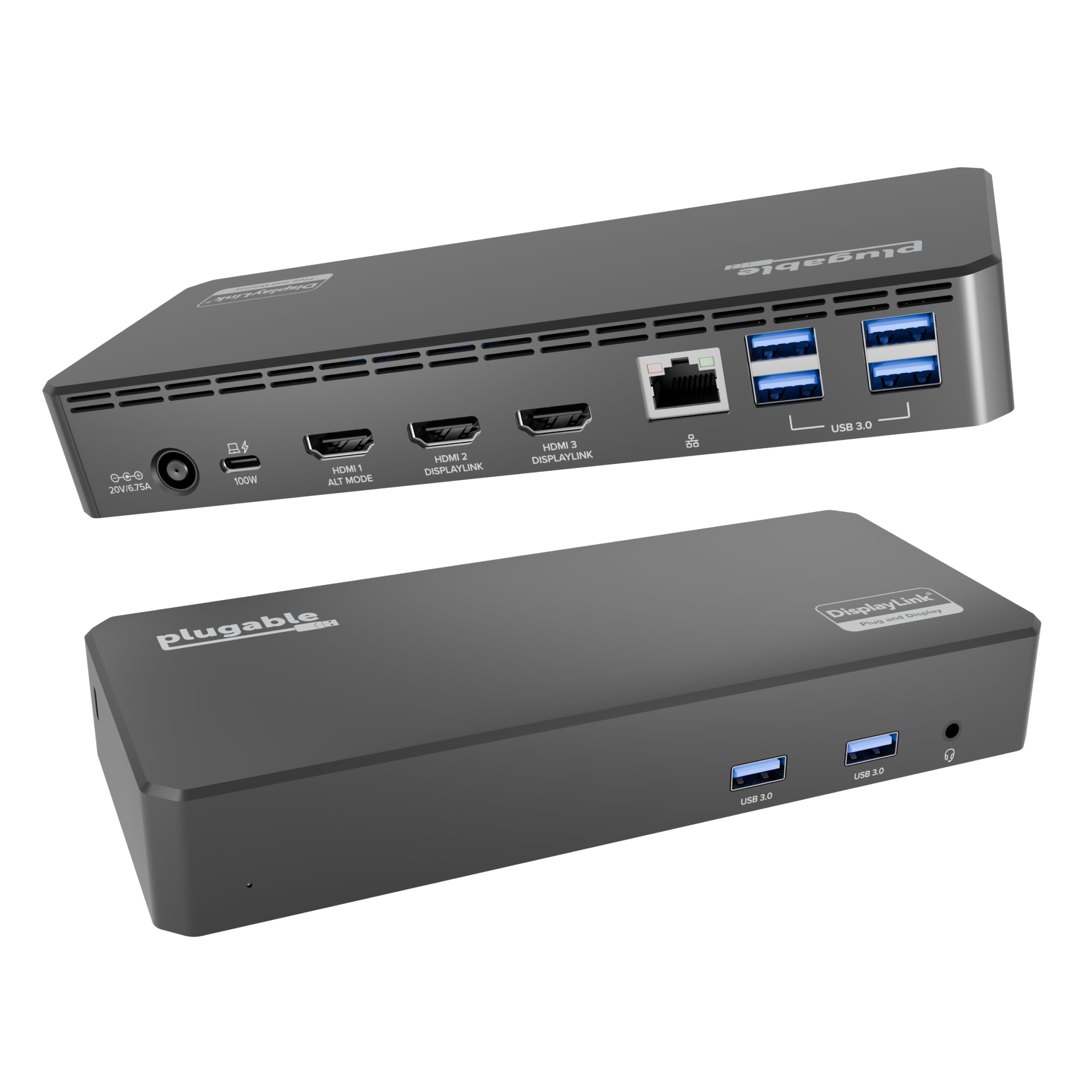
🚀 Triple your screens, double your impact — power, speed, and style in one sleek dock!
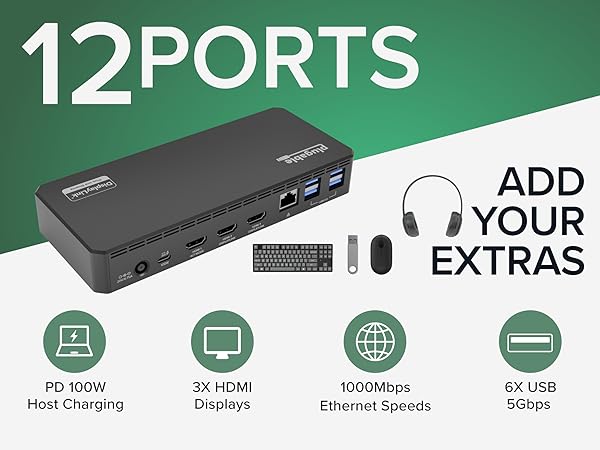
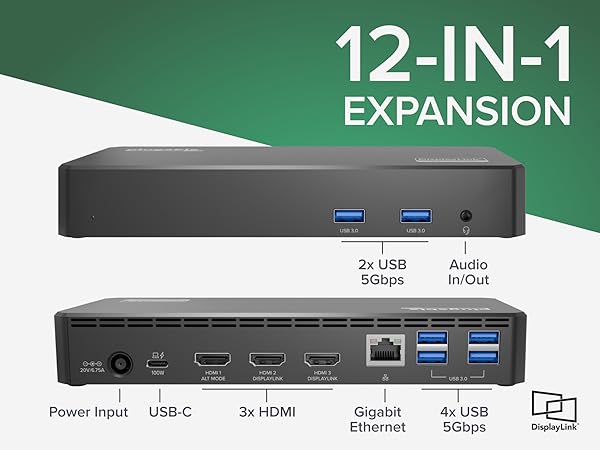
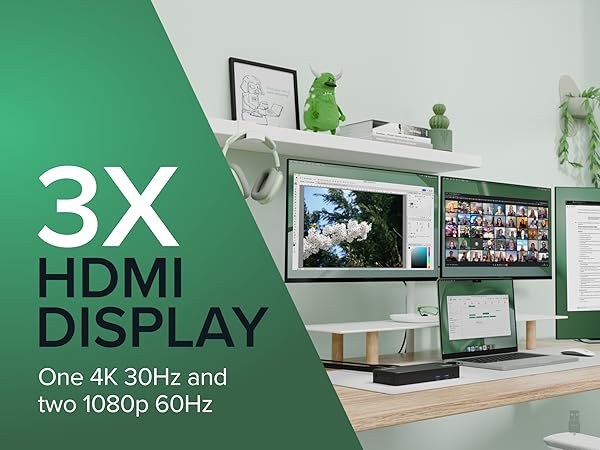
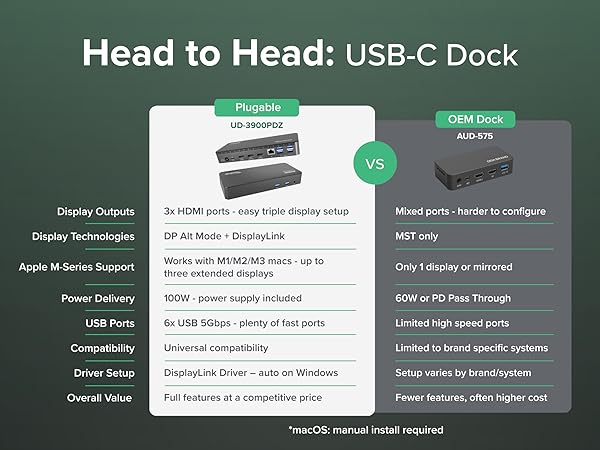
The Plugable USB C Triple Display Docking Station is a powerhouse 12-in-1 hub designed for professionals demanding multi-monitor setups and seamless device connectivity. Featuring 100W USB-C Power Delivery, three HDMI outputs supporting up to 4K and dual 1080p displays, and six USB 3.0 ports, it ensures maximum productivity across Windows, macOS (including Apple Silicon M1-M5), and ChromeOS. Ideal for hybrid teams and IT-managed environments, it combines enterprise-grade reliability with expert support to transform any laptop into a versatile workstation.






| ASIN | B08DDH5CPW |
| Best Sellers Rank | #1,086 in Electronics ( See Top 100 in Electronics ) #17 in Laptop Docking Stations |
| Brand | Plugable |
| Color | Black |
| Compatible Devices | Windows 10 / 11 & macOS 10.15.x and later, ChromeOS 100.x and later Supports full-featured USB-C, USB4, and Thunderbolt 3 / Thunderbolt 4 systems, including: M1 / M2 / M3 /M4 /M5 based MacBooks (M1 Pro/Max, M2 Pro/Max, M3 Pro/Max, M4 Pro/Max, M5 Pro/Max); Intel-based Thunderbolt 3 MacBooks (late 2016+) Dell XPS, Latitude, Inspiron series with full-featured USB-C, USB4, or Thunderbolt 3 / 4 Microsoft Surface Pro / Go / Book / Laptop models with USB-C, USB4, or Thunderbolt 4 HP ProBook, EliteBook, Spectre x360 series with full-featured USB-C, USB4, or Thunderbolt 3 / 4 Lenovo ThinkPad, IdeaPad, and Yoga with full-featured USB-C, USB4, or Thunderbolt 3 / 4 LG Gram with full-featured USB-C, USB4, or Thunderbolt 3 / 4 & thousands of other laptops which are compliant with full-featured, standards-compliant USB-C ports Compatible Devices Windows 10 / 11 & macOS 10.15.x and later, ChromeOS 100.x and later Supports full-featured USB-C, USB4, and Thunderbolt 3 / Thunderbolt 4 systems, including: M1 / M2 / M3 /M4 /M5 based MacBooks (M1 Pro/Max, M2 Pro/Max, M3 Pro/Max, M4 Pro/Max, M5 Pro/Max); Intel-based Thunderbolt 3 MacBooks (late 2016+) Dell XPS, Latitude, Inspiron series with full-featured USB-C, USB4, or Thunderbolt 3 / 4 Microsoft Surface Pro / Go / Book / Laptop models with USB-C, USB4, or Thunderbolt 4 HP ProBook, EliteBook, Spectre x360 series with full-featured USB-C, USB4, or Thunderbolt 3 / 4 Lenovo ThinkPad, IdeaPad, and Yoga with full-featured USB-C, USB4, or Thunderbolt 3 / 4 LG Gram with full-featured USB-C, USB4, or Thunderbolt 3 / 4 & thousands of other laptops which are compliant with full-featured, standards-compliant USB-C ports See more |
| Customer Reviews | 4.3 out of 5 stars 1,048 Reviews |
| Hardware Interface | USB Type C |
| Item Dimensions L x W x H | 7.87"L x 3.3"W x 1.2"H |
| Item Weight | 332 Grams |
| Manufacturer | Plugable |
| Number of Ports | 9 |
| Product Dimensions | 7.87"L x 3.3"W x 1.2"H |
| Total Number of HDMI Ports | 3 |
| Total USB Ports | 6 |
| Total Usb Ports | 6 |
| UPC | 819927012023 |
| Unit Count | 1.0 Count |
| Warranty Description | 2 Year Limited Parts and Labor |
| Wattage | 100.0 |
B**T
Excellent value for everyday use
Overall these work great, and are a great value. I'm an IT manager and I've purchased a few of these now for people to use as office docking stations for the MacBook Pro. Specifically these are being used with the M1 Pro 16" MacBook Pro and they work flawlessly*. It provides enough power that users don't have to plug in the Magsafe brick while they're in the office. It supports dual 1080p monitors, or one 1440p monitor for sure. You have to install a DisplayLink driver and software package to make it work with MacOS (windows too I think), which is typical of these devices. Now thanks to MacOS's privacy and security settings, it gives the user a constant status icon and occasional warning that their screen is being shared. I'm glad that feature is there, but sometimes users ask about it. *My only real complaint is that while the software works great under normal circumstances, MacOS updates will sometimes disable the auto-launch of the DisplayLink adapter software. I regularly get a call that the users' monitors aren't working because of this. I can't really blame this on the display software though. Launching the program and reactivating the auto-start in system settings is simple enough, but always confuses people. It's usually a good time for me to check that the DisplayLink software is up to date too. You can update the software from the resident app in the system tray, though it doesn't notify you of new updates. The driver also integrates with Apple Watch unlock, and has an f.lux feature that will optionally dim/color shift your external display at night. We're using it for 1Gbps ethernet, dual displays, power delivery, and a permanently attached Time Machine backup drive, and haven't had any trouble with connectivity for any of theses devices, nor any complaints about speed. Sometimes these types of docking stations can get kind of hot when you're making them work this hard, especially if you're using power delivery, but this Plugable model doesn't ever get above a mild fever.
C**.
works perfectly!
I have about 8 different adapters and hubs I've bought for my HP Spectre 360, which, when I bought it in 2019, was a trendsetter for having very few connection points (one USB 2.0 and 2 USB-Cs - come on!!!!). I need three large monitors to do my job effectively, and it's been really hard to find an adapter that a) allows 3 display connections, and b) works well. My latest one - a cheap Amazon purchase - didn't have a tight connection with my computer's USB-C input, and the USB 2.0 connections just stopped working after 6 months. When I went to purchase two new cheap adapters, both of the Display Port connections didn't work for my third monitor. So, I decided to bite the bullet and pay more for a legit hub - especially a hub that allows 3 HDMI connections, versus only 2 HDMIs and a Display Port connection. I'm happy to say that this Plugable hub worked right out of the box. (Okay, to be fair, I didn't follow the instructions and download the drivers BEFORE connecting the monitors, and the third monitor didn't work right away - but once I actually downloaded the driver, it connected seamlessly.) While I got this for the 3 HDMI connections, I also love that there are 4 USB 2.0 and 2 USB 3.0 connections. Between my microphone, speakers, mouse, keyboard, and camera, I have a lot of USBs to plug in, and this accommodates all of them, AND it charges my computer at the same time, so now I have 1 USB-C and 1 USB 2.0 open on my laptop. I'm impressed so far! I hope the quality continues throughout months and years of use.
J**Y
Almost Returned It. Simple Setup Fix Made It Work.
I was ready to return this, but I decided to follow the instructions first. I am glad I did. I recently bought a MacBook Pro and already owned this docking station for a dual monitor setup. At first, the second monitor would not work on my Mac. After watching the video and installing the required driver, the dock worked. One important step is missing from the instructions. After installing the driver, you must click the new icon in the top menu bar. Until you do this, only one monitor works, even after reboots. I almost returned the dock before realizing this. Once I clicked the icon, the second monitor turned on immediately. Both displays worked perfectly. The dock works seamlessly on Windows. On Mac, follow the instructions carefully and make sure to click the menu bar icon after installing the driver. Build quality feels solid. The dock charges the MacBook through a single cable. Another nice feature, you can close the MacBook lid and keep both external monitors running without issues.
T**N
No more Bluetooth keyboard/mouse issues!
ChatGTP helped me narrow down what I needed for a more stable connection to my peripheries, as I have 3 external monitors, a Bluetooth keyboard dongle, a Bluetooth mouse dongle, a Bluetooth headset dongle and CAT6 adapter attached to my Samsung laptop. My previous setup included a USBC hub for the monitors and a USBA3.- hub for the 3 Bluetooth dongles and Cat6. My mouse and keyboard would intermittently stop syncing. The Plugable docking station has simplified my desktop and cured all of the connectivity issues that I experienced with the prior 2-hub solution.
L**S
Great Dock
Very easy to use and was pleasantly surprised with how well it worked. Perfect home office companion when you have a setup with several things to connect. Love it!
W**T
works as described
worked perfectly out of the box. have 3 monitors hooked up to my dell laptop. usb keyboard, usb mouse, usb color printer, usb scanner/printer/fax, usb check scanner. 1gb nic, all running from 1 usc-c thunderbolt cable to the laptop. and it charges the laptop aswell. works great I had tried a more expensive wavlink but had issues so that was returned. good purchase no complaints
G**N
Great, but check your compatibility first
I had trouble getting two monitors to work until I plugged them into HDMI 2 and 3 (DisplayLink) and that's when I found out that my laptop doesn't support HDMI 1 (Alt mode). I only need two monitors so I'm still happy with my purchase but if I had three monitors to connect I would probably be pretty unhappy. Maybe that should have been obvious to me from reading the specs but as it was I had to do some reading online before I figured it out. So I mention this here in case it helps the next guy. Aside from that, it's a great little unit. Plugged everything else in and it was off to the races. Monitors seem very happy with the feed.
A**Y
not all HDMI ports work
I love the fact that it had a lot of ports for all my peripherals! All the USB A/C ports works however the 2nd and 3rd HDMI ports do not work for me unfortunately. The 2nd doesn’t recognize my monitor at all, and the 3rd one recognizes but does not display anything unfortunately. My laptop is an HP laptop for reference. I end up using my laptops HDMI port for my second display. The first HDMI port works fine though? So kind of odd.
Trustpilot
Hace 2 semanas
Hace 3 días