We remain fully operational. Our teams are working around the clock to ensure your deliveries continue safely.

Descargar la aplicación


Servicios al cliente
Sobre nosotros
Copyright © 2025 Desertcart Holdings Limited
Descargar la aplicación


🔐 Unlock the future of home security—smart, sleek, and always connected.
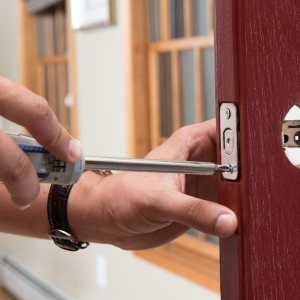
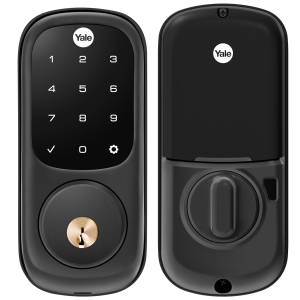
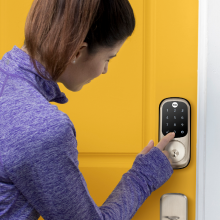
The Yale Assure Lock with Z-Wave is a black suede touchscreen deadbolt that upgrades your home security with keyless entry, smart home compatibility, and auto relock features. Compatible with major Z-Wave hubs like Ring and SmartThings, it offers remote locking, user code management, and access notifications. Easy to install on standard doors, it includes all necessary hardware and two physical keys for backup, backed by Yale’s lifetime limited warranty on finish and mechanical parts.




| ASIN | B07XHNZH2W |
| Additional Features | Z-Wave |
| Best Sellers Rank | #36,408 in Tools & Home Improvement ( See Top 100 in Tools & Home Improvement ) #179 in Deadbolts |
| Brand Name | Yale |
| Color | Black Suede |
| Connectivity Protocol | Z-Wave |
| Control Method | Touch |
| Controller Type | Nexia, SmartThings, Vera, Wink |
| Customer Reviews | 4.2 4.2 out of 5 stars (2,124) |
| Finish Types | Black |
| Global Trade Identification Number | 00081023068314 |
| Included Components | Yale Assure Lock Touchscreen, Z-Wave Smart Module, Deadbolt Strike and Mounting Hardware, 4 AA Batteries, Installation Manual and Door Template, 2 Keys |
| Item Dimensions | 5.5 x 5.5 x 10 inches |
| Item Type Name | Touchscreen Deadbolt |
| Lock Type | Keypad |
| Manufacturer | Yale Security Inc. |
| Manufacturer Warranty Description | Lifetime limited warranty on Finish and Mechanical. One year on Electronics |
| Material Type | Stainless Steel, Zinc |
| Model Number | YRD226-ZW2-BSP |
| Recommended Uses For Product | Door |
| Style Name | Touchscreen |
| UPC | 081023068314 |
| Unit Count | 1.0 Count |
M**T
AWESOME! WORKS WITH MY ABODE SYSTEM WELL
I have Abode home security & automation system and needed a lock that works with it. The Yale Assure lock with z-wave was up and running in 10 minutes (to be fair I have installed a lot of regular dead bolts, this isn't really any different, just have to make sure you put the wires in the right way, but that's pretty easy). The z-wave integration with Abode was easy enough, although if your not tech savy you may struggle with that part. Nice that I can set it up to notify my phone when its open, AND I can lock and unlock through my Abode phone app The lock is grade 2, so better than a regular cheap deadlock you'd pick up at the hardware store, so it is a step up in security, just make sure your strike plate on the door frame using 3 inch long screws that reach the frame, otherwise it won't matter if you have grade1 or 2 or 3 deadbolt- anyone could kick it open in a few seconds. This comes with everything you need, screws and all, just make sure it goes all the way into the frame of the house and not just the trim. The touch screen is very nice and responds very well and the autolock function works really well, especially when you have kids and hands are always full... no fussing with keys is such a luxury that I wish I gotten sooner. This thing looks fancy too. I can't say enough about my first impressions. That being said, I will update in 3 and 6 months... Update: a few months in and I couldn’t be happier. Opening it 5 times a day at least and battery is still strong. No issues, works great!!
S**K
Yale Assure Lock with Z-Wave (YRD226-ZW2-619) - User Log Works with SmartThings
Our Schlage keypad deadbolt lock broke after 8yrs of service. I decided to replace it with the Yale Assure Z Wave smart lock to integrate it with our SmartThings (ST) hub. Installation was very easy. The only issue I ran into was the deadbolt mechanism did not operate smoothly when I first installed it. The installation diagram mentions you need to check that it moves freely at each step of the way and although I thought I followed the directions it was still sticking. It appears the deadbolt mechanism and the interior/exterior covers have very small tolerance so you need to constantly check for smooth operation while mating and fastening them through the deadbolt mechanism (it might help with an extra pair of hands). One thing I dislike is the included rectangular strike plate for the door frame. It would have been nice if Yale provided a plate with a lip. As for programming the lock, there are many reviews/comments saying this Z Wave lock does not show who unlocked the deadbolt in the ST app log. This is inaccurate. You can see who unlocked the deadbolt if you follow the directions below: 1) Follow the directions that came with the lock including the step where you set your master entry code 2) DO NOT create regular entry codes using the keypad. If you created entry codes from the lock's keypad, ST history log will only show "Code 2" or "Code 3" as the one who unlocked the deadbolt. If you created codes using the keypad, you'll have to do a factory reset and start over. 3) Open the ST app on your phone (I'm using an iPhone app) and on the upper left corner of the screen, tap the three horizontal bars (menu bar) 4) Select SmartApps 5) Add the Smart Lock Guess Access widget by tapping on it 6) Once the widget is added, you'll see the widget on the main screen. Select the widget. 7) In the upper left corner of the widget screen, select Lock Codes and then select Invite Guest 8) Complete all three fields and save them for each account you are creating. The info provided in the "Who will be using this lock?" field is what will be shown in the log. 9) You can click on 'History' in the upper right corner and you'll see that each account has been created with a date/time stamp. 10) Users can start using their entry codes immediately. However, their unlock history will not be logged. It seems it takes 4-6 hrs for the user log history to be activated in ST. After 4-6 hrs, when a user unlocks with their code, the history log will show the date/person/time of when the deadbolt unlocked. 11) You can turn on notifications in the ST app and iPhone to notify you each time the deadbolt is unlocked.
S**Z
So good, I bought 2
When we moved into our new house, the geek in me knew I wanted a smart lock. I looked for one that looked good and found this Yale. Installing and configuring were a breeze. I use a Z-wave module for use with the Hubitat Elevation hub, but I have also used it with HomeKit and prefer Z-wave. Once I paired the z-wave module, I was able to create and assign codes in Hubitat and then automate to my heart's content. When not using an automation, the key pad is easy to see and use during the day and at night. There's a chime that lets you know the lock has locked properly or if the lock has jammed or not closed properly. It runs on 4 AA batteries, which seem to last over a year with our use. One issue you have to be aware of, but this applies to all smart locks. The deadbolt needs to open and close smoothly so you may have to adjust the strike plate in the door frame. Our house settles and shifts between wet winters and very dry summers, so at one point, the door frame wasn't lined up perfectly. We had to file away a bit of the strike plate to make sure that regardless of the season, the lock opens and closes smoothly. Once we did that, we didn't have any problems and the battery life increased quite a bit. Even a little friction in opening and closing will wear the batteries out quickly.
M**S
Nightmare to set up, but really nice functionality when it is
It works as intended once I finally got it working at all. We initially got this with a z-wave module, thinking it had all the functionality that it mentions in the marketing. It doesn't. What it does with z-wave is basically just opens with the app, and alexa. No timed features, no location features, no real way to even adjust settings. We had to spend another 130 bucks to get the wifi bridge and module to do what we wanted it to do. On top of that, it was an enormous pain to set up. I've set up probably 30-40 smart devices by now in our house and couldn't for the life of me figure out why the bridge wouldn't connect to the wifi. Turns out, iPhone has to allow it to connect to the wifi through the wifi settings. In no literature, forum post, instruction manual, does it say anything about that. I accidentally happened upon it while just trying anything and everything I could think of. After its finally set up, it works great. It absolutely demolishes batteries though. We bought a pack of rechargeables to cycle through, it goes through a set of 4 in 2 weeks.
L**U
The is the 2nd Yale Zwave deadbolt that I bought. The first one (RYD210) was bought back in 2011 and it is still work well. I replace it because the color on the outside is all dull due to 12 years weather exposure. This touchscreen one look much more luxurious and I like the voice instruction is very convenience. Also the sound effort is much soft. But other than that, the installation design and functions are all pretty much sme as 12 years ago. And work just the same. Fairly reliable with few issues that can be resolved by completely reset and reprogram. The only thing lack is the random code feature that Kiwkset/Weiser has so people cannot see your finger print to guest your code.
A**E
Slick looks, works like a charm
J**O
Excelente producto.
R**N
No es posible conectar a tu teléfono a menos que adquieras productos por separado.
C**R
I’ve had this a few years. It’s awful. I have tried to like it as they are expensive. The deadbolt always goes into the locked position when you walk by the door causing it to bang into your door casing. It won’t actually lock however when you want it too easily. The screen is very difficult to turn on to key in your pin. It’s also very evident because of the touch screen what 4 numbers get pushed for the pin. I have used a lot of similar locks. This one is an awful experience and very frustrating.
Trustpilot
Hace 1 mes
Hace 3 semanas