
Descargar la aplicación


Servicios al cliente
Sobre nosotros
Copyright © 2025 Desertcart Holdings Limited
Descargar la aplicación


🛫 Elevate your flight sim game with precision, power, and pro-level control!
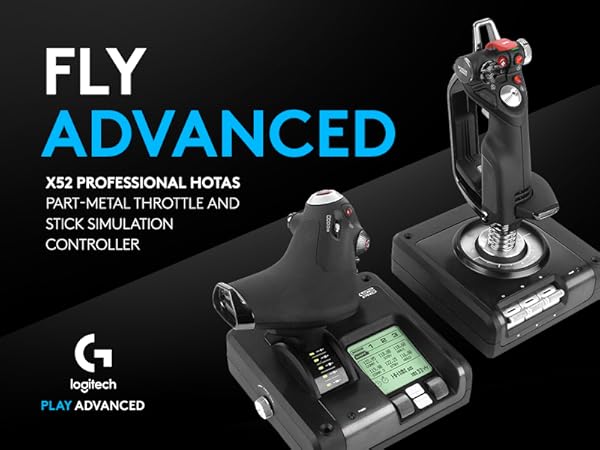
The Logitech G X52 Pro USB Flight Control System is a professional-grade HOTAS joystick and throttle combo designed for serious flight sim enthusiasts. Featuring magnetic non-contact sensors for superior accuracy, a multifunction LCD for real-time control, and 282 programmable commands, it offers customizable, ergonomic control compatible with Windows PCs via USB 2.0. Its 3D twist rudder with lock and adjustable grip system ensure immersive, fatigue-free flying.



| ASIN | B07QXPQRYX |
| Additional Features | Ergonomic |
| Best Sellers Rank | #25,389 in Video Games ( See Top 100 in Video Games ) #71 in PC Game Flight Controls |
| Brand | Logitech G |
| Brand Name | Logitech G |
| Button Quantity | 20 |
| Color | Black,Red,Silver |
| Compatible Devices | Windows |
| Connectivity Technology | USB |
| Controller Type | Joystick |
| Customer Reviews | 4.1 out of 5 stars 808 Reviews |
| Global Trade Identification Number | 00097855152817 |
| Hardware Platform | Desktop, pc |
| Item Weight | 2 Kilograms |
| Manufacturer | Logitech |
| Model Name | Logitech G X52 Pro Flight Contol System |
| Package Quantity | 1 |
| Power Source | Corded Electric |
| UPC | 097855152817 |
| Warranty Description | 2 year manufacturer |
A**L
Great all around tools for flight
Great set of flight controllers. The only diwn side is you can seem to change the time on them.
A**R
Smooth Flying
Can not say enough about it! Amazing customizable features, very intuitive layout. Easily attaches to hotas desk mounts. Strong spring on the stick, all the buttons can be customized to your color liking as well.
G**T
Good value for the money
I bought this a few months ago to use for Microsoft flight sim 20 and for DCS. I used it on a gaming laptop with the newest windows 11. When I plugged in the HOTAS I was a little upset to see that the software didn’t work with windows 11 and only the older versions and they haven’t put out an update for it yet. There are work around a for this. Regardless though it still does work and works pretty well without the updated drivers. The only issue you’ll find is some lack of customization in keybinds and the throttle portion of the HOTAS will not light up. Either way I used it pretty seamlessly on DCS and MSFS20. For a beginner setup I think it’s a great buy. You get a ton of buttons and controls that allows you to get pretty immersed in the game without dropping $500+ on the more premium setups. Some of the pretty big YouTubers who play flight sims have started on this setup as well and still recommend it before going premium. It comes with suction cups that stick very securely to your desk and they worked very well. Once they’re down they’re gonna stay there. I had to move my setup so I removed the suction cups and I did find that once they were removed they did pop up a few times since there was no easy way to remove them in the first place without getting a fingernail under one edge and breaking the seal which did deform the edge a little. The joystick is pretty solid but the motion does feel a little “budget” the spring tension can feel weak thus resulting in some drift which can be altered and fixed in game through the axis sensitivity etc. overall I probably have about 35 hours on it and I would recommend it for a beginner budget setup again without jumping into the premium setups. If you’re just getting into flight sims and don’t want one of those all in one joysticks then this would be a good rout for you.
M**E
Perfect Once Tweaked
This is a solidly built, and fully featured HOTAS that works as expected on Win 10. The programming software allowed me to set up 80 different commands and macros for CFS3, and there are still more buttons and dials left unassigned. The only issue was that the stick would frequently get hung up in the center. This has been reported by many others with a variety of root causes and fixes being speculated on. The tweak that fixed it for me was to bind a pair of adjacent coils on the outer spring to each other with 2 twist ties on opposite sides. This reduced the force on the sliding cup and cone just enough to prevent it becoming bound together without losing the self-centering function.
C**R
Could have been great…
Good things first: -Great ergonomics. It fits in the hands almost perfectly and can be adjusted to fit larger or smaller hands. Basically all the buttons are reachable without moving your hands from their positions on the stick and throttle. Finding a stick that was comfortable to hold has been the hardest part of finding a good joystick for me. It’s a shame that I found one I really liked only for it to be this one… -Tons of buttons. A good hotas needs a good amount of buttons, hat switches, analog sticks, and dials and this hotas has them (whether or not they work is another matter). The mini mouse stick on the throttle never functioned for me which was a shame because it’d have been really useful to have. It was the only button that just didn’t work at all. The buttons all had decent feedback and “clickyness” to them so you could feel right about when the pressure on the button would trigger the input. That pressure didn’t seem too much or too little. -Comes with suction cups that attach to the bottom of the controls. These would be useful on a smooth desk but since my desk has shallow wood grooves in it, these don’t do much. They’re a good thought though. Now for the deal breakers: The more I used it the worse it performed. The stick would start to register inputs on the pitch and roll with little to no force imparted on the stick. And I don’t mean like a tiny amount of drift, though it did this too, but like a max deflection-type of input. I noticed halfway through a game that I was losing control for some reason and crashing into the trees whenever someone was behind me and I did some comparisons and realized right away that something with the roll axis was totally screwed. It would go from neutral to maximum left roll the instant it registered any leftward input. Rolling to the right was fine. I tried to troubleshoot it and re calibrate it and nothing worked. I dealt with it by lowering the sensitivity by 50% on the roll controls in the game and just tried to play around the issue and did so for about a day before the next two issues cropped up. Next I noticed that the stick was now very wobbly when it used to be stiff. Maybe this is expected but I didn’t think it was because it also coincided with a loss of sensitivity. This issue was very frustrating because having a bit of resistance for those small adjustments is really helpful with aiming in a flight sim and now that control was gone. The next issue was that my game was now registering a maximum negative pitch input despite the stick being neutral and not even having a hand on it. It’d be one thing to have some minor drift on it where it gently pulls in one direction but that wasn’t what was happening. The instant I took my hand off the stick and let it go neutral, my plane would nosedive fast enough to snap its wings off if I didn’t catch it. And no, this was in no way the fault of myself or of the game. My controls and game settings were not changed in any way prior to these issues. They occurred spontaneously. Now I have to play with massive deadzones and very low sensitivity settings if I use it at all. I’m returning this and getting a VKB flight stick (they’re not sold on Amazon but look them up). I have other gripes with this hotas but they’re not worth mentioning when the thing just stops functioning 10 or 20 hours into using it. It’s simply unacceptable for a 200$ product to fail so quickly. Don’t buy this thinking everyone with bad reviews got defective units… they’re probably all like this and those that didn’t bring it up likely never had to use it themselves or never bothered to update their reviews after the product stopped working. ****Update. I bought the VKB Gladiator NXT Premium flight stick from their NA website (not available on Amazon) and it blows this Logitech hotas out of the water despite it being only a flight stick and base (no throttle). Look it up! It's at the same pricepoint and it is phenomenal!
D**N
One of the better joysticks!
Con: A bit pricey because of the Pandemic. Very few places left to buy a Joystick or any kind of Flight Controls. With everyone staying home because of the pandemic, it is evident that the majority of places to buy things for the PC are all or almost all sold out. A lot of price gouging is going on. I paid $100.00 more for this product than the original price. Pro: Logitech is one of the best game joysticks available. Right out of the box, I have enjoyed this product. No issues and responses are good.
R**O
Great Value!
Couldn’t be more excited about the X52 Logitech. My last HOTAS was the thrustmaster HOTAS X. The Logitech X52 is Way superior feel and flight control not to mention all the buttons for binding controls.
R**O
Best value for a full function flight control system
From someone who's been into top level flight combat sims since the late 90's, this is an excellent value for a flight control system. I started with the TM F16 and WCS/RCS and migrated to the TQS to the Cougar system and finally to the Warthog along with a Saitek X36 system for my kids. The X52 is a great system that balances the need for full HOTAS control and reasonable price. Yes, it still uses potentiometers instead of hall effect or optical sensors in the top end controllers but if I ever wear them out, the replacement is simple, similar to doing it on the old F16 FLCS. USB connectivity is great and configuring or using pre configured switch settings for simulations is straight forward and simple.
Trustpilot
Hace 1 semana
Hace 1 mes