We remain fully operational. Our teams are working around the clock to ensure your deliveries continue safely.

Descargar la aplicación


Servicios al cliente
Sobre nosotros
Copyright © 2025 Desertcart Holdings Limited
Descargar la aplicación

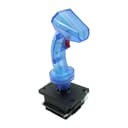



🎯 Level up your retro gaming with pro-grade precision and plug-n-play ease!
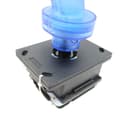
The GRS Arcade Flight Stick is a premium, industrial-quality joystick designed for classic flight and arcade games. Featuring an 8-button layout, switchable 4/8-way restrictors, and compatibility with AtGames V1.0/V1.1 and Windows PCs, it delivers authentic arcade tactile feedback without complicated wiring. Ideal for enthusiasts craving a versatile, easy-to-install upgrade that elevates gameplay on beloved titles like TRON and After Burner.
| ASIN | B07X8DZ344 |
| Best Sellers Rank | #12,081 in Video Games ( See Top 100 in Video Games ) #79 in PC Game Joysticks |
| Brand Name | ThunderStick |
| Button Quantity | 8 |
| Color | Black |
| Compatible Devices | Windows |
| Connectivity Technology | USB |
| Controller Type | Joystick |
| Customer Reviews | 4.2 4.2 out of 5 stars (215) |
| Hardware Platform | pc |
| Manufacturer | ThunderStick |
| Package Quantity | 1 |
H**I
Great substitute for the original
The handle, trigger, and base feel very solid and appear to be very well made, plastic doesn't feel cheap. The original Midway sticks (which I own several and have rebuilt in the past) that this is based off of was very large and bulky on the bottom, because it went into a dedicated cabinet, and also used leaf switches. While I do prefer leaf switches, this has a switch mechanism that is very similar to Sanwa JLF or Seimitsu sticks and has a nice clicky feel to it. The LEDs are a nice touch but a little bright for my taste they are attenuated to use a 5V connection The included bubble decal is a nice bonus and looks great. My favorite thing about this stick besides it's performance is the inclusion of the extra gates and they are easy to swap out on the fly which makes this stick very versatile. I'm using this with my own encoder that I purchased previously, while it was nice that one was included with a wire harness, I don't personally need it. I only have 1 small complaint and that is I wish there was maybe 1 or 2 more buttons on the handle for Discs of Tron, but the handle can be easily modded. Overall I highly recommend this if you love the original Tron arcade game and want a good experience playing it when accompanied by a good spinner. The price is a bargain for what is included. It's also great for games that had similar controls.
A**E
Works Great with AtGames Legend Ultimate Arcade
Fro the price you cannot beat this joystick for the AtGames Legend Ultimate Arcade. Install is straight forward. Did take a bit to figure out how the joystick "locks" into the base (there is a spring-loaded retainer that gets pushed in and rotated to hold two pins on the stick) Looks great and functions well. Ther is an additional button on the top of the joystick that you can hook to a secondary button. I do play the Tron games, so I have the trigger as button "A" and the top hat button as button "B". Your A and B button will still work on the ALU. Took a bit for the stick to come, but for the price it was worth it
K**I
Good value, but with some limitations
So I think this is possibly the third (and I assume,finale) revision to this joystick. It works well but has some issues. As others have noted, it's smaller than an original Tron stick and those with large hands may find it hard to use because of that. Not an issue for me, but I can see how it could be for some. The other problems to note are as follows: This listing as well as the official GRS site listing do not clearly point out what is included with this current version of the stick. It's been revised to fit the AtGames Legends Ultimate 1.1 control panel, it has the logo sticker pre applied and it has a second button up top. Previous versions were missing these options and/or required you to make modifications with extra parts. It's great this version has them, but the listing should point them out. It also comes with the swappable ball top joystick. Of the included ALU wiring harnesses that are included, one of them is out of date and unusable. AtGames changed the CTR board a couple of years ago. The harness for the switches works fine. Just wire it up, and go. The other harness has the power line for the LED in the stick. If you have a 2021 or newer model of the ALU, you will have to wire in 5v to get the joystick to light up. It has no effect on the functionality of the joystick, just the LED light. No biggie, but something to be aware of. There is one significant step missing in the instructions that absolutely should be there. When you install the stick into the base, you have to lock it in place. If you don't, the stick will just pull right out and rip the wiring harness out with it. The included instructions and videos made by GRS and others never mention it or don't go into any detail on how to do it. Once the stick in in place, look on the bottom of the base. The end of the stick will be bottomed out in a little black plastic cup. Hold the stick in place and push up on the outer edges of the plastic cup. When you do this, a couple of lugs on the stick will be exposed. Rotate the cup 90° and a couple of notches will line up with the lugs. Let the cup go and spring tension will push it back into place with the stick now locked in correctly. On a side note, it was reasonably quick and easy to swap out the tron stick to the ball/bat top with the old ALU 1.0. That system used a simple mdf enclosure that you could leave the bottom off and access it to unplug the wires. The newer 1.1 and above, have an enclosed plastic box that prevents this. So unless you cut the bottom of the box off, you would have to disassemble the control panel every time you want to switch out the stick. I think it's still a good stick, and should be seriously considered for those who play lots of games that take advantage of it. I'm a shooter junkie, so it's perfect for my needs. I currently have it installed in a Legends Ultimate Mini, in a second control panel. It just needs revised instructions, and a five pin harness with LED power to replace the old eight pin harness for older ALU's.
D**Y
Great-looking and -working replacement, not quite perfect restrictor for Tron
tl;dr - it's a fine looking replica at around 3/4 scale, and by far the best I've found. Clickier sound than original, and the restrictor isn't quite right for light cycles. First, for anyone having trouble with "not centering" - you have to lock the handle in place. Someone already posted a video, but on the UNDERSIDE, push the plastic ring up and rotate 90 degrees, which will lock the handle in place and it will center just fine (it's not designed to be used in the unlocked position). Second, the included wiring harnesses are for retrofitting into an ATGames cabinet. If you're using it for any other purpose, well, you should expect to be on your own. There's a ground pin, and one pin for each switch - just wire them up to a USB encoder or picade or whatever. If you don't know how to do that, then maybe you should tackle a simpler project. This is not advertised as being a plug-and-play USB controller, nor an arcade or JAMMA replacement, so it's not really fair to down-rate it because your specific use case isn't covered in the (admittedly cryptic) manual. Really the only complaint I can lodge is that it doesn't -quite- replicate the behavior of a real Tron stick in the corners. An arcade Tron is mechanically engineered so that the corners are hard (but not impossible!) to get into - if you're playing the light cycles on an original cab, it's not easy to accidentally land in the corner unless you force it. The circle restrictor on this joystick helps, but honestly I don't know how you can replicate the exact behavior without significant engineering (beyond a restrictor plate). I've had some success with mappings on an Ultimarc ultrastik, but then I don't get this great reproduction handle... Pick your poison.
M**N
It has a deflect button on the rear of joystick not shown in picture,a pleasant surprise!
B**B
manual is pathetic. if you’re using a traditional pinout board, forget it. terrible support to boot. to the person who posted they saw a post online that said that many of the light wires were installed backwards, can you post that link please. i’ve got the trigger to work but no light.
A**R
Bought this product and the description says that it comes with a USB Encoder...it does NOT come with it, so I had to buy it separately. The instructions that came with it, only showed what to do if you were installing in an ATGames cabinet, which was no help with a Raspberry Pi or PC, etc. that it specifies it will work with. I then had trouble getting the lights to work until I saw a post online that said that many of the light wires were installed backwards. As soon as I switched the wires, it worked. I contacted the seller twice on different subjects, and each time they said they would get right back to me, but NEVER did. I don't recommend this product unless you have experience.
Trustpilot
Hace 2 semanas
Hace 2 días