We remain fully operational. Our teams are working around the clock to ensure your deliveries continue safely.

Descargar la aplicación


Servicios al cliente
Sobre nosotros
Copyright © 2025 Desertcart Holdings Limited
Descargar la aplicación
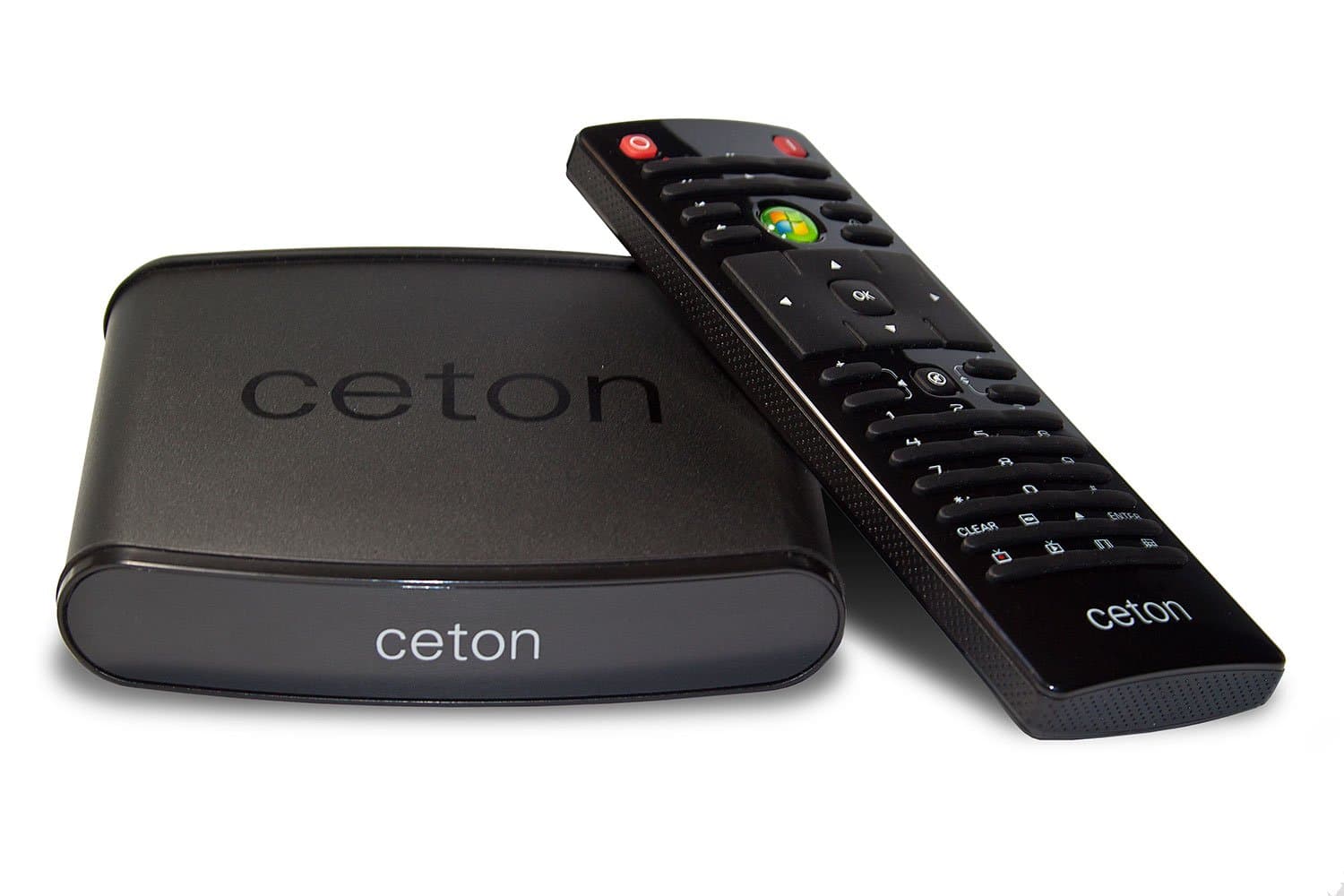


📡 Elevate Your Viewing Experience!
The Echo - Windows Media Center Extender transforms your home entertainment by allowing you to enjoy live TV and DVR across multiple televisions. With access to premium channels and your personal media library, it eliminates the need for costly set-top boxes and DVR fees, all while ensuring you have the support you need when purchased from authorized sellers.
| ASIN | B008TZJ126 |
| Antenna | Television |
| AntennaDescription | Television |
| Brand | Ceton |
| Compatible Devices | Television |
| Connectivity Technology | Ethernet, HDMI, Infrared |
| Connector Type | HDMI, RJ45 |
| Customer Reviews | 3.4 out of 5 stars 212 Reviews |
| Includes Remote | Yes |
| Item Weight | 0.4 Pounds |
| Manufacturer | Ceton |
| Mfr Part Number | 6100-MCX |
| Model Number | 6100-MCX |
| Tuner Technology | Digital |
| Tuner Type | Digital |
| UPC | 856940002051 |
J**L
Latest version fulfills its promise...
I was torn between giving this product 4 or 5 stars, but decided to go with 5 to help bring up its average star rating as much as possible, because at THIS point in its development it deserves a good rating. I know it had issues early on, but from my experience with the current firmware, it now works 100% as advertised with a bright future ahead of it. I run one these with an X-Box 360 extender at the same time off a modest HTPC (2.4ghz Dual Core, 4gb RAM, GeForce 210, InfiniTV4, 250gb OS Drive + 3TB Media Drive) and it works flawlessly. Both it and the 360 extender stream the video and audio as well as the local HTPC WMC does to its own monitor. I plan on adding a 2nd echo to the setup. The HTPC, which is also used as a normal PC and still doesn't break a sweat running this, should handle it fine. The package it arrived in is very nice. A well designed box with all the cables you need (Power, HDMI, Ethernet). The unit is small and nice looking but with just enough heft to not feel cheap. It was found and connected to my WMC in a snap, and also did its own firmware update in a couple minutes and was ready to go after I installed the setup program on the WMC (make sure you download this from Ceton and apply it so you can tweak your echo's settings). The remote, which includes 2 lithium batteries, is passable. A bit small and as of this writing doesn't do volume on the extender. But most people can and should get a universal remote to consolidate the remote codes for this, the TV, and whatever else is in your HTPC setup. It will definitely help your wife acceptance factor by a lot. Response and execution were crisp. The UI animations (sliding from menu option to menu option) had a slightly lower framerate than the XBox or local PC, but still move and respond just as fast. The forthcoming android support will double this device's usefulness, but there are other ways to get your netflix/hulu etc if it doesn't come to pass. This is the only device currently sold new outside the XBox 360 that can act as an extender for windows media center, and it uses much less power than a 360 and works brilliantly. Highly recommended and looking forward to more updates!
M**E
Worth weighing up a 360 as an alternative.
Update: I'm about a year on from ditching the Ceton and I can't believe how 'night and day' it is. The regular/daily issues mentioned below just all 'went away' and I haven't seen any of them since. I'm also back to running flawlessly with the virus killer of my choice. I'm still using the same server too. It's a real pity Ceton seemed focused on trying to blame whatever wasn't their own part of the setup rather than accepting flaws with their own hardware. Original review: It did work for me, but not without numerous issues both with the unit itself and with Ceton support. I fixed all the issues by ditching the unit and replacing it with an Xbox 360. Yes, merely changing the extender resolved everything, therefore clearly (and contrary to Ceton's customer support claims) all the issues were squarely with the Echo unit. I list a summary of some of my most common problems so you can judge yourself whether they're reasonable or not for you: -Trouble re-connecting to the server, usually after the Ceton Echo had locked up and rebooted. So yes...two problems there. -Frequent lock ups/freezes on pressing pause while viewing content (sometimes with rewind/fast forward). -Lock ups just navigating menus, or even just being sat in the menus - not even playing video. -Lock ups would about 50/50 require you to pull the plug on the Ceton unit to re-start. At other times, the unit would reset after sometime, either a crash itself or a less than graceful recovery method. and it is also reasonable to give you information that will lead you to your own judgment about whether or not the Ceton Echo was at fault: -None of these problems were apparent on the Xbox 360 being used for the same purpose in a different room during the same time period I owned the Echo. I could use the 360 as the Echo was experience these problems and the 360 would be free of issue. -None of these problems were apparent on the Xbox 360 that replaced the Ceton Echo in the living room. None of these problems were apparent on an additional Xbox 360 added to another remote TV. -Server, both hardware and software and the cable company hardware did not change as I went from 'broken with Ceton's hardware included in my setup' to 'fully resolved with no Ceton'. -Update: None of these problems have been apparent on a 360 installed in the same place as the Ceton Echo...same network cable, same splitter, same TV. Either the Ceton Echo was to blame or all these issues magically fixed themselves at the point I unplugged the Echo and returned it. I had it for six months - this was not a short trial. I am very lucky Amazon accepted a return at this point. My server PC (for the record) was a dedicated media server (minimal software installed just to do the job). It could be summed up as Windows 7/Media center with a virus killer, a torrent client, the serviio media server and HD Homerun prime drivers/plug-ins. Anything else installed on the machine was merely to set it up. It is still this way today. Ceton were utterly terrible to deal with as far as customer support goes. I did everything they asked, stopping short at applying some hotfixes that were (a) unrelated and (b) what Microsoft told me not to apply (due to them not being related). Ceton were unable to find any problem (or at least denied it) despite all logic reasonably pointing to the Ceton unit being at fault. Most of what I was asked to do was nothing other than groping around in the dark and at the point where I told them I was not comfortable with applying the unrelated hotfixes (which I was polite about and decent enough to explain/justify) they simply closed the thread. The attitude was 'we don't care about your concerns, if you won't do what we asked, we won't help' with no explanation or justification, which they had been invited to provide. They were simply unwilling to honor a request to proceed and work with my in a manner I was comfortable with and they not were willing to justify themselves. I ended up speaking with their Director of Corporate Development. More on support...If you have any virus killer installed and it's not Microsoft Security Essentials they'll tell you to uninstall it and point out they only play nicely with that product, which is what they 'recommend'. This product is free and is among the lowest rated virus killers (in terms of protection) around and it has now fallen into the status of repeatedly failing the minimum certification level...which was somewhat intentional on the part of Microsoft as they have been developing the product as 'a baseline' for other vendors to develop their own virus products against. This being your only supported virus killer is simply 'unacceptable'. Software should be developed to work well with common and popular virus killers - all too common it isn't. Ceton clearly fall into this now unfortunately common 'you have an unsupported virus killer on your system' scenario and it becomes one of the default line items in the support response regardless of whether or not it is causing or even related to an issue. Which does bring me to another topic. In order to get a view of your computer (to see which virus killer and other things Ceton doesn't like that you installed) Ceton's Support workflow asks you to run a program that dumps a lot of information out for them. This is common and not an issue, provided it is not intrusive. I made the mistake of having a detailed look at the information captured only after I'd uploaded it, trusting it nothing unnecessary was going to be probed. That was a mistake. At the level this reports information to Ceton, this program falls into the Spyware category. My recommendation: You might be able to tolerate these even frequent issues on a remote TV in another room that you maybe don't use all the time, however given the Xbox 360 pricing remains quite competitive (and with deals, is often cheaper) I would be hard pushed to truly recommend the Ceton Echo unit unless it's in a flash sale and is substantially discounted.
E**O
Works pretty good for me
Worth the purchase even if you're only using to watch tv My cable company (comcast), began encrypting all signals going thru my home requiring me to lease cable boxes for every tv I wanted to view tv on even local stations. That's why I started looking elsewhere and came across this lil box. Having Dvr boxes in 3 rooms was costing me 36 bux/month so doing simple math concludes purchase of a few of these boxes pays off within a year and provides savings after that and provides much better interface/ guides. In comparisons with the xbox I'd say its on par or even better, I set it to play tv at startup which Xbox cannot do. I also leave the box on constantly and use a harmony remote in which I program the live tv command at start of activity and it sends a stop command at end of activity so the box is not continously using a tuner on my hd homerun prime. I agree that the menu transitions are choppy compared to the xbox but I find it faster than the xbox. I've installed a few fancy plugins like media browser and remote potatoes and found that it slow the echo down a lot so I uninstalled and it's faster than xbox again. Nice menu transitions would be nice but I purchased the echo to watch tv not look at menu transitions. Some reviews mention that viewing tv can be a bit choppy at times and yes it can be but so is all tv that is being recorded for live pausing/ recording. The clearest tv signal you will get is from antenna or unencrypted like comcast used to. Movies don't work we'll with extenders, I have the shark codecs installed on my mcpc to be able to watch mkvs but most playback is choppy like reviewers mention and I find it choppy on all my extenders not just the echo(2 360s and 2 echos) like many, I've searched for the perfect all in one box but never found it, my favorite movie media box is the wdtv live and second favorite is plex. With that don't get your hopes up for the echo or 360 to be your answer for all. It may be possible with time and more knowledge but I'm just a consumer and a family man so I don't have time to tinker with thing that I pay money, for the most part they should just work. All in all even if it's just to watch live/recorded tv I thinks it's worth it since you can save money in the long run. the guide and mini guide is a very nice and setting recordings from any room is much better than the comcast boxes so I'm happy
G**O
Good but Getting worse
Update 2014/SEP/28 I am lowering the rating to 3 stars. The problems reported about the echo still there, apparently NOBODY is making improvements to this device: 1. The IR control is terrible I was hoping that they will release an update with improved IR management but has not happened so far. The only way this is usable is using an IR extender and placing it exactly at 2 inches from the echo and Using the remote provided with the echo, any attempts to use a universal or harmony remote will want to kill yourselves http://www.amazon.com/gp/product/B00F3O50OE/ref=oh_aui_detailpage_o00_s00?ie=UTF8&psc=1 The 4.99 Ceton MyMediaCenter app for phones makes a very good control, but again you will need 2 controls if you are using the echo. 2. The volume keys in the remote are not usable 3. There are some movie profiles that cannot be reproduced by the echo (High profile ones) It is a shame that a company that has a lot of the pieces needed to deliver a A+ end to end solution for managing videos and livetv does not have the capability on delivering because they left the products die. The other day I was doing a research for a friend, and Tivo is not looking bad at all. I spent 199 for my Ceton quad tunner card (same as Tivo Romaio) and 129 for an echo (a Tivo Mini is 150), With Tivo You have an additional cost of 499 for a lifetime subscription but the ceton route needs a PC, routers, infrared blasters and does not stream Netflix, Amazon, Hulu, etc and a LOT of work. BOUGHT 2014/APR The Good: Quality image is good, as good as with the HTPC. No noise (People comparing this to the XBOX do not mention the XBOX360 or the HTPC is noisy for a bedroom) People comparing this to an XBOX360 also say that you can stream Netflix, Amazon, etc from it, they fail to mention that you have to pay USD$99 a YEAR!, in order to have the right to do the streaming of the services You already pay for. No heat, it is on all the time and is luke warm (compared with the HTPC, XBOX or CableBox) LiveTV is VERY good, no jitter, no audio/video problems, etc (I have a Gigabit ethernet using and HP Procurve 1410-16G switch and CAT6 cable through the house, I can get easily 50MB/s from HD/HD and 80 MB/s from SSD/SSD) Playback of recorded TV jitters sometimes (once every hour). I suspect the problem is my Disk System (WD green drives) as the Live TV works like a charm, so I am not holding this against the device. The BAD: The IR receiver is BAD. You have to use the provided control and point straight to the screen in the echo, any deviations and is a miss. if you use ANY other WMC remote, it does not work well. The signals are received but they will take time to be processed. Apparently this is due the fact that there are multiple types of WMC IR protocols. I am using a harmony remote (Other devices->PCs->Ceton echo) but I had to learn ALL commands form the echo remote or it will NOT work. If you use the Mobile application Windows Media center remote form ceton the response time is excellent. As people has mentioned fast forward, forward, etc performance is less than stellar. Setup was complicated on my case I needed to open a case with ceton, and took around 2 days to solve the issue, at the end I had to do 3 things for the pairing to work: 1. disable UAC 2. Allow Everybody to read all files under C:\users\Default 3. Play LiveTV in the HTPC 4. then do the pairing while playing LiveTV. I got this at $129 from Amazon/Ceton, and I will keep it but I think is too expensive. I would be willing to pay 175/200 for a box that does this plus streams Netflix, Amazon, etc, etc, kind a roku+extender. I would pay 300 for a box that also has a blueray player and I can mount in the back of my TV. Ceton Support is TOP NOTCH. I have an Echo, an InfiniTV4 and the Remote Mobile application, and the 3 times I have opened cases with them, the answer was prompt and helpful. I was planing to use my Sony BD player to complement this for Netflix, etc, but the Sony DB players are awfull for Netflix, I cannot get that to work, so I am looking for an alternative that can play BD and stream Netflix, Amazon, etc.
J**A
Excellent low-power extender for an existing Windows Media Center setup
This system is exactly what I needed. Currently I have a MediaPC behind each of my TVs in my house and 2 Ceton InfiniTV USB units on my main Media PC. This was a good setup, but Ceton does not allow their tuners to be dynamically assigned, nor do they allow the recording device to be centralized. By using an extender (instead of a full PC) you can use one central machine to host all your recordings, etc. I added a television to my office when I updated my Bedroom television, and decided to go the route of an extender since I have a full computer on my desk. I've just got to say that the setup was extremely simple, but I'm certainly not on the low-end of the techno-nerd scale. Plug in the HDMI, ethernet, and power. The device powers up, connects to the internet, and if there is a firmware update, will ask you if you want to update it. I chose to update it. It then rebooted and showed me the 8-digit key to enter on the Media PC. I entered that on the Media PC, and I was off and running. I don't see any of the jittering or audio problems that others have commented on. The main interface is slightly slower than the native one on the Media PC, but it is still extremely usable. I can also confirm that it works with the Media Center Plugin called "My Movies", and is compatible with media stored on a NAS. I haven't yet found a codec that it can't play. One thing I will say, is that everyone commenting on the remote are 100% correct. It's garbage. It didn't last long though, I replaced it with a Logitech Harmony 300 (for like 10 bucks from eBay) and the experience is immediately improved. Overall, if you're already setup with a Media Center PC, and are looking to mirror your media and television signal this is a great little unit.
O**R
Good device, but crippled by the worst remote I have seen in ten years...
This thing became obsolete too fast and was a big waste of money. That has a lot to do with Microsoft letting media center wither and die a slow and miserable death. SiliconDust has adapted, though it has been a slow and clunky and not quite there yet. Ceton has ended up in my ewaste bin. I had been watching the Echo for a while and it seems the complaints about buggy firmware have subsided a bit. The price also dropped, which was a good thing since I feel it was overpriced when released. The Xbox 360 did not cost that much more than this device and it could do more. Setup was easy with no issues. A few minutes and I was up and running. My television guide showed up and I was able to watch live and recorded television with no issues. The performance of the Echo seemed fine without unnecessary lag, but anything was better than the terrible FiOS set top boxes I had been using. I did not try and directly play video from a USB device, so I cannot comment on that capability. I will leave this to my Roku 3 and Plex - the best combination ever. The part that made this a [generous] three star review was the absolutely terrible, regretful, and useless remote control. This has to be the worst remote I have ever had come with a device, other than a portable DVD player from ten years ago. The buttons are so small it was as if they were sized for toddler fingers. The print and symbols are also so incredibly small Ceton should include an illuminated magnifying glass. This remote is essentially useless. Who at Ceton looked over the final product and thought it was ready for production? I think the main unit was ready and they just made a remote to get this thing on the market. I could go on and on, but I think I made my point. I am going to try the Rosewill RRC-126 remote because it will supposedly work with the Echo. Another negative about this product is the somewhat limited lifespan because of Microsoft phasing out Media Center. Microsoft has done very little to improve Media Center over the last few years and did not include it with Windows 8. It is now a paid option for something MS seems to have no interest in keeping around. I wish Ceton would find a Linux solution. Barely three stars, but at least I do not need to lease another cable box.
A**Y
Perfect solution if you don't (or don't want to) have a cable line available
Met all of my expectations! I happen to have a cable connection in my upstairs bedroom, but I have been looking to ditch the monthly cost of a cable box and DVR. Granted, I still have to pay the monthly fee for the cable card, but Comcast did not charge me for the card itself. Setup was easy, except for the fact that this is not a wireless solution….understood that wired is the best solution for consistent HD signals. While Ceton recommends MoCa adapters, I used PowerLine adapters with no difficulty. Picture quality is great – no pixilation! There is some delay when first accessing Media Center and some pixilation when changing channels, but when watching a show, there is no degradation of picture or sound. The only con I would give this is that the remote it comes with it is not a universal remote, so you will need a separate remote to turn on/off your TV and to control volume (even though there are volume controls on the Echo remote). The Echo does work with Logitech Harmony remotes, though. The only other issue I have with the remote is that the buttons are somewhat small. On the plus side, there are “hot key” buttons for the program guide, recorded tv and live tv for Media Center. My next move is to buy another Echo for my daughter’s bedroom, which has no cable hookup. I will buy another PowerLine for her room, which as I stated, works fine. Now I have HD programming with DVR capability, and receive all of my cable channels -- with no cable box! My wife will also attest to the fact that the size of the echo is perfect, as it does not take up much space on her dresser, which is below our wall-mounted TV. I highly recommend this product….especially where on Amazon it is $30 less than buying it direct.
D**N
It plays tv from my tuner card but...
I've had this product since the beginning of 2013. This product should have never been released to the public. It is clearly not ready for market. I feel I'm beta or even alpha testing this product for free for Ceton. I cannot figure out how to make my Echo play video files in my media library, even though my windows media server can play them fine and Ceton's website states "Access Your Personal Media Libraries Enjoy all your music, photos and videos on any TV in any room. " on the Ceton Product home page. The video still stutters a bit during HD playback during a screen pan, though it is way better and I dare say watchable now with the latest updates. I am a technically savvy person, and there is no way I would recommend this product to a person who expects a product to just work out of the box. The remote they give you is horrible: The buttons are small and the layout is awkward and I have to use my thumbnail to depress them. It also uses coin style batteries. I would recommend a 3rd party media center or programmable remote. I will say that Ceton is very active in sending out updates (about once a month) and they are responding to people's issues and concerns. But by going to their website it would not seem like it since all the correspondence I've found are on forum websites. The Tech support is also responsive if you submit a support ticket, but I cannot invest the time for support over email: The 1 sentence responses and replies are too aggravating to me (ie: send a support ticket about video playback stuttering and receive a response 24 hours later that states "did you try to restart the device" or "what speed is your lan" or "can you reproduce the problem". In short, it does work well with my tuner card and the tv listings; dvr-like features work well. but don't expect to play back stored movies or stream online subscription content. Maybe in a future update it will support those things. -- Update One Year Later -- So I've had the unit for a year. There was talk about upgrading the operating system to something Android, but that was scrapped. No updates to firmware for 9 months. My Echo has developed a problem where I cannot watch recorded tv. When you try to select a recording to watch, I get the spinner icon and the Echo just sits there. While the spinner is going, pressing the Live TV button causes the Echo to reboot. I have sent in a couple of support tickets, but the problem keeps coming back. I don't have the time to deal with the e-mail based support. I've moved on to a Raspberry Pi running XBMC.
Trustpilot
Hace 5 días
Hace 2 semanas