We remain fully operational. Our teams are working around the clock to ensure your deliveries continue safely.

Descargar la aplicación


Servicios al cliente
Sobre nosotros
Copyright © 2025 Desertcart Holdings Limited
Descargar la aplicación






🖤 Print smarter, connect faster, work better.
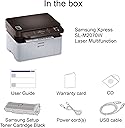
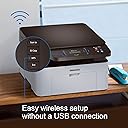
The HP Samsung Xpress M2070W is a wireless monochrome laser printer that combines printing, scanning, and copying in one compact device. Featuring NFC and WiFi connectivity for seamless mobile printing, it delivers sharp 1200 dpi output at speeds up to 20 pages per minute. With a 250-sheet input capacity and built-in Ethernet, it’s designed to boost productivity in home offices and small businesses.


| ASIN | B00KC7Q3CK |
| Additional Printer Functions | All In One |
| B&W Pages per Minute | 20 ppm |
| Brand | Samsung |
| Built-In Media | SS298H Power cord(s); Black Toner Cartridge (~500 pages); User Guide; warranty card; CD |
| Color Pages per Minute | 21 ppm |
| Compatible Devices | Smartphones |
| Control Method | Touch |
| Controller Type | Android |
| Customer Reviews | 3.9 3.9 out of 5 stars (37) |
| Dual-sided printing | No |
| Duplex | Automatic |
| Global Trade Identification Number | 00191628403417, 00887276958682 |
| Hardware Interface | USB 2.0 |
| Ink Color | Black |
| Is Electric | Yes |
| Item Weight | 7400 Grams |
| Manufacturer | HP |
| Maximum Copies Per Run | 250 |
| Maximum Copy Resolution Black and White | 1200 dpi |
| Maximum Copy Speed Black and White | 20 ppm |
| Maximum Media Size | 8.5 x 14 inch |
| Maximum Print Resolution Black and White | 1200 dpi |
| Maximum Sheet Capacity | 250 |
| Model Name | Xpress M2070W |
| Model Number | SL-M2070W |
| Model Series | Xpress |
| Number of Ethernet Ports | 1 |
| Number of Trays | 1 |
| Other Special Features of the Product | Wireless |
| Output sheet capacity | 100 hojas |
| Paper Size | 8.5 inch x 11.7 Inches |
| Power Consumption | 310 Watts |
| Print media | Envelopes, Paper (plain) |
| Printer Connectivity Type | Ethernet, Wireless |
| Printer Output Type | Monochrome |
| Printer Type | Laser |
| Processor Count | 1 |
| Resolution | 1200 x 1200 |
| Scanner Type | Sheetfed |
| Series Number | 20 |
| Specific Uses For Product | Home, small business |
| Total USB 2.0 Ports | 1 |
| Total Usb Ports | 1 |
| UPC | 887276958682 191628403417 |
| Unit Count | 1.0 Count |
| Warranty Description | Warranty varies by country. Please contact customer service for information. |
| Warranty Type | limited warranty |
| Wattage | 310 watts |
Z**P
Great little machine
Great little machine. I don't need to print in color, but I do need sharp copies, and this is the ticket. Far more economical than an inkjet, IMHO. Highly recommend it.
J**A
CD instructions not very good. After finally getting it to work
Could not load drivers from the CD for Windows 7 Home Premium. Had to go on internet to find drivers that would work. CD instructions not very good. After finally getting it to work, love the print quality.
G**E
We returned it because when we turned it on it ...
We returned it because when we turned it on it said paper jam, when we opened it up there was no paper there and we tried several times to release it with no success
C**R
Overimproved so much it's a pain
I have been installing printers for decades. And the setup on this was easy with a Win 10 machine. The wireless aspect was incredibly inconsistent from desktop PC, laptop, and Samsung Smartphone. (Although the phone worked best.) Printing from a wired PC worked fine. On the plus side it scans and copies very quickly. If you install the official software for the printer expect to get a bunch of colourful, panicky ads about only using GENUINE Samsung toner. The final annoyance with the printer was its eco politically correct habit of falling dead asleep (to what? Save the planet by not using 100 milliwatts?) and constantly needing to awaken it. That may be a feature that can be turned off. But it certainly would impinge on your ability to accomplish remote printing. The thing isn't a dog, but I find that they have over-fussed with things that should be simple. I am returning it and buying a different laser printer. Good price, disappointing performance.
R**M
doesn't support 5G router. you have to change network to 2g whenever you need printer
stupid installation process. very long warm up time when you first boot up the printer. The box seems like opened before. I guess I got one somebody returned.
J**B
Easy to use and easy to set up
Easy to use and easy to set up. The scanner works great too. It's small compared to other laser printers which I like because I don't have a lot of space. I believe I paid $89 dollars for it so it was a steal!
Y**T
This printer works fine with my Linux box and the Samsung driver downloaded ...
This is my 2nd M2070W/XAA as I gave my 1st to my son. This printer works fine with my Linux box and the Samsung driver downloaded from the Samsung support site.
J**L
Me gusto la tengo hace meses y no ha fallado todavía
S**Z
Güzel ürün
J**S
la meilleur et très pratique
Trustpilot
Hace 3 semanas
Hace 3 días